



Saving time as a hairdresser: where your hours leak away and how to get them back
You are halfway through a colour when the phone rings for the fourth time. In the back of your mind are the messages you still owe people, and the gap from this morning when someone simply did not show up. The cutting itself is rarely the problem. It is everything around it that breaks your day into pieces. So this article is not about working faster. It is about the five places where your time actually leaks away, and what to change at each one.
The five places where your working day leaks
Ask a hairdresser where the time goes and the answer is almost never about the treatment. It is about everything around it. Five places come up in nearly every salon.
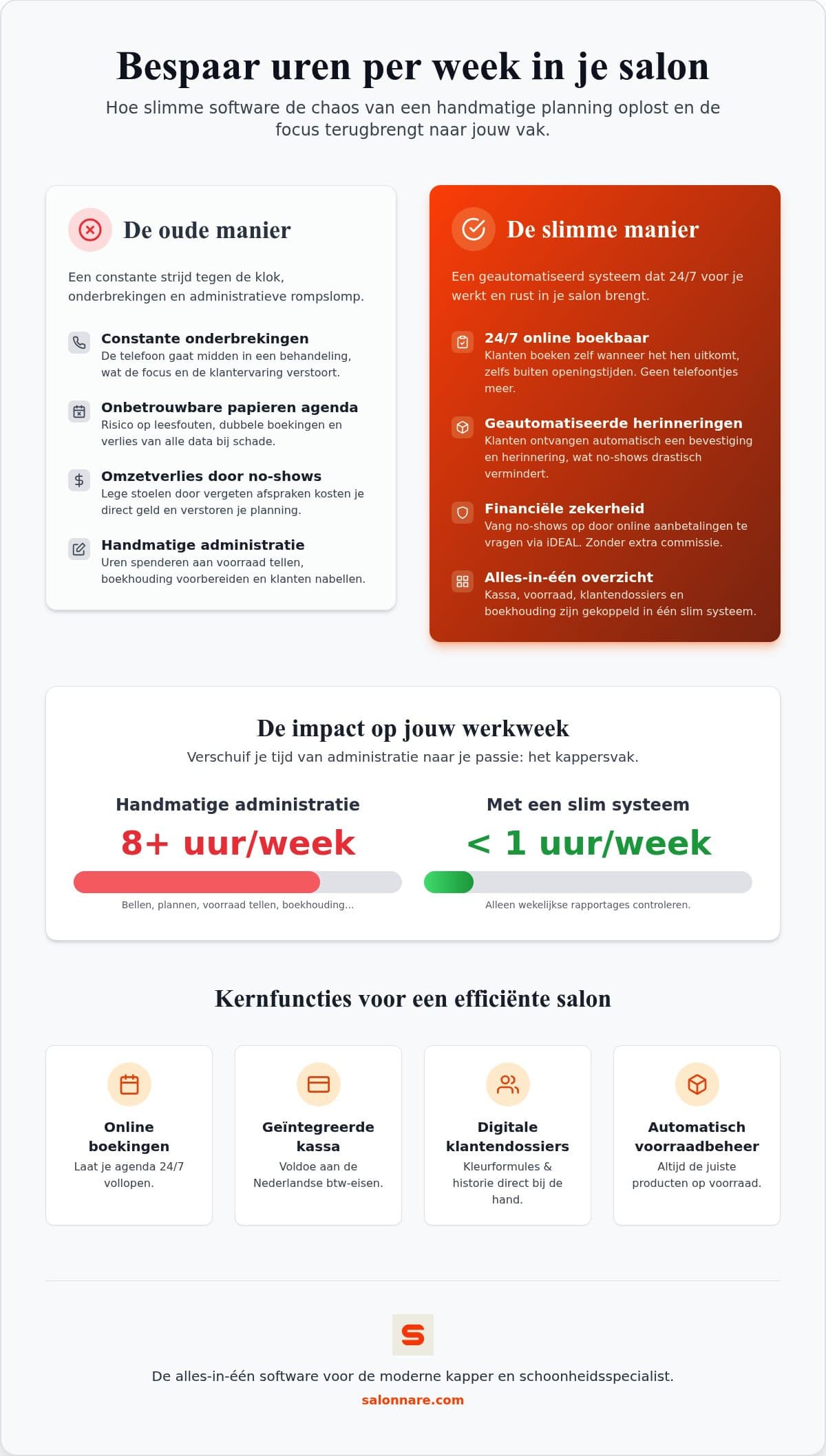
- The phone during a treatment. You put the brush down, wipe your hands, pick up, hunt for a free slot and then find your way back into the job. Two minutes on the phone costs you five minutes of work. - Messages piling up. Texts and emails about moving, cancelling and pricing that you end up answering on the sofa at night. - Looking for what you did last time. The colour formula was on a slip of paper, or in your head, or nowhere at all. - Gaps from no-shows. An hour that could have been full sits empty, and you find out when the client is already late. - Admin after closing. Counting receipts, checking stock, working out the VAT.
What these five have in common is that none of them is a big job. They are interruptions. And an interruption costs more than the task itself, because afterwards you have to climb back into your concentration. So saving time as a hairdresser is mostly about removing interruptions, not about working harder.
Get the phone out of your treatment
The biggest win sits at the moment a client books. As long as that can only happen through you, you are the bottleneck: you are reachable while you are working, and unreachable when your client has time to call.
Move your bookings online and that order flips. The client picks a moment that suits them, including Sunday evening or while you are mid-cut. A booking widget on your salon website catches exactly the appointments you would otherwise miss, and does three more things along the way:
- Your calendar matches everywhere. Anything booked online lands straight in your bookings management on your phone and at the front desk. Two people writing the same hour into the diary is no longer possible. - The confirmation sends itself. The client immediately receives a confirmation with date, time and treatment. That saves one message out and one message back. - You are findable beyond your own site. Clients can book through your website and through your Google listing, so the person searching without knowing your site still gets in.
Do the sums for your own week. Ten calls a day, half of which are only about making or moving an appointment, quickly adds up to three quarters of an hour of interruptions daily.
Standardise whatever repeats every day
Removing interruptions is step one. Step two is making sure the time you do schedule is actually right. In many salons a treatment sits in the calendar at a duration that was estimated once and never revisited. If it structurally overruns by ten minutes, your whole afternoon slides with it.
So spend a week timing a handful of treatments end to end, including the wash, the payment and the tidying in between. Then correct those durations in your service list. It is an hour of dull work, and it buys you a calendar that stops slipping for the rest of the year.
The same goes for the start of an appointment. If the previous colour formula, the products used and a photo of the result are already in front of you, you do not have to ask again what you already knew. Client records inside your salon software pull that history up as soon as the client appears in the calendar. If you work with a team, a colleague can take over a client without the client having to tell their story twice.
The evening admin: till, stock and VAT
The third leak sits after closing time. Receipts you retype, stock you count by hand and a VAT overview you assemble at the end of the quarter.
Take payment in the same system that holds your calendar and most of that work disappears. A point of sale set up for your VAT rates splits services and retail onto the correct rate without you thinking about it per receipt. Sell a shampoo and it comes straight off your stock, so you can see you need to reorder before the shelf is empty.
For your bookkeeping you export a file at the end of the month and load it into your accounting package, or send it to your accountant. Note the distinction: this is an export, not a live integration that writes into your books by itself. For most salons that is exactly enough, and it saves you the evening spent at the kitchen table with a shoebox full of receipts.
Fewer no-shows means fewer gaps in your day
A no-show costs you twice: the hour itself, plus the time you spend ringing round to fill it. The cheapest countermeasure is also the simplest. An automatic reminder by email or WhatsApp the day before catches the clients who had simply forgotten, and that is the largest group.
If a group remains that books but does not turn up, a deposit at the time of booking helps. Ask for one only on long treatments or from new clients, for instance. Clients can pay by card or local methods such as iDEAL, through Mollie or Stripe, and that money goes straight to your own bank account. Your software provider takes no commission per booking on it, only its own platform fee of 0.5% (min. €0.30) per payment.
If you introduce deposits, be clear about your cancellation window and put it in the confirmation email as well. A client who knows the terms in advance is more likely to cancel in time. And a cancellation that arrives in time is not a gap, it is a slot you can still fill.
Why Salonnare fits this well
Everything above only works if it sits in one system rather than four separate tools you have to update one by one. In Salonnare your calendar, your client profiles, your till and your stock hang together, so a booking carries through all the way to your revenue overview.
You can try the whole thing without paying first. Free costs 0 euro per month for one staff member and 50 bookings per month, Starter costs 29 euro per month and Pro 59 euro per month. There is no commission per booking, only a fixed platform fee of 0.5% (min. €0.30) per payment, so a fuller calendar does not make your software much more expensive.
If you work with a team, you set per staff member who may see revenue figures or stock settings. If you record health details such as a dye allergy or a pregnancy, they do not sit loose in a notes field but in a separately encrypted vault, as article 9 of the GDPR requires. Your data sits on servers inside the European Union, the interface is available in five languages, and you sign in with Google, Microsoft, Apple or Facebook.
If you want to know in which order to switch this on without derailing your week, read the guide on hair salon automation and what to automate first. And if you would rather just start: create a free account and turn on online booking this week.
Take back your first hour this week
Start on the permanently free plan at 0 euro per month: switch on online booking, let the confirmations send themselves and watch where your calendar gets calmer. No commission per booking - just a 0.5% platform fee (min. €0.30) per payment - and no annual contract.
Start for freeFrequently asked questions about saving time as a hairdresser
How much time does an online booking system actually save me?
That depends on how many appointments currently arrive by phone. The gain sits less in the calls themselves and more in the interruptions they cause: after every call it takes a moment to get back into the treatment. Spend a week counting how many calls were only about making or moving an appointment. That number times roughly five minutes is the time you get back, plus the confirmations you no longer send by hand.
Is salon software worth it for a self-employed hairdresser?
Yes, and the effect shows up fastest there, because you are the only one who can pick up the phone. Salonnare's free plan costs 0 euro per month and is built for one staff member and 50 bookings per month, including the calendar, client profiles and the till. For a solo hairdresser most of the gain sits in online booking and in automatic confirmations and reminders. If you grow past those 50 bookings you move to Starter or Pro without re-entering your data.
How do I get my admin to my accountant without retyping it?
You export your sales data from the till as a file you load into your accounting package or send on to your accountant. Revenue in it is already split onto the correct VAT rate, so you do not have to walk through the receipts again. This is an export rather than a live integration that writes into your books by itself. For most salons that is enough, and it saves the evenings spent retyping receipts.
What works best against no-shows?
Start with an automatic reminder by email or WhatsApp the day before. It catches the largest group, namely the clients who had simply forgotten. If drop-off remains after that, add a deposit on long treatments or for new clients. That payment runs by card or a local method such as iDEAL, through Mollie or Stripe, straight into your own bank account. Put your cancellation window clearly in the confirmation and clients will cancel earlier, which leaves you time to fill the slot.