



Client records software for your salon: capture treatment history safely
Are your clients' most sensitive details still on loose treatment cards or in an unprotected spreadsheet? That carries a risk bigger than a fine: the trust of your regulars. Without a proper client record it is also hard to remember every allergy, colour formula and preference while the next client is already walking in. This guide covers the features that make a client record genuinely useful, why health data needs extra protection under GDPR Article 9, and how to digitise your admin step by step.
Why a digital client record is essential

A client record is more than a digital address book. It is where contact details, treatment history and specific preferences come together, so you never have to guess which colour mix you used last time or ask again about an allergy that was noted months ago. That saves time at every appointment and prevents mistakes where they matter most.
Paper treatment cards are fragile: they get damaged, go missing, or end up with someone who should not see them. Digital storage gives you automatic backups and encryption. This follows the principles of Customer Relationship Management (CRM), where technology deepens the relationship with your client rather than merely storing data.
Note the difference with your client database as a whole. If you mainly want to know how to keep that list clean and current, read our guide on keeping your salon client database up to date. This guide goes a layer deeper: into the professional history per client and the rules that come with it.
From paper treatment card to a digital record
The switch does not have to be overwhelming. Two steps get you most of the way:
- Take stock of what you have on paper. Treatment cards, consent forms and notes on earlier results. Decide straight away what you actually need: outdated data does not need to move with you. - Choose software that supports importing or fast entry. That way you avoid retyping every client and keep the migration to a single evening's work.
Schedule the switch for a quiet moment in your week and work per client group. Your regulars first, the rest afterwards. Within a few days the records you open most often are in order.
What good client records software should do
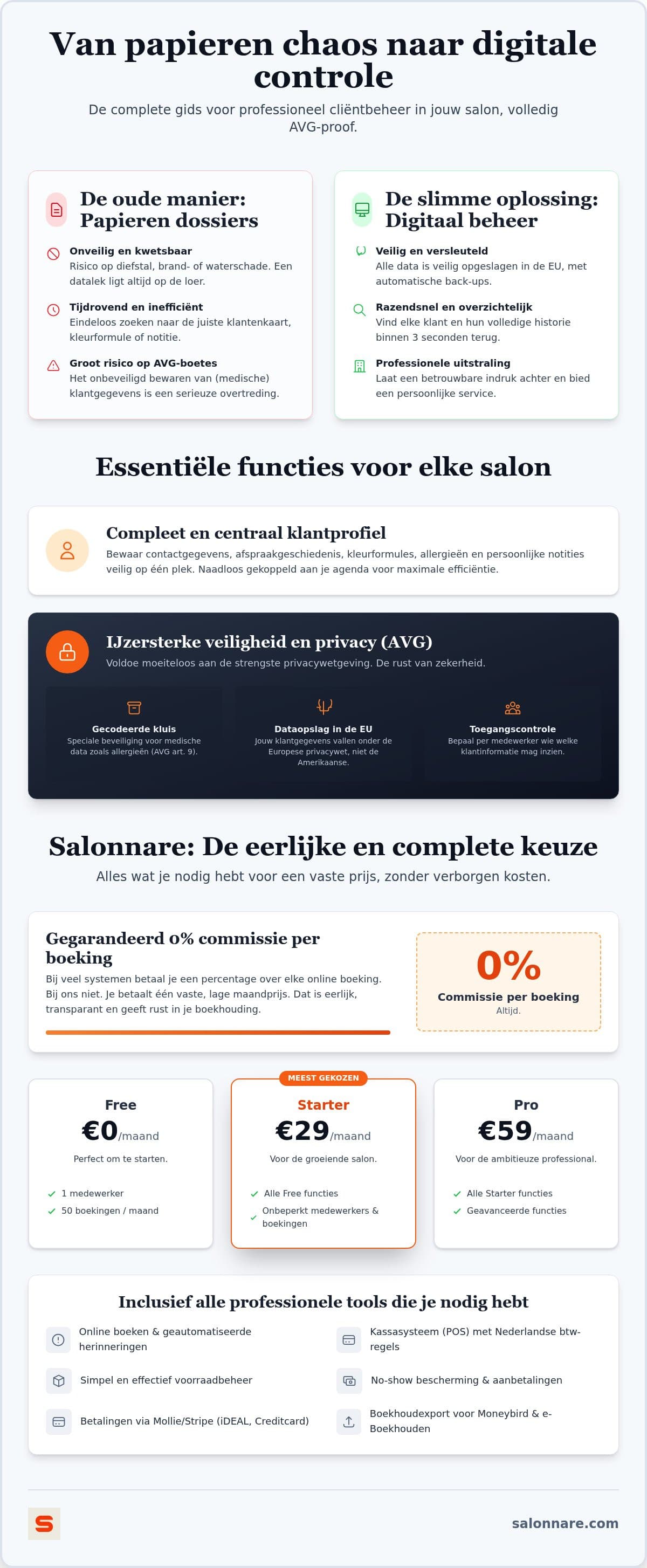
Good software is about speed and precision. You pull up a client's history while they are still hanging up their coat, and you capture colour codes, allergies and treatment results in detail. That accuracy prevents costly mistakes and makes sure every client gets the treatment that suits them.
The link with your calendar is what makes the difference. As soon as an appointment comes up, you see what was done last time and which products were used, without digging through folders. Take a look at client CRM in Salonnare to see how that simplifies your daily workflow.
Just as important: who is allowed to see what. With per-staff permissions you can let a trainee open the calendar while keeping sensitive notes out of reach.
GDPR Article 9: the encrypted vault for health data
Privacy is not optional for a salon owner. Under the General Data Protection Regulation (GDPR) strict rules apply to personal data, and the moment you note skin conditions, allergies or medication you land in Article 9: special category data that requires an extra level of protection.
In Salonnare that data therefore does not sit among your ordinary notes but in a separate encrypted vault. The contents are stored encrypted with AES-256-GCM, only staff you explicitly grant the right can open it, and every access is logged. Treatment photos go into that same vault, because they can reveal health data too.
Also choose software that stores data inside the EU, so your records stay under European privacy law. Want to see how this works in practice? You can start for free and create your first records today.
Professionalising your salon with Salonnare
Salonnare charges no marketplace commission. You pay a fixed monthly price plus only a 0.5% platform fee (min. €0.30) per online or card payment, which keeps your costs largely predictable. The system is available in five languages (Dutch, English, German, French and Spanish), which helps with an international team or a varied clientele.
A practical touch is the link between client history and automatic reminders: you send messages based on earlier treatments, which strengthens client loyalty and reduces no-shows without extra work.
You can start without investing. The free plan is permanently free for 1 staff member and 50 bookings per month, at €0 per month. As your team or calendar grows, you move up to Starter at €29 per month or Pro at €59 per month. You keep every record and all client history you have built up.
Ready for records that are accurate and secure?
Capture colour formulas and preferences at every appointment and keep health data in a separate encrypted vault. Start for free at Salonnare via https://salonnare.com/en/free and expand as your salon grows.
Start for freeFrequently asked questions about client records software
Is keeping a client record mandatory for salons?
No law obliges you to create a treatment record, but the moment you do, GDPR rules apply in full. If you note allergies, skin conditions or medication you are processing special category data under Article 9, which means extra security, a valid legal basis (in practice explicit consent) and a retention period. Software that enforces this keeps your admin demonstrably in order.
How secure is client data in salon software?
That varies by provider, so ask explicitly. At Salonnare data is stored on servers inside the EU and health data goes into a separate vault: encrypted with AES-256-GCM, accessible only to staff you grant the right, with every access logged. That keeps the most sensitive details protected even if someone has access to the rest of your admin.
Can I add photos to the client history in Salonnare?
Yes. You attach treatment photos to the client, for example to track the result of a series of facials or how a hair colour is built up. Because such photos can contain health data, they are stored encrypted in the same vault as the health notes and are visible only to staff you grant that right.
What is the difference between client management and a client record?
Client management is the broad term for contacts and communication: details, appointment confirmations and marketing. A client record covers the professional history, such as colour formulas used, allergies and treatment results. In Salonnare both live in one client card, with sensitive health data kept separately and encrypted.