



Salon software subscription: what you pay for in 2026
You usually pick a salon software subscription once and stay with it for years. Yet the number on the invoice is rarely the whole story. One provider charges a flat monthly fee, another takes a percentage of every booking, and a third puts the features you actually need behind a tier you only reach once you grow. So this article is not about which product has the prettiest dashboard. It is about what you are buying: which functions belong in the monthly fee, where costs sit outside the subscription, and at what point you move to a different plan. By the end you can read a pricing page without any surprises later on.
What a subscription actually buys you

A salon software subscription is not a program you buy once and install on the computer behind the desk. You rent access to a system that runs over the internet, and that difference decides what you get for your money. You log in through your browser or the app, at home on the sofa just as easily as at the front desk, and you always see the same calendar.
The monthly fee covers more than the software itself. Maintenance, updates and security are part of it, as is storing your client data on servers inside the EU and backing it up. With a program on a single fixed PC, a dead hard drive means a lost client list; with a subscription that is the provider's problem. You also need no expensive hardware or IT installation to get started.
The category these systems belong to is appointment scheduling software, and that is the heart of it: the system schedules, calculates and reminds, while you treat clients. Everything else in the package, from the till to stock control, builds on that calendar.
Which features belong in the monthly fee
There is a baseline you can expect from any serious subscription. The most important part is an online booking module: clients pick their own treatment and time slot, at eleven at night if they like, and only see the gaps that are genuinely free. That saves you the stream of messages between two appointments and gives your business the professional look that trade bodies for hairdressers, such as the Dutch brancheorganisatie voor kappers, keep pointing to.
A proper client record belongs in there too. Colour formulas, preferences and the history of earlier treatments are the reason a regular comes back, and you should be able to find that information without leafing through a notebook. How that works is covered under client CRM, and the calendar side under bookings management.
On the financial side, a till that talks to the calendar is the difference between half an hour and five minutes of work per day. VAT is applied and tracked per receipt, using the rate that applies to your treatments and the general rate for the products you sell over the counter. Stock belongs in the same system, so you get an alert before a colour runs out rather than after. See point-of-sale and inventory management.
Flat fee or commission: where the monthly cost lands
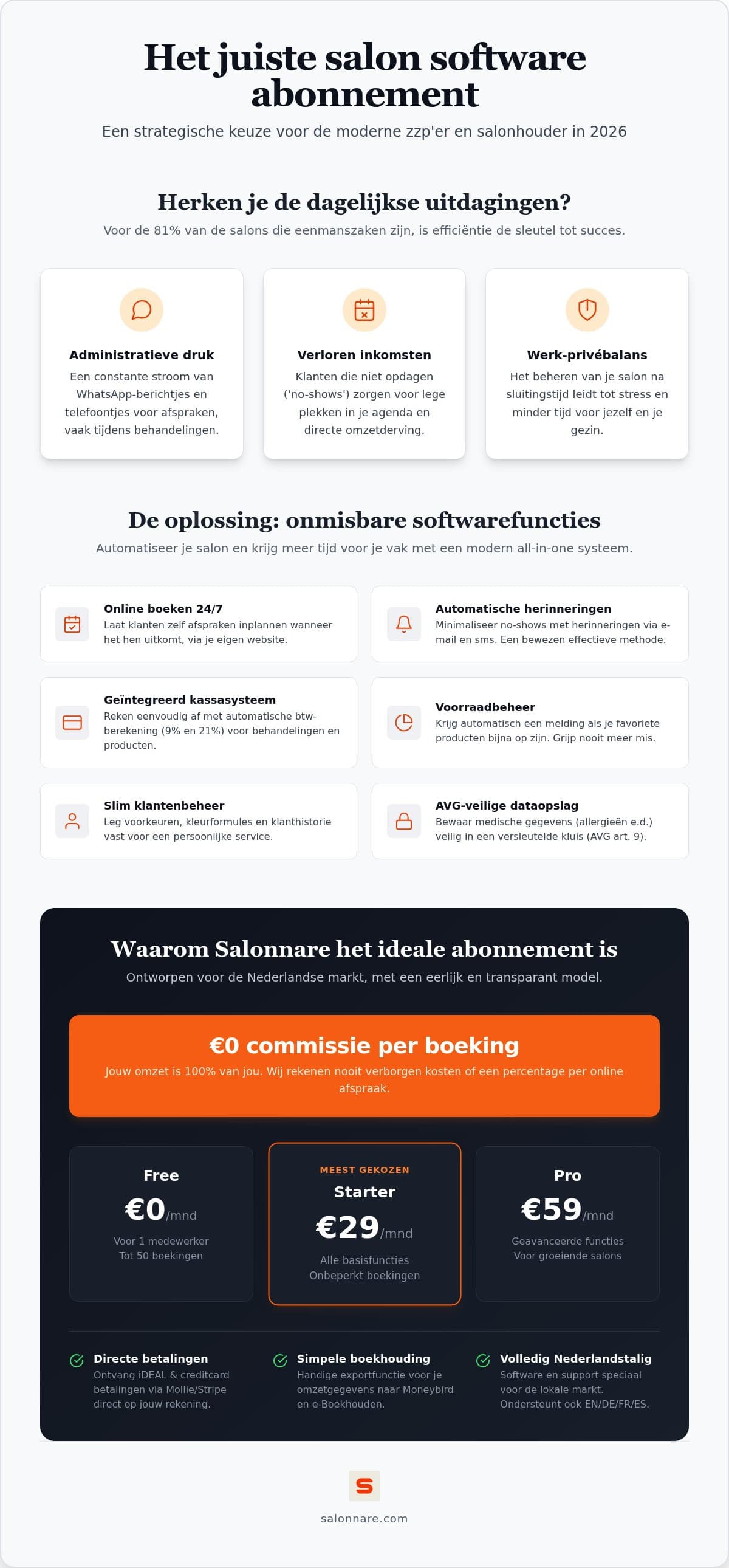
The pricing model matters more than the feature list. A system that charges a percentage per booking gets more expensive the better you do: a busy month costs you more than a quiet one, even though the software does the same work. With a flat monthly fee you know at the start of the year what you are committing to.
Salonnare runs three plans. Free costs 0 euro per month and is meant for one staff member with up to 50 bookings per month, including online booking, the till, client records and email reminders. Starter costs 29 euro per month for three staff members and unlimited bookings, adding a loyalty programme, gift cards and stock control. Pro costs 59 euro per month for unlimited staff, with email campaigns, deposits, memberships and white-label branding. None of the plans charges commission per appointment.
Do watch the line between the subscription and transaction costs, because pricing pages are often vague there. If you take payment online or ask for a deposit, those payments run through your own Mollie or Stripe account and land in your own bank account. On top of that provider's standard rates, Salonnare charges 0.5 percent with a minimum of 0.30 euro per transaction. That sits outside your monthly fee: a 50 euro payment therefore carries the minimum of 0.30 euro in platform costs, since 0.5 percent would come to only 0.25 euro. The full breakdown is on the pricing page.
Covering no-shows and storing health data safely
An empty hour is not something you win back later in the day, and that is exactly where a subscription pays for itself. The first measure is an automatic email reminder that the system sends without you having to think about it. The second is a deposit at the time of booking, which you set per treatment: not needed for a dry cut, worth it for a long colour service. You will find the settings under automatic reminders and online payments.
The other side of client data is more sensitive. An allergy to a colouring agent, medication that affects the skin or a pregnancy are health data, and they fall under article 9 of the GDPR. They do not belong in a general notes field, and certainly not in a group chat.
Salonnare keeps those notes in a separately encrypted vault, apart from the regular record, with recorded consent and an access log. If you work with a team, you decide per staff member who may see what. Ask any subscription you are considering how this is handled; it is one of the few parts you cannot easily fix afterwards. The guide on client records software sets out what to check, point by point.
When to switch plans
Most salons start too big. You pick the most extensive package because the feature list is impressive, and six months later you still only use the calendar and the till. So start small and let practice decide when you scale up.
Three moments matter in practice. The first is the staff limit: as soon as a second stylist needs their own calendar, you hit the ceiling of the free plan. The second is booking volume: if you consistently pass 50 appointments per month, Starter is the logical step. The third is marketing: only once you actively want to run campaigns, sell memberships or put your own brand on client communication does Pro earn its price.
Switching should be painless. At Salonnare, Free is free for good and has no contract. Starter and Pro are paid monthly on a 12-month contract, or yearly in advance with two months free. You can cancel in the app at any time; the cancellation takes effect at the end of your current contract term, after which you move back to Free and your data stays where it is. If you first want a wider view of how providers compare, read the guide on comparing salon software.
The order in which to switch things on
Taking out a subscription is a matter of minutes; setting it up decides whether it does anything for you. The sequence that pays off fastest starts with your services. Enter your treatments with the right duration and price first, because everything else calculates from there.
Then switch on online booking and place the module on your own website, or use the booking page you get if you have no site yet. Link it to your Google profile as well, so someone searching nearby can book straight away instead of only seeing a phone number. Turn on email reminders in the same week; it is the cheapest defence against no-shows there is.
Only at step three come the till with its VAT split and the export for your bookkeeper, and after that stock control. Expect an export that you import yourself into a package such as Moneybird or e-Boekhouden, not a live integration that syncs continuously. You can start that route without payment details: the free plan stays free, and you only take a paid subscription once you run into a real limit, such as stock control or the accounting export, which come with Starter. Start free with Salonnare and set up your first treatments today.
Test what your monthly fee actually returns
Free is 0 euro per month for one staff member and 50 bookings, with no commission per appointment and no payment details. Starter costs 29 euro and Pro 59 euro per month. Switch on online booking and the email reminders, then look at your calendar a month later.
See the pricingFrequently asked questions
How much does a salon software subscription cost per month?
At Salonnare, Free costs 0 euro per month for one staff member with up to 50 bookings, Starter costs 29 euro per month for three staff members with unlimited bookings, and Pro costs 59 euro per month for unlimited staff. No plan charges commission per appointment. If you take payment online, transaction costs are added: 0.5 percent with a minimum of 0.30 euro per payment, on top of the Mollie or Stripe rates.
Is a free salon software subscription really free?
The Salonnare Free plan costs 0 euro per month permanently and is not a trial that stops after thirty days. It includes online booking, a till for cash and card payments, client records and email reminders, for one staff member and up to 50 bookings per month. You need no payment details to start. Once you outgrow those limits you move to Starter or Pro.
Am I tied into a long-term contract?
Not on the free plan: Free costs nothing, for good, and has no contract. Starter and Pro are paid monthly on a 12-month contract, which renews automatically for another 12 months unless you cancel, or you pay yearly in advance and get two months free. You can cancel in the app at any time; it takes effect at the end of your current term and you keep everything until then. After that you drop back to Free, with your account and data intact. So feel free to start on Free and only move up once you know it suits your salon.
Is commission charged on every booking?
Not on the booking itself. You pay a fixed monthly price for your plan, however many appointments come in through your website or booking page. There is a platform cost of 0.5 percent with a minimum of 0.30 euro on payments processed through the connected payment provider, alongside the standard Mollie or Stripe rates. The money lands in your own bank account, not in a platform wallet.
Which features do I genuinely need in the first year?
In practice there are four: a calendar with the right duration per treatment, online booking, automatic email reminders and a till that splits VAT per receipt. Stock, loyalty and marketing campaigns are useful, but they only solve a problem once the basics are in place. So start on the smallest plan that fits and expand when you hit a concrete limit.
Can I export my data to my accounting package?
Yes. You download your financial data and VAT overviews as an export file and import that into your accounting package, for example Moneybird or e-Boekhouden. Note the distinction: it is an export you import yourself, not a live integration that syncs continuously. In practice it still saves you retyping receipts by hand at the end of every quarter.