



Appointment confirmation email examples: salon templates for 2026
A client books a colour appointment on Thursday evening, you spot it the next morning and retype a confirmation by hand from your diary. Two weeks later she does not turn up, because she was sure it was an hour later. That is not carelessness on her part - it is a confirmation that arrived too late and said too little. This article gives you three complete example emails you can copy today: a casual one for a barbershop or nail bar, a formal one for a clinic or medical pedicure, and one with a deposit for long treatments. You will also learn which details genuinely belong in a confirmation, how to ask health questions without breaching GDPR, and how to stop retyping everything by hand.
What belongs in a good appointment confirmation
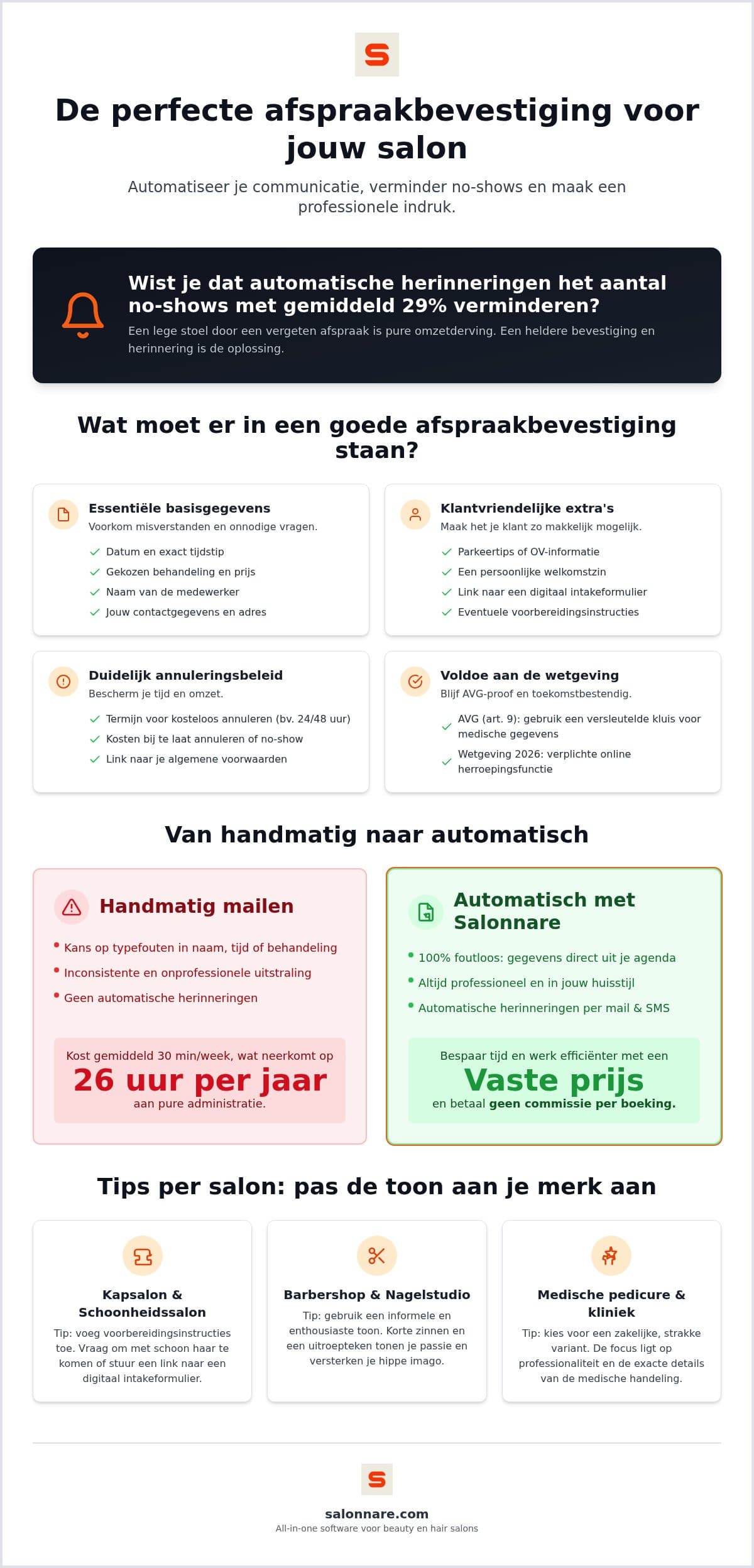
A confirmation has one job: the client should not have to think about anything else. Four details are essential. The date and exact time, the treatment as booked, the name of the team member carrying it out, and the expected duration. That last one is forgotten most often and causes the most confusion, because someone who has to stay for two hours plans her day differently than someone who is out in twenty minutes.
Then there is the practical information you only miss when it is absent: the address with a hint about parking, what the client should bring or leave at home, and how to reach you if something comes up. Anyone following the general principles of business communication will recognise the pattern - you do not write what you know, you write what the reader needs in order to do the right thing.
Close with a human sentence. A confirmation that reads like it was spat out by a machine still does its job, but a line like "Looking forward to seeing you - the coffee will be on" costs you nothing and sets the tone of your salon straight away.
Health questions in your confirmation: keep it GDPR-proof
Plenty of salons use the confirmation email to ask about allergies, medication or pregnancy. Sensible, because you want that information before the treatment rather than once the client is already in the chair. The catch: these are health data, and they fall under Article 9 of the GDPR. They do not belong in a loose notes field, not in an inbox your whole team can open, and certainly not in a group chat.
The workable route is a link to a digital form the client fills in herself, after which the answer lands encrypted with her client record. In Salonnare that runs through digital intake forms; answers go into a separate encrypted vault, kept apart from the ordinary notes in the client record. The client's consent is logged, and the system records who has viewed the data.
If you work with a team, you set per employee who may see what. An apprentice does not need medical notes to wash someone's hair. That sounds strict, but it is exactly the distinction the GDPR expects from you: access based on necessity, not on convenience.
Your cancellation policy: one paragraph that protects your revenue
The part salons skip most often is also the part that saves the most money. State in plain language in every confirmation what happens if the client cannot make it: how many hours in advance she can reschedule free of charge, and what you charge if she cancels late or simply does not show.
Keep it short and concrete. "You can change or cancel free of charge up to 24 hours in advance. After that, or in case of a no-show, we charge 50 percent of the treatment." That is one sentence, and it heads off almost every argument afterwards, because the client received it in writing at the moment she booked.
Give her an easy way out at the same time: a link she can use to reschedule herself. Someone realising at half past ten on a Monday night that Wednesday no longer works is not going to phone you. She puts it off, forgets, and does not turn up. If she can pick another slot in two taps, you see the gap in time and can still fill it. How to build such a policy and vary it per treatment is covered in our salon cancellation policy checklist.
Examples 1 and 2: the casual and the formal confirmation
Casual, for a barbershop or nail bar. Subject: "Your appointment at [Salon name] - Tuesday 14 April, 10:00".
"Hi Lisa, great to have you in! We will see you on Tuesday 14 April at 10:00 for a new set of gel nails, with Sanne. Allow around 90 minutes. You will find us at 12 High Street; the car park round the back is the cheapest option. Cannot make it? You can reschedule up to 24 hours in advance using the link at the bottom of this email. See you Tuesday!"
Formal, for a clinic or medical pedicure. Subject: "Confirmation of treatment appointment 14 April, 10:00 - [Practice name]".
"Dear Ms De Vries, we hereby confirm your appointment on Tuesday 14 April at 10:00 for a medical pedicure treatment with [practitioner name]. The treatment takes approximately 45 minutes. We kindly ask you to arrive five minutes beforehand. Please complete the intake form via the link below in advance. Cancellation or rescheduling is free of charge up to 48 hours before the appointment."
The difference is not in the information, which is identical. It is in the register: the first sounds like the place you walk into, the second like the practice where you undergo a treatment. Pick the tone that matches what the client will actually find, otherwise the expectation is off. For more variants and phrasings, this collection of appointment confirmation templates and tips is a useful addition.
Example 3: the confirmation with a deposit
For long or expensive treatments a deposit is the single most effective measure there is. Someone who has already paid turns up or cancels in good time, and then you can still fill the gap.
Subject: "Confirm your appointment on 14 April - [Salon name]".
"Hi Amber, your balayage appointment is booked for Tuesday 14 April at 13:00 with Sanne. This treatment takes around 3.5 hours, so we are setting aside a good part of the day for you. That is why we ask for a €25 deposit, which we deduct from your final bill. Pay securely using the button below and your appointment is confirmed. If you cannot make it after all, you get the full amount back as long as you cancel 24 hours in advance."
Note the order: first why you are asking, then the amount, then the condition under which the client gets it back. A deposit without explanation feels like distrust; with that one sentence about the reserved time it feels obvious. In Salonnare you set per treatment whether a deposit is required and how much it is - see online payments and deposits. The payment runs through your own Mollie or Stripe account, so the money lands directly in your own bank account. How to use deposits more broadly is explained in our guide on preventing no-shows.
The subject line and the road to the inbox
A perfect confirmation that lands in the spam folder is worth nothing. Start with the subject line: put your salon name and the date in it, keep it under fifty characters, and skip the capitals and exclamation marks. "Your appointment at Studio North - Tuesday 14 April" does exactly what it needs to do. Words like FREE or OFFER belong in a newsletter, not in a confirmation.
Technically, what matters most is the address you send from. Send from your own domain rather than a free address, and make sure the sender is set up with the right DNS records. A confirmation from a recognisable sender the recipient has dealt with before almost always arrives.
Keep the email light. One logo is plenty; a confirmation stuffed with large images loads slowly on a phone and is flagged as advertising more often. And send confirmations separately from your marketing email: it is a transactional message someone is expecting, and you never want to mix that with a promotion they can opt out of.
From retyping by hand to sending automatically
Confirming by hand looks free because no invoice arrives for it. Count half an hour a week of retyping and you are at more than 26 hours a year: three working days spent at a keyboard instead of with a client. And that is the cheap side of it, because one typo in a time costs you a whole chair.
Sending automatically means the email pulls the details straight from the diary: the right name, the right treatment, the right team member, the right time. Salonnare sends the confirmation immediately after booking, a reminder the day before the appointment and a rebooking invitation afterwards - all three automatically by email, in the client's own language. See automatic reminders for the settings.
It only gets truly quiet once clients book themselves. Put a booking widget on your own website or link your booking page to your Google profile, and the confirmation goes out without you touching your phone. Including at half past eleven at night, and while you are busy with a client.
On costs we can be brief, because you deserve clarity up front. Salonnare works with a fixed monthly price: Free is €0 per month for one employee with up to 50 bookings, Starter is €29 and Pro is €59 - see pricing. No marketplace commission is deducted from clients who book with you, not even from new ones. If you take payment online or ask for a deposit, a transaction fee of 0.5% with a minimum of €0.30 per payment applies on top of your own Mollie or Stripe rates. On a €25 deposit that is €0.30. Cash payments in the salon are unaffected, as are card payments on a terminal you do not link through Mollie; a card payment through a Mollie terminal linked to Salonnare does carry the fee.
Confirming is the start, reminding is where you win
The confirmation confirms, but the reminder prevents. There are often weeks between booking and appointment, and in those weeks your client's life shifts around. A message the day before is therefore not duplication: it is the moment someone runs through her week and can still move your appointment rather than miss it.
Salonnare sends that reminder by email, not by SMS. That is a deliberate choice and it is only fair to say so: an SMS bundle is a recurring cost that adds up per message, while email does not. If you want to know when SMS does add value and how to word such a message, read our article on appointment confirmation by SMS.
Whichever you choose, the combination of a clear confirmation, an explicit cancellation policy and an automatic reminder does most of the work. After that you only need to look at it when someone cancels - and then you have time enough to fill the gap. Start with Salonnare for free and set up your first confirmation email tonight.
Let the confirmation send itself
Set up your treatments, switch on online booking and let Salonnare email the confirmation, the reminder and the rebooking invitation automatically. Free to try, with a fixed monthly price and no marketplace commission on your clients.
Start for freeFrequently asked questions
When is the best time to send an appointment confirmation?
Immediately after the appointment is made. The client expects something in her inbox within a few minutes as proof it worked; if nothing arrives, she will call anyway to check. With a system that sends automatically this also happens in the evening and at weekends, without you being involved.
What should an appointment confirmation contain as a minimum?
Date, exact time, the treatment booked, the name of the team member and the expected duration. Add the address with a parking hint, your cancellation terms in one sentence, and a link the client can use to reschedule herself. That last one prevents most no-shows, because cancelling then becomes easier than staying away.
Should I send the confirmation by email or by SMS?
For the confirmation, email is the logical choice: you can fit in house rules, parking tips and an intake form, and the client can find it again later. Salonnare sends confirmations and reminders by email, not by SMS. That avoids a recurring cost that adds up per message.
Is an appointment confirmation legally required for a salon?
For an ordinary salon appointment the law does not prescribe a confirmation email. As soon as you let people book online and pay in advance, the rules on distance contracts do apply: you set out clearly beforehand what the client is buying, what it costs and how cancelling works. If you ask about allergies or medication, the GDPR rules on health data apply on top. So a proper confirmation is mainly good practice - and your evidence in a dispute.
How do I stop my confirmation email landing in the spam folder?
Send from your own domain with correctly configured DNS records, use a recognisable sender name and a sober subject line with your salon name and the date. Skip capitals, exclamation marks and words like FREE, keep the number of images small, and send confirmations separately from your newsletter.
What does sending automatic confirmations cost with Salonnare?
It is included in your plan: Free is €0 per month for one employee with up to 50 bookings per month, Starter is €29 and Pro is €59. No marketplace commission is deducted from your bookings. If a client pays online or leaves a deposit, a transaction fee of 0.5% with a minimum of €0.30 per payment applies, on top of your own Mollie or Stripe rates.