



Salon POS system in 2026: from booked appointment to closed ticket without double work
Most guides to a salon POS system are about the choice: which features you need, which package suits your business. This article is about what comes next. Because a till that sits apart from your calendar is not a time saver, it is a second place where you type the same thing again. The gain only appears once the appointment, the treatment, the payment and the VAT line run through one chain without you sitting in between. Below, that chain is walked through link by link: where it breaks in practice, what tax and privacy rules ask of it, and what the pricing model does to your margin the moment you get busier.
What a salon POS system actually has to do in 2026

A Point of Sale (POS) system is originally just the place where the client pays. In the beauty industry that has long since stopped being a drawer with a receipt printer. Checkout is the moment where four things are recorded at once: which treatment was delivered, who performed it, which product left the building with the client, and at which VAT rate all of that counts.
That is exactly where it differs from an ordinary till. A till records an amount. A salon POS system records an amount in the context of an appointment that was already in your calendar. It sounds like a detail, but it decides whether you close up at the end of the day or spend another half hour correcting things.
Three things that make the difference:
- The ticket comes out of the calendar, not out of your head. The booked treatment with its price and duration is already there. Checking out means confirming, not re-entering. - It runs in the cloud, not on the PC behind the desk. A local install is a single device that can fail. Cloud software works from your sofa just as well as from the front desk. - The numbers come back out in a usable form. Not as a screen you copy by hand, but as an export your bookkeeper can read in.
If you want to see what that checkout screen looks like in practice, it is described under point-of-sale.
The chain in practice: four links, one run
Lay out a client's day and you will see there are four moments where data is created. In a closed chain, those four moments become one continuous line.
Link 1: the booking. The client picks a time and a treatment online. The matching duration and price are already fixed, so your calendar is right from the start. This is also where you can ask for a deposit on long or sensitive appointments, through your own Mollie or Stripe account (deposits are part of the Pro plan).
Link 2: the treatment. What actually happened lands on the client card. Colour formula, preferences, which staff member did the work. That is no longer admin afterwards, because it was recorded at the moment itself.
Link 3: checkout. The booked treatment is waiting at the till. You add a product if there is one, pick the payment method, done. VAT is split per line, because a service and a retail product do not always fall under the same rate.
Link 4: the bookkeeping. At the end of the month you run an overview and export the figures. That export is built to line up with bookkeeping packages such as Moneybird and e-Boekhouden. Note the distinction: it is a file you read in yourself, not a live integration that pushes everything through automatically.
The client data feeding this chain lives in client CRM. If you want to step back and compare at feature level first, our article on the salon POS system gives you a checklist.
Where the chain breaks: five places double work appears
A solid POS system buyers guide points out that most problems are not in the software itself, but in the seams between systems. These are the five places where it almost always goes wrong in a salon.
1. The calendar sits apart from the till. You type the amount in by hand. A wrong amount only shows up at cash-up, when you no longer remember which client it belonged to. 2. Products move outside the system. A shampoo you sell but never book out is wrong in your stock and wrong in your revenue. That gap compounds month after month. 3. Treatment durations do not match reality. If a colour service is set at 45 minutes while it costs 70, your whole day runs late and your occupancy figure is meaningless. 4. The client card gets updated afterwards. Anything you still have to enter in the evening gets entered incompletely. What is recorded in the moment is accurate. 5. VAT gets lumped together. Keeping services and retail apart is not a luxury: it is exactly what you need to be able to substantiate a return.
The common thread: every place where a human copies data from one screen to another is a place where time and accuracy leak away. Bringing the number of those hand-offs down to zero is where a salon POS system earns its keep.
The stock side of this is handled in inventory management, where the system flags a best-seller before it runs out.
VAT, GDPR and permissions: what daily practice asks on top
International till software can be technically fine and still not fit a salon. There are three points where it tends to get stuck in practice.
VAT that is right per line. A treatment and a retail product do not automatically fall under the same rate. A till that puts everything on one rate hands you a report your bookkeeper still has to work through. A till that splits per line hands you an overview you can use as is.
Health data does not belong with your ordinary notes. Notes about allergies, medication, skin conditions or pregnancy fall under Article 9 of the GDPR and are therefore special category personal data. Many standard packages have no separate place for it, so it ends up in the free-text notes field. At Salonnare it sits in a separately encrypted vault, with its own per-staff access right and a log of who viewed what. Your data stays inside the EU.
Permissions per staff member. If you work with a team, you do not want everyone to reach your revenue figures. With role-based permissions you give a stylist access to the calendar and the client card, and keep the financial side to yourself. That is not just practical, it is what the GDPR expects once several people work in the same system.
If you want the sensitive details captured properly at the first appointment, use the digital intake forms.
What it costs, and why the pricing model matters more than the price
The salon POS software market trends show that owners increasingly look at fixed pricing models rather than at the lowest entry rate. The reason is simple: with a commission per booking, your software cost grows along with your success.
Run the numbers. Process 200 appointments a month and pay one euro per booking, and that is € 200 a month, a cost that rises the moment you get busier. With a fixed monthly fee that cost stays where it is, and every extra appointment goes almost entirely to your own revenue.
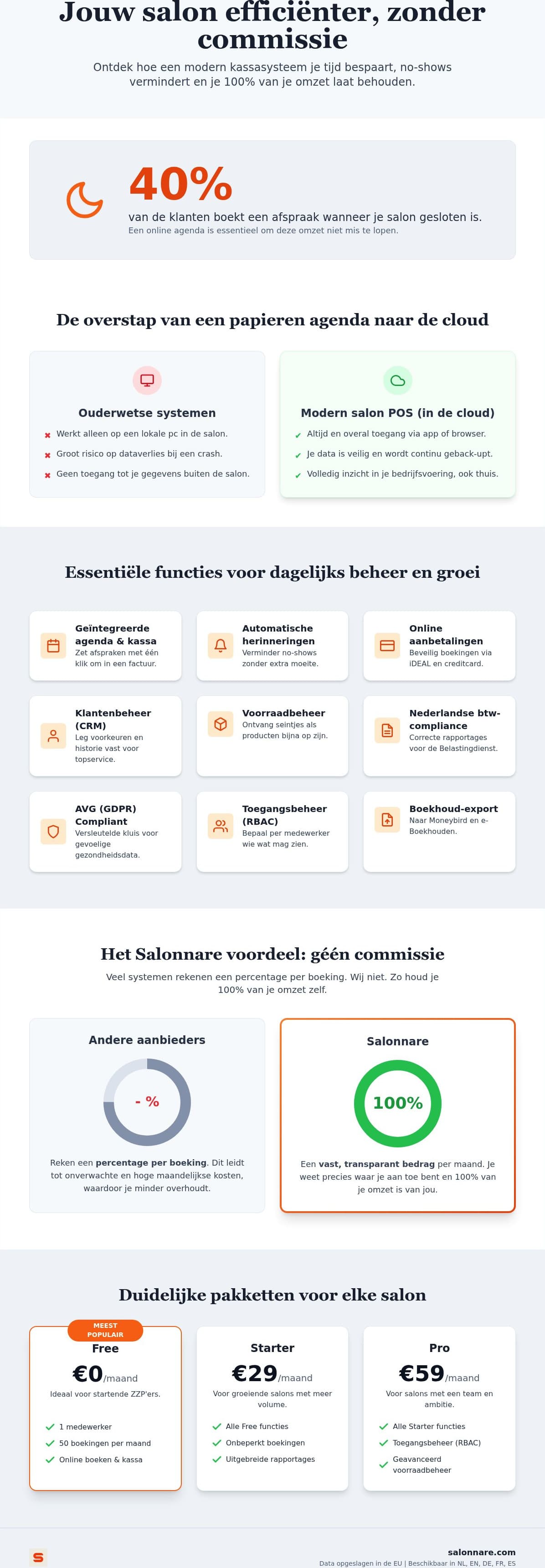
Salonnare has three tiers, with no marketplace commission:
- Free - € 0 per month. For 1 staff member and 50 bookings a month. Permanently free, not a trial period. - Starter - € 29 per month. For when you grow past those limits. - Pro - € 59 per month. For larger teams.
On top of that, your online payments run through your own account at Mollie or Stripe. The client pays by iDEAL or card, and the money lands in your own bank account. You pay the usual transaction fee to the payment provider, plus Salonnare's own platform fee of 0.5% (min. €0.30) per payment. How that works is described under online payments.
You can try the core of the chain (calendar, client card and till) on the free plan; stock and online payments come with Starter, deposits with Pro: start free with Salonnare.
How to close the chain this month, in the right order
The salons where this works best do not switch everything on in one week. They close the chain link by link, and check each step before moving on.
Week 1: your services and durations. Enter every treatment with its real duration, including development and clean-up time, and with the price you actually charge. This is the step that costs the most time and the one that decides whether everything after it is correct.
Week 2: turn on online booking. Put the booking widget on your own website and connect your calendar to your Google listing, so people searching nearby can book straight away. A share of your appointments will then come in outside opening hours, and those are bookings a phone-only calendar would never have caught.
Week 3: check out through the till. For one week, run absolutely everything through the system, including small cash amounts. Only when everything goes through does your data give an honest picture.
Week 4: test the export. Run a monthly overview and send the export to your bookkeeper before the filing deadline arrives. Then you know the format works.
How you know it worked: the time between your last client and the moment you lock the door. If closing up is a few minutes of confirming rather than half an hour of detective work, the chain is closed.
You can start today without installing anything: start free with Salonnare and get your services and durations right in the first week.
Ready to make your calendar and till work as one chain?
Start on the free plan for 1 staff member and 50 bookings a month. No commission per booking - just a 0.5% platform fee (min. €0.30) per payment -, VAT split per line and iDEAL through your own Mollie or Stripe account.
Start free with SalonnareFrequently asked questions
What does a salon POS system cost per month?
At Salonnare you pay a fixed monthly amount with no commission per booking. There are three tiers: a permanently free plan at € 0 per month for 1 staff member and 50 bookings a month, Starter at € 29 per month and Pro at € 59 per month. On top of that, Salonnare charges its own platform fee of 0.5% (min. €0.30) per payment, alongside the usual transaction fee from your own payment provider, Mollie or Stripe.
Do I need special till hardware?
No. The software runs in your browser and as an installable web app on your own phone, tablet or laptop. Salonnare does not sell card terminals or cash drawers itself, so you decide which equipment you use and whether you expand it later. That keeps the switch cheap: you can start with what you already own.
Can I move my existing client list across?
Yes, you can import your client list so you do not start with an empty system and do not have to retype anything. Contact details and history come with it. Do walk through your data after the import: what you carry over from an old system is exactly as complete as it was there.
Does it connect to my bookkeeping package?
You export your revenue and VAT figures in a format built to line up with packages such as Moneybird and e-Boekhouden. Important to know: it is an export that you or your bookkeeper read in, not a live integration that pushes bookings through automatically. In practice it saves your bookkeeper manual data entry every month.
Is this suitable for a solo stylist or one-person business?
Yes. The free plan is meant for exactly that situation: 1 staff member and 50 bookings a month, permanently and without a credit card. That gives you online booking, automatic reminders and the till. If you grow past those limits you move up to Starter or Pro, but there is no point at which the free plan expires.