



More clients for your beauty salon: how to fill your calendar without marketplace commission
A full calendar only feels like profit when you actually keep what you earn. In many beauty salons the opposite happens: the diary looks packed, then a no-show punches a hole in it, admin eats your evenings and a booking platform keeps a percentage of every appointment. This guide shows you how to attract more clients in 2026, how to stop those clients from quietly slipping away, and how to do it on a fixed monthly price instead of a cut per booking.
Start with one clear audience

The most common mistake in salon marketing is trying to serve everyone. Your budget scatters, your message turns vague and you mostly attract price shoppers. Choose a clear profile instead: skin improvement for someone in their thirties dealing with pigmentation, quick maintenance treatments for people short on time, or calm and thorough facials. The more specific your offer, the faster someone recognises that you are the right fit.
That profile then drives everything: which treatments sit at the top of your price list, which photos you share and which questions your website answers. On social media, show more than the end result - explain what a treatment solves and who it is meant for. Put reviews from existing clients next to it, because social proof convinces a hesitant visitor faster than any advert.
And make sure every place you are visible leads through to an appointment. A profile without a booking link is a shop window without a door: people look, get distracted and never come back. For an overview of what software covers in your field, see beauty salon software.
Turn your website into a booking machine
Your website works around the clock, including the hours when your hands are covered in product. It only truly works, though, when someone can book an appointment there themselves. Put a booking widget on your salon website, visible on every page, so a visitor never has to hunt for the way in.
Then take the friction out of that process. Calling only works during opening hours, which is exactly when you are in the treatment room. Email means going back and forth about dates. Online booking lets someone pick a slot on a Sunday evening, with the correct treatment duration and an instant confirmation in their inbox. That saves you phone calls and prevents double bookings.
Pay attention to mobile, because that is where almost every search starts. Salonnare runs in the browser and installs as an app, so your client books quickly and you update your calendar on the go. Connect your bookings management to your Google Business Profile as well, and people can reserve a time straight from the search results. Want to try it yourself? Start for free and set up your booking page in an evening.
Close the gaps: no-shows and forgotten appointments
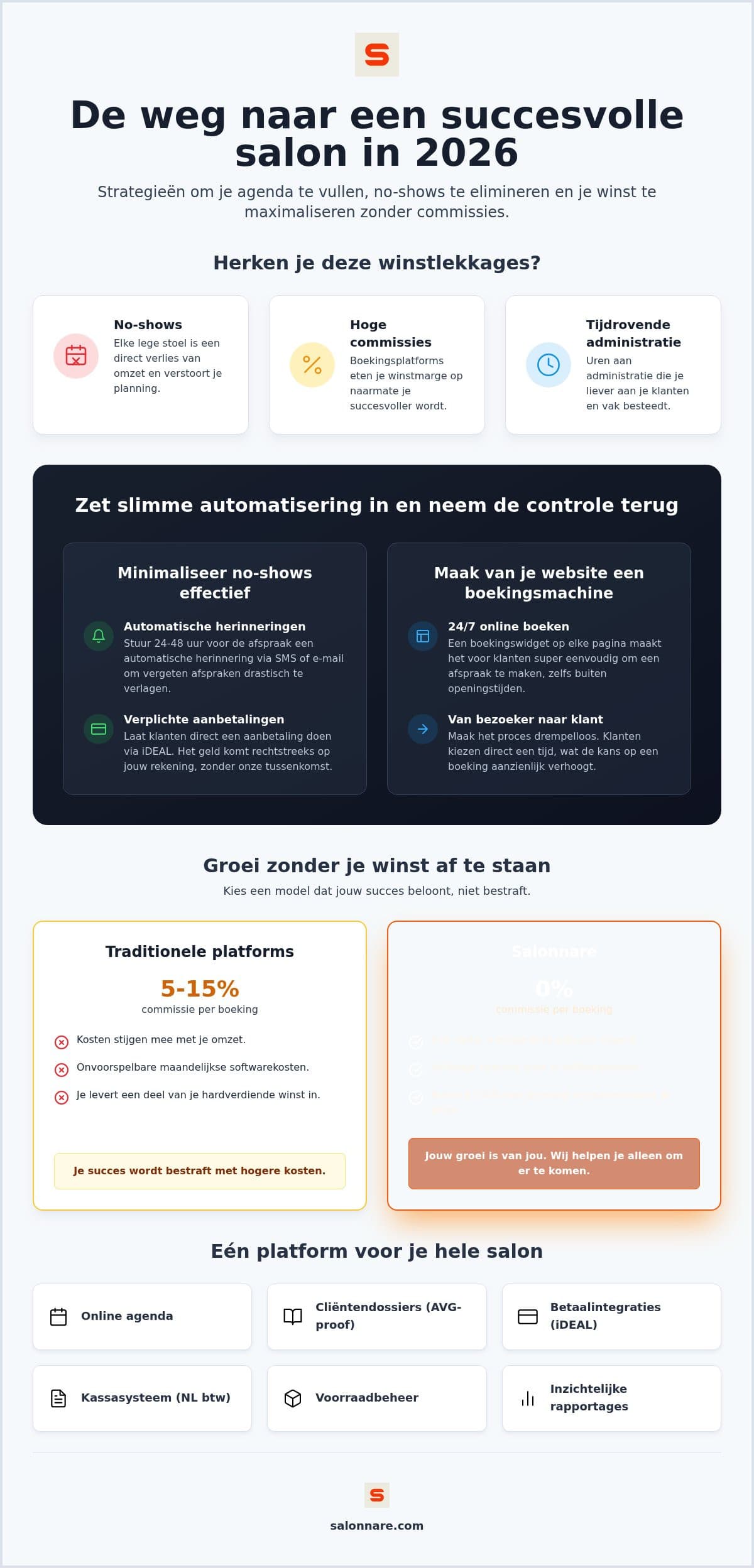
Recruiting new clients while your calendar leaks is mopping the floor with the tap running. A missed one-hour appointment costs you the revenue of that hour and the slot somebody else could have booked. Two measures demonstrably help, and once set up they cost you no time at all.
The first is automatic reminders. A confirmation right after booking plus a reminder 24 to 48 hours in advance removes plain forgetfulness, which explains most no-shows. The second is a deposit at the moment of booking, especially for longer or more expensive treatments. Someone who has paid a deposit is far more likely to cancel properly than to simply not turn up.
With that deposit, where the money lands matters. Through online payments with iDEAL and Mollie, or via Stripe, the amount goes to your own account rather than a platform's holding account. Salonnare charges no commission per booking, only a platform fee of 0.5% (min. €0.30) per payment, so what the client pays stays mostly yours. And if someone still fails to show, the deposit at least covers part of the gap.
A second appointment is cheaper than a new client
A returning client does not need convincing all over again. Yet a share of your first-time visitors quietly disappears, simply because nothing happens after the treatment. The answer is not a bigger advertising budget but a record of what you already know about that client.
In your client CRM, note which treatment someone had, which products you used and when a follow-up makes sense. That lets you send a targeted message to people who have not been in for a while, instead of the same newsletter to your entire list. How to build such a record without falling into the usual traps is covered in the guide on client records software for your salon.
Do watch what exactly you store. A note about an allergy, medication, a skin condition or a pregnancy falls under article 9 of the GDPR and needs extra protection. In Salonnare those health notes go into a separate encrypted vault: only staff with that specific permission can open them and every view is logged. With per-employee permissions you can give a colleague access to the calendar without exposing your revenue figures or sensitive notes. Your data is stored on servers inside the EU.
Grow without your margin growing for the platform
Under a commission model you pay a percentage of every appointment. It feels modest at first, but it scales with your success: the better your month, the more you hand over, while the service stays the same. With a fixed monthly price you know your costs up front and keep the profit from every extra client.
At Salonnare you start on the permanently free plan: €0 per month for one employee and 50 bookings per month. Enough to set up your treatments, prices and online booking page and to run on it properly for a few weeks. As your salon grows you move to Starter at €29 per month or Pro at €59 per month, still without commission per booking - just Salonnare's own platform fee of 0.5% (min. €0.30) per payment.
Then steer on numbers rather than gut feeling. Your reporting dashboard shows which treatments earn the most and which time slots stay structurally empty. Sometimes one thorough facial delivers more margin than three short appointments in a row, and then you know where to aim your marketing. A point-of-sale closes the loop: you settle card, cash and iDEAL in one go, VAT is split automatically and your bookkeeper gets an export to load into a package such as Moneybird or e-Boekhouden. Note the distinction: that is an export you import yourself, not a live integration that syncs continuously.
Ready to fill your calendar?
Start for free at Salonnare via https://salonnare.com/en/free: €0 per month for one employee and 50 bookings, with no commission per booking, just a 0.5% platform fee (min. €0.30) per payment. Your deposits and revenue land in your own account.
Start for freeFrequently asked questions about getting more clients in your beauty salon
How do I get more clients for my beauty salon through Google?
Start with your Google Business Profile: current opening hours, your treatments with prices and real photos of your work. Ask clients for a review after their treatment, because reviews weigh heavily in local search results. Add a direct booking link to your profile as well, so anyone who finds you can reserve a time immediately instead of having to call first.
What is the best way to reduce no-shows?
The combination of automatic reminders and a deposit works best. A confirmation at booking and a reminder 24 to 48 hours in advance remove the forgotten appointments. A deposit on longer or more expensive treatments makes people cancel rather than vanish. In Salonnare that deposit runs through iDEAL and Mollie or via Stripe into your own account, subject to Salonnare's platform fee of 0.5% (min. €0.30) per payment.
Do I need my own website or is a booking page enough?
A booking page works perfectly well as a starting point. Salonnare gives you your own online booking page that you can share through your Instagram bio, WhatsApp or your Google profile. If you do have a website, embed the booking widget so visitors never have to leave the site. What matters more than the number of channels is that every channel leads through to an appointment.
What does salon software cost for a small beauty salon?
Salonnare has three fixed tiers: a permanently free plan at €0 per month with one employee and 50 bookings per month, Starter at €29 per month and Pro at €59 per month. There is no marketplace commission on top, only a 0.5% platform fee (min. €0.30) per payment, so your monthly costs do not rise sharply as you gain more clients.
Am I allowed to store notes about a client's skin or allergies?
Yes, provided you do it carefully. Details about allergies, medication, skin conditions or pregnancy are special category data under article 9 of the GDPR. Record only what you need for a safe treatment, with the client's consent. In Salonnare those notes sit in a separate encrypted vault, accessible only to staff with that permission, and every view is logged.
How long before I start receiving online bookings?
Setting up usually takes an evening: you enter your treatments with duration and price, set your opening hours and activate your booking page. Your existing clients import through a CSV file from Excel or your current system. From that point you can share the link, and the first appointments typically arrive within the same week.