



Salon software for freelance hairdressers: admin without the evening work
Your last client has left, the brushes are clean, and then the second half of your day starts: counting receipts, answering messages and dealing with the gap this afternoon where someone did not show up. As a freelance hairdresser you are the diary, the till and the bookkeeping all at once. This article is not about more discipline. It is about timing: which admin appears at which moment, and how much of it your salon software can capture right there.
Why the admin only gets its turn in the evening

For most solo hairdressers admin is not a matter of not wanting to. It is a matter of not being able to, exactly when it appears. A client wants to move an appointment while you are blow-drying. Someone pays cash while the next one walks in. A colour formula changes halfway through. Each of those moments produces a piece of business administration, and each of them lands while your hands are busy.
So you push it forward. To the end of the day, to Sunday evening, to the week before the tax return. The annoying part is not that it never happens, but that it then takes twice as long: first you have to remember what happened before you can record it.
That is exactly the gap salon software for a freelance hairdresser closes. Not by making your admin faster, but by letting it appear at the moment itself, while you simply keep working.
A solo hairdresser's admin runs at three speeds
It helps to stop seeing your admin as one pile and start seeing it as three rhythms that run separately. People who work on small business management keep arriving at the same split: what has to be recorded daily, what gets planned weekly and what gets reported each quarter.
- Every day: the appointment that gets booked or moved, the payment that comes in, the colour formula and the products you used. - Every week: your diary for the coming weeks, the reminders that need to go out, your stock and the clients who have not been in for a while. - Every quarter: your turnover split by VAT rate, your costs and the handover to your accountant.
Only that first row is genuinely time critical. Capture it as it happens and the weekly round becomes a matter of looking, while the quarterly round becomes a matter of exporting. Skip that first row and you have to reconstruct it later. That is where the evenings go.
Let your diary be the starting point of your admin
Most of a hairdresser's admin starts with an appointment. As long as it only lives in your head, in a message or on a note, you still have to move it somewhere afterwards. Put it straight into your bookings management and that step disappears.
Move your bookings online and the client does the data entry for you. They pick a service, see which slots are free and book on a Sunday evening while you are doing nothing at all. It also makes you reachable at the moments your hands are busy, and for a one person business that is the difference between a missed and a booked appointment. Clients can book through your own website and through your Google listing.
From that point the rest follows along:
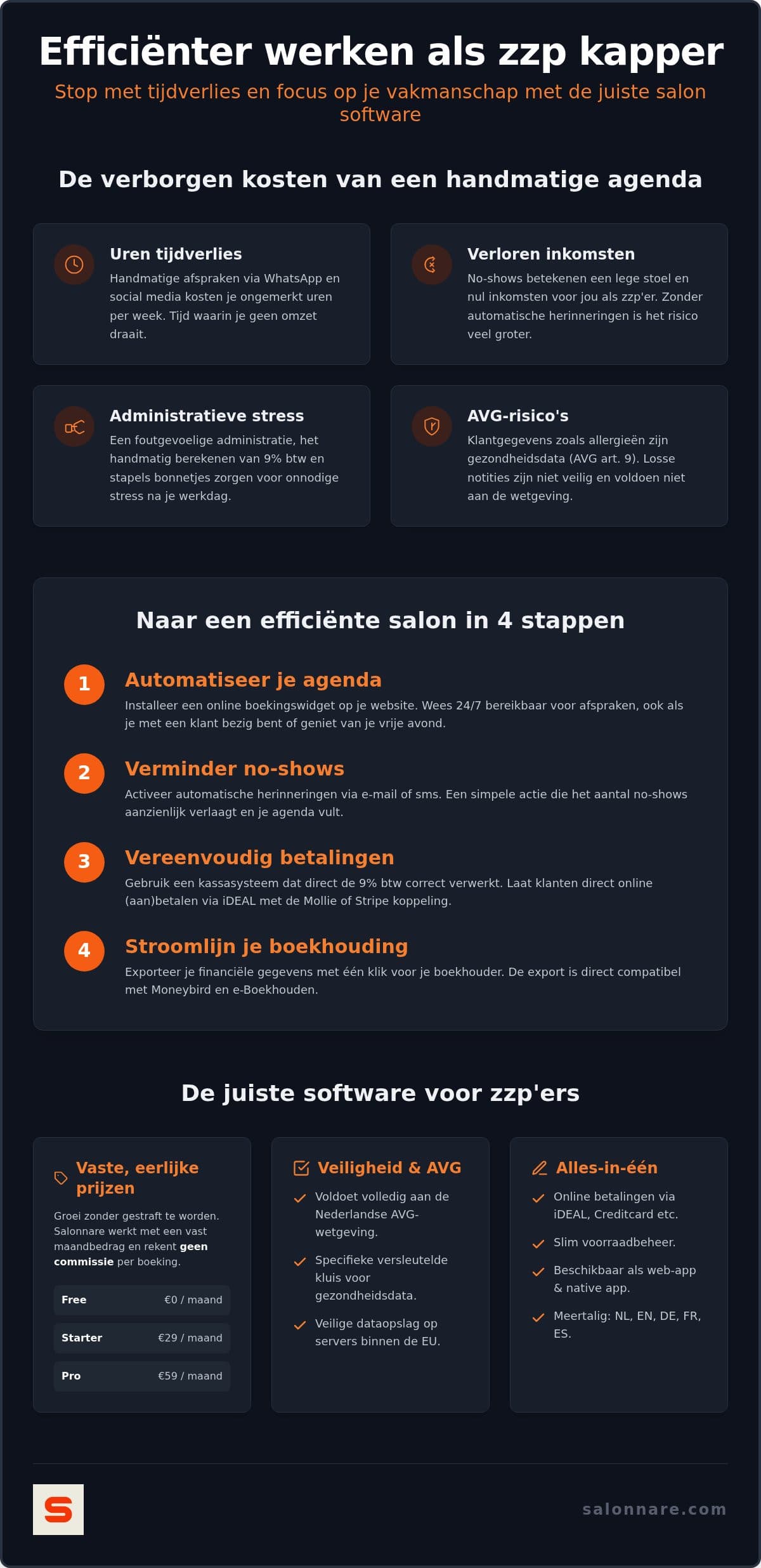
- The confirmation goes out immediately, with date, time, service and price. That saves a message out and a message back. - An [automatic reminder](https://salonnare.com/en/features/automatic-reminders) by email or WhatsApp, a day in advance, catches the clients who simply forgot. With no-shows that is by far the biggest group. - A deposit at booking stops most of the rest. It runs through iDEAL or card, via Mollie or Stripe, straight into your own bank account. No per booking commission goes to your software supplier.
Do not put that deposit on everything by default. For a freelance hairdresser it works better to ask for it only on long treatments and with new clients, and to state your cancellation window clearly in the confirmation. A client who knows the rules up front cancels earlier, and a cancellation that arrives in time is not a gap but a slot you can still fill.
Charge the right VAT rate right at the receipt
The second moment admin appears is at checkout. Do that with a loose cash drawer or a payment request and you end up with a pile of amounts at the end of the quarter that still has to be split.
Check out in a point-of-sale that hangs off your diary and the split has already happened. Rates differ per country: in the Netherlands hairdressing services such as cutting, colouring and blow-drying fall under the reduced rate of 9 percent, while products sold over the counter fall under 21 percent. You set the rate that applies to you once per service and per product, and after that every receipt is right.
Sell a shampoo or a styling product and it comes off your stock straight away. You can see you need to order before the shelf is empty, and at the end of the quarter you know what was actually sold without counting by hand.
If you want to know what to look for when picking a till, the guide on choosing a point-of-sale system for your salon goes into that in more depth.
From till to accountant: export instead of retyping
At the end of the month or the quarter you want one thing: to hand everything over in one go. You do that with an export from your till, a file you import into Moneybird or e-Boekhouden or simply forward.
Note the distinction, because it is often presented as bigger than it is: this is an export, not a live integration that writes into your bookkeeping itself. For a freelance hairdresser with a single revenue stream that is exactly enough in practice, and it saves you the evening spent retyping receipts.
What you have to keep and for how long is separate from your software. The article on what a self-employed hairdresser needs to record covers that in more detail.
Client data in a one person business: what really matters
As a freelance hairdresser you record more than names and appointments. A reaction to a dye, an allergy, a pregnancy or a scalp condition are health data, and they fall under article 9 of the GDPR. They do not belong in a loose notes field, in a chat thread or in a notebook in the drawer.
In Salonnare that information sits in a separately encrypted vault, apart from the ordinary client notes, with its own access rules and an audit log. Your data is stored on servers inside the European Union.
In practice it also saves you work. The previous colour formula, the products used and last time's notes are in front of you the moment the client appears in your diary, instead of you having to ask all over again. You sign in with Google, Microsoft, Apple or Facebook, and you install the app on your phone so you can update something between two clients.
What salon software for a freelance hairdresser costs
For a one person business the price works differently than for a salon with five chairs. A fixed monthly amount is something you can plan for; a percentage per booking punishes exactly the weeks that go well.
Salonnare uses three fixed plans. Free costs 0 euro per month and is meant for one staff member and 50 bookings per month, including the diary, the client profiles, online booking and the till. Starter costs 29 euro per month and Pro 59 euro per month. There is no commission per booking, only a 0.5% platform fee (min. €0.30) per payment, so a fuller diary does not make your software much more expensive.
For many freelance hairdressers that free plan is enough to run on for a while. Grow past those 50 bookings a month and you move up without re-entering your client data.
If you want to put Salonnare next to other packages first, use the guide on how to compare salon software. If you would rather just start: create a free account and switch on online booking as your first step this week.
Switch on one thing this week
Start with the permanently free plan at 0 euro per month: let clients book online themselves, let the confirmations and reminders go out on their own, and see how much is still left in the evening. No commission per booking - just a 0.5% platform fee (min. €0.30) per payment - and no annual contract.
Start for freeFrequently asked questions about salon software for freelance hairdressers
Which salon software suits a freelance hairdresser who is just starting out?
Start with what you use every day: a diary, online booking and a till. Everything above that is for later. Salonnare's free plan costs 0 euro per month and is built for one staff member and 50 bookings per month, including the diary, client profiles, online booking and the till. That lets you run without fixed costs and only move up to Starter at 29 euro per month once your diary grows past it.
How do I set up VAT in my till as a hairdresser?
You set the rate once per service and per product, after which every receipt is split correctly. Rates differ per country. In the Netherlands, for example, hairdressing services fall under the reduced rate of 9 percent while products sold over the counter fall under 21 percent. Check which rates apply to your own country with your accountant or your tax authority, then enter them once and leave the till to do the splitting.
How do I prevent no-shows when I work on my own?
Switch on the automatic reminder first, a day before the appointment, by email or WhatsApp. That catches the biggest group: clients who simply forgot. If drop-outs remain, ask for a deposit on long treatments and with new clients. It runs through iDEAL or card, via Mollie or Stripe, and lands in your own bank account. State your cancellation window in the confirmation and clients will cancel earlier, so you can still fill the hour.
Can I hand my salon admin to my accountant without retyping it?
Yes. You export your sales data from the till as a file you import into Moneybird or e-Boekhouden or forward to your accountant. The turnover in it is already split by VAT rate, so you do not have to go through the receipts again. It is an export, not a live integration that writes into your bookkeeping itself, and for a one person business that is enough in practice.
Where do I keep sensitive client data such as allergies?
Not in an ordinary notes field, and certainly not in a chat thread. Data about allergies, medication, pregnancy or scalp conditions counts as health data under article 9 of the GDPR and needs extra protection. Salonnare keeps it in a separately encrypted vault, apart from the ordinary client notes and with its own access rules, on servers inside the European Union.