



Salon marketing automation: the stop rules that keep your messages personal
When salon owners think about marketing automation, most of them think about what gets sent: a reminder, a birthday email, a campaign. But whether an automated message feels personal or pushy depends mostly on something else: who does NOT get it, and when it does NOT go out. A review request while the client is still on the doorstep, a come-back reminder to someone who sat in your chair last week, the same offer for your entire client list. Those are not problems with the wording, they are missing stop rules. In this guide you walk through five fixed contact moments, each with the stop rule that belongs to it, and you learn how to start in four steps and measure what it delivers.
Why the stop rule matters more than the start rule

Salon marketing automation means setting up software in advance to handle recurring contact moments. As the general explanation of marketing automation shows, it revolves around fixed rules that connect to client data. Those rules have two sides. The start rule says when a message goes out. The stop rule says who skips it and how often it may be sent at most.
You set up the start rule in a minute. The stop rule is easy to forget, and it is exactly what decides whether your client experiences the message as attention or as noise. You would never send a handwritten note twice, or to someone who just visited. Software only knows that if you tell it.
It helps to separate three kinds of automation. Appointment messages are about a planned treatment: the confirmation and the reminder. Follow-up messages come after a visit: a review request or an invitation to come back. Campaigns share news or an offer with a group of clients. They complement each other, but each has its own goal and therefore its own stop rule.
Five contact moments and the stop rule that goes with each
1. Confirmation and reminder. The goal is that the client shows up on time. The stop rule: keep marketing out of it. A reminder that also carries an offer will not be read next time. In Salonnare the confirmation and the reminder go out automatically by email, and you choose how many hours in advance the reminder is sent. You can pause reminders per client. Read more on the page about automatic reminders.
2. The review request. The goal is an honest review. The stop rule: not while the client is still standing outside, and not after every visit. Salonnare sends the request on the morning after the day of the appointment, at 09:00 salon time. So even an appointment that ends at a quarter to nine waits until the next morning. A client receives at most one request, also on later visits.
3. The come-back reminder. The goal is that a client rebooks at the right moment. The stop rule: the interval has to fit the treatment, and an older visit should no longer trigger a message once a newer visit has taken place. Lashes need a different rhythm than a haircut. That is why Salonnare lets you create groups of treatments, each with its own number of days; anything not in a group follows the general setting. A client gets one reminder at a time, counted from her latest visit in the group that fits her.
4. The birthday email. The goal is a personal gesture. The stop rule: once a year, and only to clients whose date of birth you have. Salonnare sends it at most once a year per client, and you switch it on or off for the whole salon.
5. The campaign. The goal is to inform a group about something relevant to that group. The stop rule: never your whole list, and never to people who unsubscribed. With email campaigns in Salonnare (Pro) you choose a segment by last visit, number of visits, spend, labels, treatment category or birthday month. Unsubscribed clients and addresses where mail does not arrive are skipped automatically. How to split clients into useful groups is covered in our guide to email marketing for hair salons.
How to set your stop rules in four steps
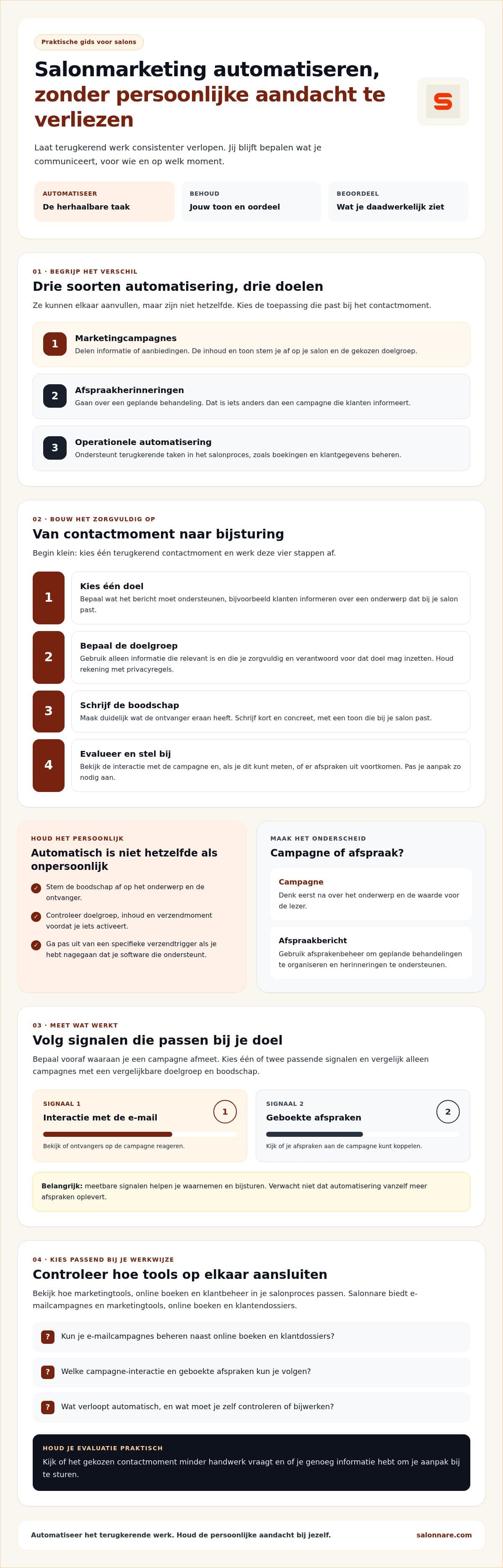
Start small: pick one contact moment and work through these four steps before you switch it on.
Step 1: pick one goal. Write down in one sentence what the message should achieve. "Clients arrive on time" calls for a different message than "clients book their next colour appointment". If a message has two goals, turn it into two messages.
Step 2: decide who gets it, and who does not. This is the stop rule. Only use client data that is relevant to this goal and that you are allowed to use for it. For appointment messages that is usually straightforward; campaigns come with stricter rules on consent and unsubscribing. Those differ by country, so ask for advice when in doubt.
Step 3: write the message. Short, concrete and in your salon's tone. Mention something useful to the recipient: the treatment she had, or the moment when it is time for a new appointment. In Salonnare you edit the texts of the automatic emails yourself, so they sound like your salon and not like software.
Step 4: evaluate and adjust. After a few weeks, check whether the message does what it was meant to do, and whether it led to complaints or unsubscribes. A stop rule that is too loose often shows up first in clients saying they got "another email".
Measure what works, and know what was sent
Decide in advance which signal you will judge a message by. Pick one or two that fit the goal. For a reminder, that is the number of clients who do not show up. For a come-back reminder, it is the number of bookings in the weeks after. For a campaign, you look at how many recipients opened the email, and at the bookings that follow.
For email campaigns in Salonnare you see per campaign how many recipients opened the email. Only compare campaigns when the audience and message are comparable, otherwise you are measuring the difference between groups and not between messages.
Just as important: knowing what a client has received from you. If a client calls to ask why she got a message, her client record shows which emails were sent to her. That way you check whether your stop rules do in practice what you intended, instead of having to guess. And do not expect automation to bring in more appointments by itself: the software carries out your rules, but choosing which message fits which moment stays with you.
Which plan you need and what it costs
You do not have to switch everything on at once. Start with the contact moment that currently costs you the most manual time. If you want to know which tasks beyond marketing to automate first, read our guide on what to automate first.
Salonnare has three fixed monthly prices. Free (€0) is free forever for one staff member and 50 appointments per month, with online booking, client management, the point of sale and automatic email reminders. Starter (€29) covers up to three staff members with unlimited appointments, online payments, reports, gift cards and loyalty. Pro (€59) adds email campaigns with segments, among other things, for unlimited staff.
Online payments via Mollie or Stripe go straight to your own bank account. You pay no marketplace commission on new clients; a transaction fee of 0.5% does apply to every online or card payment, with a minimum of €0.30. Your client data is stored in the EU, and you decide per staff member who can see what.
Want to try the stop rules from this article yourself? Start free with Salonnare and set up your first automatic message on the free plan.
Automate the contact, not the attention
Set up your first automatic message with clear stop rules. Salonnare's free plan is free forever for one staff member and 50 appointments per month.
Start freeFrequently asked questions
What is salon marketing automation?
Salon marketing automation means setting up software in advance to handle recurring contact moments, such as an appointment reminder, a review request, a birthday email or an email campaign. You decide the content, the tone and the rules: when a message goes out and who skips it. The software applies those rules consistently.
What is a stop rule for automated messages?
A stop rule defines when an automated message does not go out or who skips it. Examples: at most one review request per client, a birthday email no more than once a year, no come-back reminder about an old visit when the client has already returned, and never a campaign to clients who unsubscribed.
Which marketing tasks can I automate in my salon?
Think of the appointment confirmation and reminder, a review request after the visit, a reminder to rebook, a birthday email and email campaigns to a selected group of clients. Appointment messages are about a planned treatment; campaigns share news or an offer. Keep the two separate.
Is salon marketing automation suitable for a small salon?
Yes. Start with one contact moment, for example the appointment reminder, and set its stop rule. Salonnare has a free-forever plan for one staff member and 50 appointments per month, including automatic email reminders. Email campaigns with segments are part of the Pro plan at €59 per month.