



POS system for nail salons: choosing one without marketplace commission
You became a nail technician to do beautiful work, not to spend your evenings on receipts or hand over a slice of every treatment to a booking platform. Yet that is exactly where many nail studios get stuck: no-shows nobody covers, VAT records that do not add up, and costs that rise in step with your revenue. This guide walks you through what actually matters when picking a POS system for your nail salon in 2026 - from your margin and your empty slots to storing health notes safely.
Why your till and your calendar belong in one system

In a nail studio, a point of sale system has long stopped being a standalone cash drawer. It is where your calendar, your treatment prices, your stock of gels and polishes and your daily takings come together. The moment the last coat of topcoat dries, the checkout is ready with the right treatments on it, without you retyping anything.
Mostly, that saves you errors. Working out VAT by hand or counting receipts at the end of the day costs time you would rather spend on clients, and every manual step is a place where a number can slip. When your till works directly with your bookings management, you record a treatment only once.
The real difference with a paper diary is what you are left with: usable numbers. You can see which treatments earn the most, which time slots stay structurally empty and how your month is tracking, instead of a book that only tells you who is coming.
Records your tax authority can work with
Tax authorities rarely prescribe a specific POS system, but they do set firm requirements for your bookkeeping: every transaction recorded in full and kept for the statutory retention period, which in the Netherlands is seven years. For a nail studio running many short treatments a day, that quickly adds up to dozens of lines a day that all have to stay correct.
Software takes over that arithmetic. Treatments and retail sales are booked with the VAT rate that applies to them, applied per receipt and tracked separately. When your return is due, you are not puzzling over a box full of paper slips.
For your accountant, the export is what counts. Salonnare produces an export you load into your accounting package. Note the distinction: this is an export you import yourself, not a live integration that syncs continuously.
What to look for: your margin and your empty slots
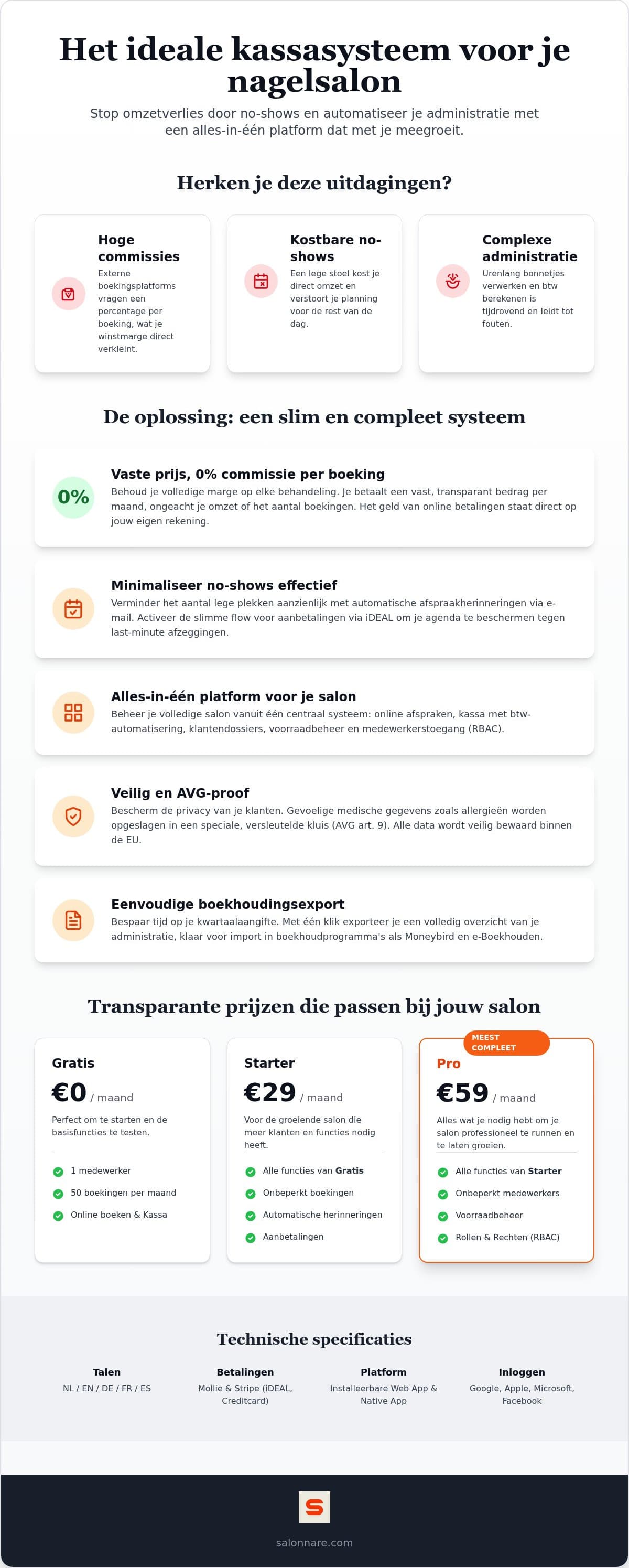
When selecting POS software, start with your margin. Many booking platforms charge a percentage per appointment. In a nail studio, which lives on volume and relatively short treatments, that bites hard: the better your month, the more you hand over. A fixed monthly price turns that around, because you know upfront exactly what you are paying.
The second cost is no-shows. Two things help noticeably: automatic reminders by email and WhatsApp, and a deposit taken at booking. That deposit runs through local methods such as iDEAL and Mollie, or through Stripe, and lands in your own bank account - not in a platform holding account. If someone still fails to turn up, the deposit covers part of the gap in your day.
Finally, look at who can see what. Per-staff permissions let you give an apprentice access to the calendar without exposing your revenue figures or sensitive client notes. You can try all of this at your own pace by starting for free.
Health notes belong in a separate vault
Nail technicians record health data more often than they realise. A note about a nail fungus, an acrylate allergy, diabetes or a pregnancy falls under article 9 of the GDPR: special category personal data that demands a higher level of protection than a phone number.
In Salonnare those notes therefore do not sit among your ordinary client notes, but in a separate encrypted vault. The content is encrypted at rest, only staff with that explicit permission can open it, and every access is logged. The rest of your client CRM stays available to your team as usual. Your data sits on servers inside the EU.
If you want to go deeper, our guide to client records software covers in detail what you may and may not record.
How to start without an upfront investment
New software does not have to be a months-long project. You start on the free plan: permanently €0 per month for one staff member and 50 bookings per month. Enough to set up your services, prices and calendar and run on it for a few weeks before deciding anything.
The switch itself is limited work. You load your existing client list from a CSV file, which you export from Excel or from your current system. After that you set up your treatments and prices and switch on online booking on your own site and through Google, so appointments land straight in your calendar.
You do not need expensive till hardware. Salonnare runs in the browser and as an app on your phone, so you check out on the laptop or tablet you already own. When choosing a POS system, that is a real saving on your start-up costs.
As your studio grows you move up to Starter at €29 per month or Pro at €59 per month, still without marketplace commission - only Salonnare's own platform fee of 0.5% (min. €0.30) per payment. Salonnare is available in five languages and you sign in with your existing Google, Microsoft, Apple or Facebook account. For a broader look at what is in it for your trade, see nail salon software.
Ready to digitise your nail studio?
Start for free with Salonnare at https://salonnare.com/en/free: €0 per month for one staff member and 50 bookings, with no commission per booking, just a 0.5% platform fee (min. €0.30) per payment. Your deposits and takings arrive in your own bank account.
Start for freeFrequently asked questions about nail salon POS systems
What does a POS system for a nail salon cost per month?
It varies widely by provider and feature set. Salonnare uses three fixed tiers: a permanently free plan at €0 per month (one staff member, 50 bookings per month), Starter at €29 per month and Pro at €59 per month. There is no revenue-based commission on top, only a 0.5% platform fee (min. €0.30) per payment, so your monthly cost does not rise much with your revenue.
Is a POS system mandatory for nail technicians?
In most countries no specific POS system is prescribed, but tax authorities do set requirements for your records: every transaction captured in full and kept for the statutory retention period, seven years in the Netherlands. Keeping it by hand is allowed but error-prone and slow. Software automates the capture and tracks VAT per receipt.
Can I import my current client list?
Yes. You load your existing clients from a CSV file exported from Excel or from your current system. That means you do not have to retype every client when you switch, and you can start sending confirmations and reminders right away.
Does the POS work on an iPad or Android tablet?
Yes. Salonnare runs in the browser and is also available as an app, so you sign in on any device with an internet connection: iPad, Android tablet, laptop or phone. You can check out right at the treatment table or check your calendar on the go.
How does POS software help against no-shows?
In two ways. Automatic reminders by email and WhatsApp reduce the chance a client simply forgets. On top of that you can require a deposit at booking via iDEAL, Mollie or Stripe. That deposit lands in your own account and covers part of your lost revenue if someone does not show up.
Do I need to buy special hardware for an online POS?
No. The software runs on devices you probably already have: laptop, tablet or phone. That saves considerably on start-up costs. Receipts go to the client digitally by email, which is more than enough for most nail studios.