



Client management app for hairdressers: digitise your client cards in 2026
The card box behind the counter worked fine for years. Until the day you need it and the card of that one regular with her specific colour formula turns out to be missing. This article is not about your whole admin, but about the heart of it: the client card itself. You will read what belongs on such a card for a hairdresser, how to move your existing client list across without retyping everything, and how to store sensitive details like allergies the way the GDPR expects.
Why the paper client card no longer holds up in 2026
A paper card system rarely costs you a minute. It costs you the conversation in which you have to admit you no longer remember which mix ratio you used last time. Exactly at the moment your client assumes that you do.
A client management app solves that by creating one place where everything comes together. The idea is not new: it is the core of customer relationship management (CRM), where every interaction with a client is collected on a single profile. The difference with a card box is that you can reach it anywhere, nothing goes missing, and your colleague sees exactly what you see.
For a hairdresser the gain sits in the details you normally keep in your head. Which numbers you used, how long you let the colour develop, which product she took home. Once that lives on the profile, every visit starts where the last one ended.
What belongs on a hairdresser's client card
A useful client card is more than a name, phone number and email address. For the styling chair it is about the details you actually act on during a treatment.
- Colour formulas and technique. Brand, numbers, mix ratio and development time per visit, so a successful result can be repeated. - Treatment history. What was done when, by whom and at what price. That immediately answers how long ago the last visit was. - Before and after photos. An image says more than a note, certainly during a colour correction that runs across several appointments. - Allergy and warning fields. Visible before you start, not buried at the bottom of the profile. - Preferences and loose notes. Black coffee, prefers the last slot of the day, no small talk while colouring.
That is exactly how client management in Salonnare is set up: one profile with history, formulas, photos and allergy alerts that you open on your phone while the client is still in the chair.
The point is not that you must record everything. The point is that you record it where you will genuinely find it back next time.
Moving your client list across without retyping it
The biggest barrier to going digital is rarely the software. It is the idea that you have to key in three hundred names by hand. You do not: an import through Excel or CSV moves your entire list in one go.
Work in this order and it stays manageable:
- Gather what you have first. An export from your old system, an Excel list or the card box itself. All in one pile. - Get the columns right. Name, phone number, email address and optionally date of birth, neatly separated. This is the boring part and at the same time the most important one. - Import and spot-check. After the import, open ten random profiles and check that every field landed in the right place. - Fill in history as you work. Do not retype every old card. Note the formula the moment that client is back in the chair.
That last step saves the most work. Your list does not need to be complete on day one, it needs to become complete.
Sensitive client data: what the GDPR expects from a hairdresser
As a hairdresser you sometimes note more than you realise. An allergy to a dye, a sensitive scalp, medication that affects hair structure or a pregnancy. Those are health details, and they fall under article 9 of the GDPR: special category data with stricter requirements than a phone number.
In practice that means three things. You only record them with the client's consent and for a clear purpose. You store them so that not everyone can simply open them. And you do not keep them longer than necessary.
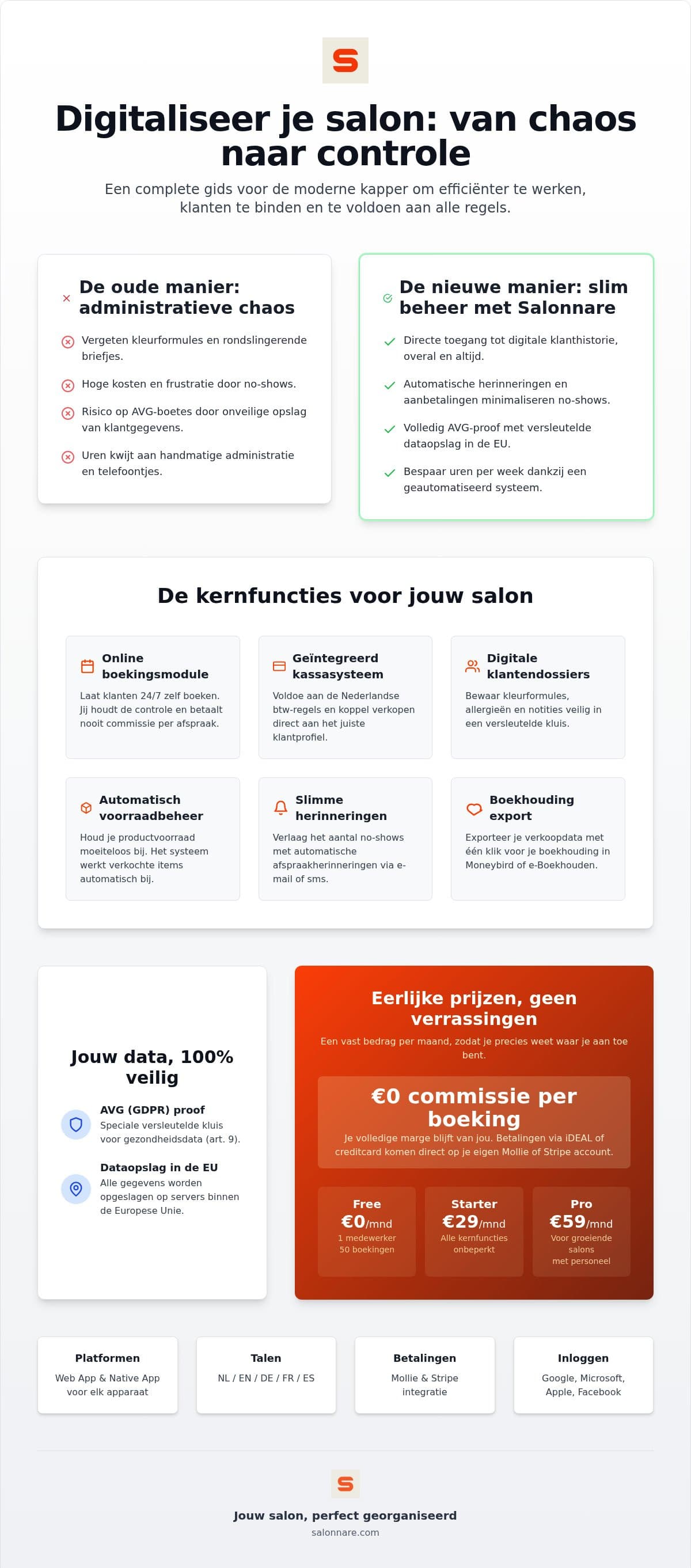
In Salonnare those details therefore do not sit loose in a notes field, but in a separately encrypted vault with access set per staff member. A trainee sees the calendar and the regular client card, but not the medical part, unless you deliberately grant that right. The data is stored on servers inside the European Union.
A card box behind an unattended counter rarely meets that standard. On this point going digital is not an added risk, it is the safer route.
One profile for calendar, checkout and reminders
A client card only becomes powerful once the rest of your salon hangs off it. Book an appointment and it appears on the profile. Take payment and the receipt sits underneath, including the products the client took home. That way history builds itself without extra effort.
Checkout runs through the point-of-sale, which splits VAT correctly and links sales to the right client profile. Card and online payments run through Mollie or Stripe straight into your own bank account, with only a 0.5% platform fee (min. €0.30) per payment.
Automatic confirmations and reminders go out from that same profile, which brings down no-shows. If you want to tackle that side of the business more broadly, the guide to admin software for your hair salon covers the full administrative chain.
Why Salonnare suits a hairdresser going digital
You can try the move at no cost. The Free plan is permanently free for one staff member and 50 bookings a month, so you can import your client list and run alongside your old method for a month before deciding anything. As you grow there is Starter at €29 a month or Pro at €59 a month. A fixed amount, plus only a 0.5% platform fee (min. €0.30) per payment.
The app runs on what you already own: phone, tablet or laptop, as a web app or a native app. If you work with international staff it helps that the interface is available in five languages, and with permissions per staff member you decide who sees what.
If you want to go beyond recording and actively bring clients back, read how to use client management to build regulars. And if you simply want to start: create a free account today and move your first client card across.
Retire your card box this week
Start with the permanently free plan at €0 a month: import your client list, record your first colour formulas and see whether it works for you. Only a 0.5% platform fee (min. €0.30) per payment, no credit card needed.
See the plansFrequently asked questions about client management for hairdressers
Is a client management app also suitable for a self-employed hairdresser?
Yes, working solo is exactly where it saves time, because your calendar, client history and reminders live in one place. With Salonnare you start on the permanently free plan at €0 a month, for one staff member and 50 bookings a month. That commits you to nothing and lets you check calmly whether the way of working suits you.
Can I import my existing client list?
Yes, an Excel or CSV file moves your whole list across in one go, whether it is an export from your previous system or a list you kept yourself. Make sure name, phone number and email address sit in separate columns before you import. Afterwards, check a handful of profiles to confirm everything landed correctly.
Do I pay commission per booking with Salonnare?
Not on your bookings: you pay a fixed amount per month regardless of how many appointments you take: Free €0, Starter €29 or Pro €59 per month. Online payments run through Mollie or Stripe straight into your own bank account, with only a 0.5% platform fee (min. €0.30) per payment.
How safe is client data in an online app?
Your data is stored on servers inside the European Union. Health details such as allergies are kept in a separately encrypted vault in line with article 9 of the GDPR, and only staff you grant that right can view them. For ordinary client data you set per staff member what is visible.
Can I record colour formulas and photos per client?
Yes. On the client profile you record the formula, the products used and the development time for each visit, and you add photos of the result. At the next appointment that history is right in front of you, so you can repeat a successful colour or adjust it deliberately.
Does the app work on my phone?
Yes. Salonnare runs as a web app in your browser and as a native app, so you open a client profile on your phone, tablet or laptop without needing special hardware. What you enter at the counter is immediately on the device in your pocket.