



Salon admin software: how to automate your hair salon in 2026
It is eight in the evening and your last client has just left. You want to sit down, but the pile of receipts and tomorrow's schedule are still waiting. You became a hairdresser to make people look good, not to spend your evenings at a computer. This article is not about closing your books, it is about the step before that: taking the manual work out. You will learn how to keep your calendar open around the clock, how to prevent no-shows with automatic reminders, and how to end the month with a ready-made overview for your accountant instead of copy-and-paste work.
Why hair salon automation matters in 2026
Admin software is no longer a luxury in 2026, it is the digital heart of your business. It connects appointments, payments and client records so information flows through instead of being retyped by you. This kind of business process automation removes exactly the steps where mistakes tend to happen in practice: the handover from one system to the next.
The gain is rarely in a single task. It is in the sum of small actions that disappear. An appointment that confirms itself. A receipt that lands on the right VAT rate straight away. A client who reschedules without calling you. Those are precisely the actions that currently demand your attention between treatments.
Your clients have changed too. Someone who decides on a Sunday evening that they need a cut wants to book that moment, not wait until Tuesday morning. If you cannot offer that, the booking moves to a salon that can.
What manual work quietly costs you
The real cost of a paper-based routine never appears on an invoice. Every time the phone rings during a treatment you lose your focus and interrupt the experience of the client in your chair. You end up doing two things halfway instead of one thing well.
No-shows are the second silent cost. A forty-five minute gap on a Thursday afternoon does not get filled. Automatic reminders by email or WhatsApp, optionally combined with a deposit, remove most of that. The client gets a nudge while it still matters.
Then there is the retyping itself. Appointment in the calendar, client details in a notebook, revenue in a cash book. Something can go missing at every handover. How you then get those figures ready for the tax office is a separate story, covered in the guide to hair salon bookkeeping software.
A step-by-step plan you can build up calmly
Going digital is a big step for many owners, and this challenge and opportunity for small businesses does not have to happen in one weekend. Start with the basics and expand once the first part runs smoothly.
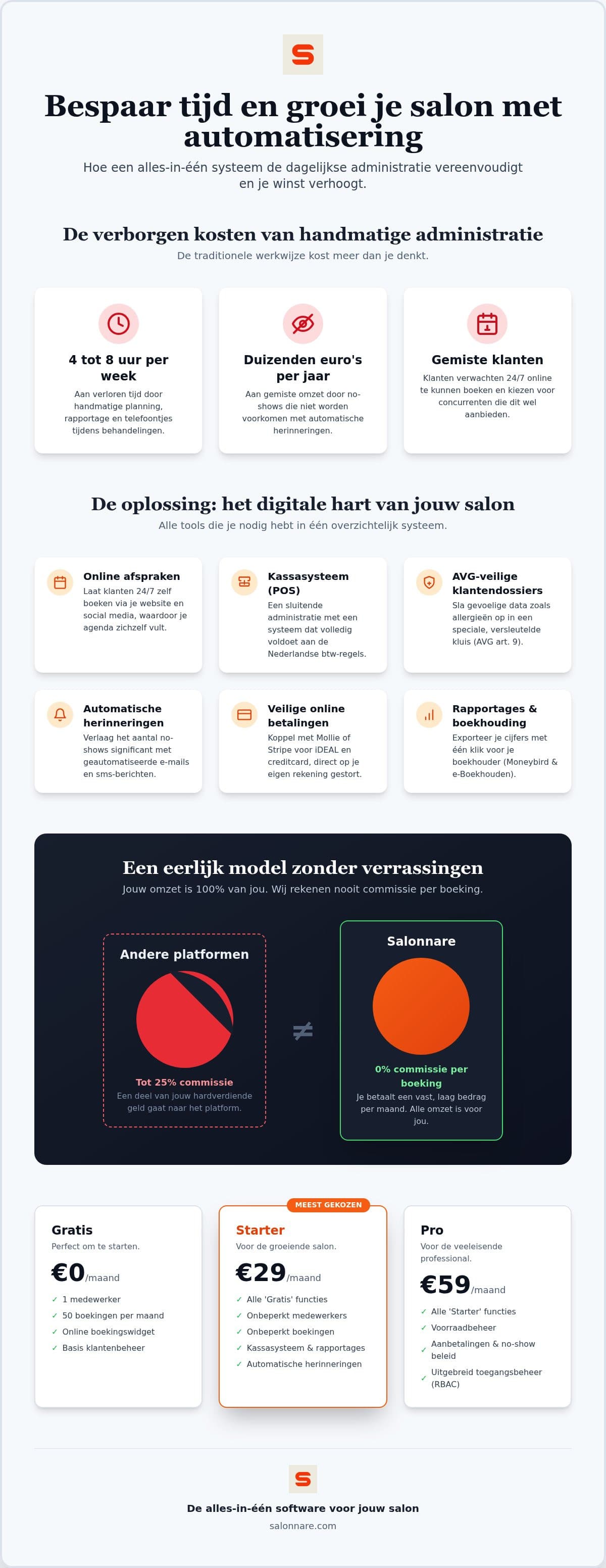
- Pick a foundation that fits your size. Start on a free plan to get to know the features without committing to monthly costs. At Salonnare that is Free at €0 per month, with one staff member and 50 bookings per month. - Build your database. Import your existing client list from Excel or CSV and set up your services, durations and prices properly. Everything else leans on this foundation. - Make yourself reachable. Put the booking widget on your own website and social channels, and connect your calendar to Google so clients can book you there directly too. - Sort out payments. Connect Mollie or Stripe for local payment methods and card payments. The money lands in your own account, without paying a percentage per booking.
Keep that order. Anyone who switches everything on at once tends to discover halfway through that the service list is still wrong and has to start over.
From appointment to export for your accountant
A good workflow does not stop at the booking, it runs all the way into your accountant's books. Your point of sale should comply with local VAT rules, so every receipt lands on the right rate and products come off your stock automatically.
At the end of the month you export your revenue and VAT overview and hand it to your accountant, or load it into a package like Moneybird or e-Boekhouden. Note the distinction: this is an export, not a live connection that writes into your bookkeeping by itself. For most salons that is exactly enough, and it saves the cost such a live link brings.
If you want more from your numbers than just the tax return, look at salon reporting software. And if you are still weighing up the till itself, the guide to choosing a point-of-sale system lists the criteria.
What automation gives you as your team grows
As soon as a second pair of hands joins, the question changes. It is no longer only about saving time, but about oversight and clear agreements. With per-employee permissions you give a junior stylist access to their own calendar only, while you as the owner keep the reports and settings. That avoids discussion and prevents mistakes.
One point that often gets forgotten is the privacy of sensitive data. Information about allergies or a scalp condition counts as special category data under GDPR Article 9 and does not belong in a loose notes field. Salonnare keeps it in a separately encrypted vault that only staff with the right permission can open. How to set up such a record in practice is covered in the guide to client records software for your salon.
It scales financially too: you pay a fixed monthly amount instead of a percentage per booking. Whether you serve 50 or 500 clients a month, your fixed costs stay predictable.
Why Salonnare suits a hair salon
You can try the switch without risk. The free plan is permanently free for one staff member and 50 bookings per month, so you can run alongside your current setup for a month before deciding anything. As your business grows you move to Starter at €29 per month or Pro at €59 per month.
The platform runs as a web app and a native app on the devices you already own: laptop, tablet or phone. No special hardware needed. It is available in five languages, which helps if you work with international staff, and your data sits on servers inside the European Union.
To see what that saves in your own working week, start for free today.
Ready for a calmer working week?
Start on the permanently free plan at €0 per month and see for yourself what automation saves. No marketplace commission - only a 0.5% platform fee (min. €0.30) per payment, no strings attached.
Start for freeFrequently asked questions about hair salon automation
Is admin software mandatory for a hair salon?
No, specific software is not a legal requirement. You are required to keep proper records for the tax authorities and to retain them for the statutory period. A digital system makes that easier and less error-prone than a paper diary, but it remains a choice rather than an obligation.
Can I import my current client list?
Yes, you import your existing client list from an Excel or CSV file, so you do not have to retype hundreds of names and phone numbers. Make sure your columns are cleanly separated before importing and it takes just a few minutes.
How does the link with my accountant work?
Through an export function. You download your revenue overviews and VAT reports as a file for packages such as Moneybird or e-Boekhouden, and your accountant reads them in. It is deliberately an export rather than a live connection: that keeps costs down and prevents errors from copying amounts by hand.
What does good admin software cost for a hairdresser?
It varies by provider. At Salonnare you start free on the permanent plan at €0 per month (one staff member, 50 bookings per month). For more features or staff there is Starter at €29 per month and Pro at €59 per month, plus only a 0.5% platform fee (min. €0.30) per payment.
Is my client data stored securely and GDPR-compliant?
Your data sits on servers inside the European Union. Sensitive information such as allergies or colour formulas is kept in a separately encrypted vault in line with GDPR Article 9. Only staff you grant that permission to can access it.
Do I need special hardware for a digital point of sale?
No. The software runs as a web app and native app on a laptop, tablet or smartphone you probably already own. You can take payments and manage appointments straight from your browser, so there is no need to invest in equipment first.