



Digital loyalty card for hair salons: from stamp card to automatic points
A paper stamp card works exactly as long as your client is carrying it. In practice it sits at home in a coat pocket, goes through the wash, or turns up once the promotion has already expired. A digital loyalty card solves that, but the real gain is not in going digital as such: it is in the link with your till and your client records. This article covers which savings model suits your salon, how to sign clients up without asking them to install an app, and how to let points accrue automatically at checkout.
Why the paper stamp card costs your salon more than it returns

A stamp card is meant to bring clients back, but it puts the work on the client. They have to keep the card, bring it along and fill it in time. Lose it, and the saving starts over, which kills exactly the feeling you were building. A loyalty programme only works when taking part costs no effort.
Paper gives you nothing back. A stamp does not tell you when someone last came in, what they spend on average or which treatment they keep choosing. So you do not know who your most loyal guests are, even though that group carries your calendar. A digital card records every transaction next to the client profile, so visit frequency and spend become visible on their own.
Stamping by hand costs time at the busiest moment. Checking out, taking payment, finding the card, adding the stamp: it all happens while the next client is already in the chair. With a digital system, points are awarded during checkout, with no extra step at the desk.
And there is revenue you never see leaving. A client who has lost their card rarely asks about it. They simply come back a little less often. That loss appears nowhere in your figures, which is precisely why it goes unnoticed for years.
Points per euro or a full card: pick the model that fits your salon
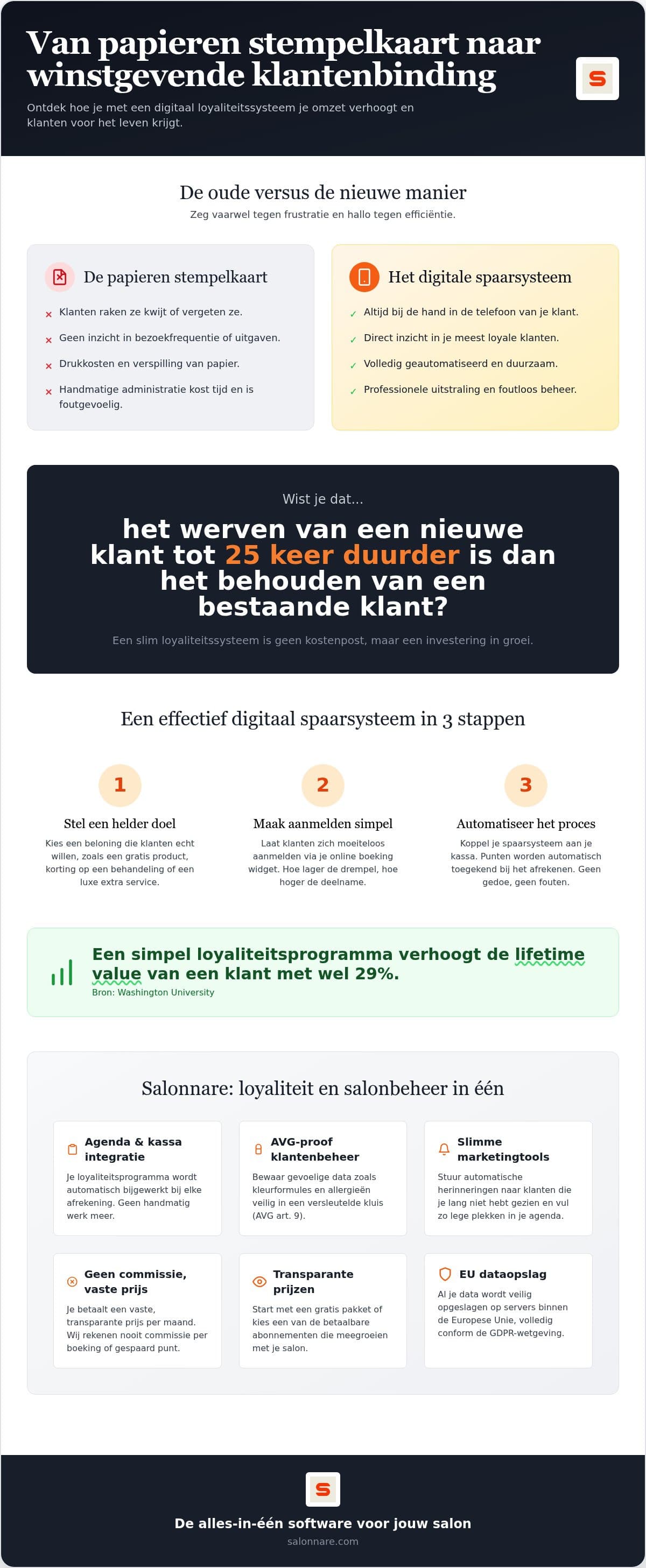
Before you configure anything, decide what a client is actually saving towards. Two models work well in a hair salon, and they reward different behaviour. Research from Washington University shows that a well-designed loyalty programme measurably increases the value of a client relationship, provided the rules are immediately clear to the client.
Points per euro spent. The client earns a set number of points for every euro they spend. This model rewards spending, so it works well if you sell products alongside treatments. Someone booking a colour treatment and taking shampoo home saves faster than someone coming in for a cut only.
The full-card model. This is the digital version of the stamp card your clients already know. You set how many points make up a full card, and what discount that full card is worth at checkout. If a client has several full cards, they can use them at the same time. The advantage is that the reward is concrete: not an abstract point balance, but an amount that comes straight off the bill.
Which one should you choose? In Salonnare you do not have to choose, because the two work together: points accrue per euro spent and convert into a discount once a card is full. Start with a ratio you can explain in one sentence at the desk. If you cannot explain the rule in one sentence, it is too complicated and clients will not pay attention to it.
Sign clients up at the desk with a QR code, no app and no account
The biggest leak in a loyalty programme is not the saving, it is the sign-up. Ask clients to download an app or create an account and a large share drop out while standing at the desk with their coat in hand. That is exactly the moment you want to enrol them.
The QR code on the desk. In Salonnare you switch on QR-based sign-up. The client scans the code with their own phone, registers and is done. No download is involved and no account has to be created. You can also set a number of welcome points that are credited straight away on sign-up, so the balance does not start at zero.
A time window prevents misuse. The QR sign-up has an adjustable window in minutes. Outside it the code no longer works for that session, so a photographed code will not earn points later on.
Send them somewhere afterwards. After a successful sign-up you can show your own redirect URL as a button, for example to your social media page or your online booking page. Leave the field empty and no button appears at all.
And clients without a smartphone? They do not have to do anything. The balance is attached to the client profile in your system, not to a card or an app. Your team member looks the client up by name and the balance is simply there.
Let points run through your till and your client records
A savings system that sits apart from your till is a second set of books, and nobody keeps that up. The link is therefore the point at which a digital loyalty card pays for itself.
Awarding and redeeming happen at checkout. In the Salonnare point-of-sale, points are credited automatically when you check out a treatment or a product. If the client redeems a full card, the discount is processed within that same sale, including how VAT is allocated across the lines. There is nothing to track separately or correct afterwards.
Everything sits with the client profile. Through client records you see each client's balance alongside their appointment history and spending. That makes the conversation at the desk concrete: you can say how much is still needed for a full card, instead of waiting for the client to ask.
Keep sensitive data separate. Allergies and other health data do not belong in a notes field; colour formulas simply stay on the client card. Salonnare stores those in a separately encrypted vault in line with GDPR article 9, with permissions per team member. For how to organise the rest of your salon administration in a GDPR-proof way, see the guide on client records software for your salon.
Client tiers and return visits: from one-off visitor to regular
Saving rewards the client who was coming anyway. The bigger gain sits with the client who slowly drifts away without you noticing.
Work with client tiers. In Salonnare you define your own tiers based on total amount spent, each with its own name, threshold and colour. That way you see at a glance who belongs to your core group. It helps with small decisions: who gets a slot first in your busiest week, or who to approach about a new treatment.
Let the system do the remembering. Salonnare automatically messages clients who have not been in for a while, so you fill empty slots without picking up the phone yourself. The same principle applies to appointment reminders, which bring down the number of no-shows.
A savings system is a means, not an end. Experts point out that embedded loyalty programmes transform customer engagement precisely when they are part of the normal process rather than a separate campaign. A card that runs along with checkout gets used. A card someone has to remember does not.
If you want to look beyond the savings system itself, the article on customer loyalty strategies for your salon covers the broader approach to a full calendar.
Setting up digital loyalty cards in Salonnare
You switch the savings system on in the settings, choose your points ratio and decide what a full card is worth. After that it runs along with your normal working day.
A fixed price, no commission per booking. Salonnare has three plans: Free (0 euros, 1 team member and 50 bookings per month), Starter (29 euros) and Pro (59 euros). No percentage is taken from your bookings or from points saved, only Salonnare's own platform fee of 0.5% (min. €0.30) per payment, so what your client pays stays mostly yours. What each plan includes is listed on the plans and pricing page.
Payments land in your own account. Through Mollie or Stripe, online payments including iDEAL go straight to your own bank account, with no intermediary holding on to your revenue.
Your data wherever you are. You work from a tablet, phone or laptop through the installable web app or the native app. Your data stays within the EU, team members only get the permissions their role requires, and you can sign in with Google, Microsoft, Apple or Facebook.
Your bookkeeping lines up. At the end of the month you export your data for packages such as Moneybird or e-Boekhouden, so nothing has to be retyped by hand.
Start small: switch the savings system on, put the QR code on the desk and let the points run for a month. The savings system comes with Starter. Start free with Salonnare and replace your paper stamp cards.
Ready to replace your stamp cards?
Switch on the savings system, choose your points ratio and let Salonnare run the points at every checkout. Starting is free (the savings system comes with Starter), with no commission per booking - just a 0.5% platform fee (min. €0.30) per payment.
Start free with SalonnareFrequently asked questions
Does a digital loyalty card work for clients without a smartphone?
Yes. The balance is attached to the client profile in the salon software, not to a physical card or an app. Your team member looks the client up by name and awards points or redeems a full card. So the client has nothing to download and nothing to bring along. The QR sign-up at the desk is an added convenience for those who do use a phone, not a requirement for taking part.
How are points tracked in Salonnare?
Automatically, at the moment you check out the treatment or product at the till. You set in advance how many points a client earns per euro spent, how many points make up a full card and what discount that card is worth. At checkout the balance is updated and a redeemed card is processed directly as a discount, so there is no manual counting or correcting.
Is client data stored securely in line with the GDPR?
The data is held on servers within the European Union. Sensitive information such as allergies and scalp conditions goes into a separately encrypted vault in line with GDPR article 9, apart from ordinary client notes. On top of that you decide per team member which permissions they have, so not everyone can reach every record. That keeps access to privacy-sensitive information limited to those who need it.
Can I migrate my existing paper stamp cards?
Yes, and the first visit after the switch is the natural moment for it. You enter the number of stamps or points already saved once in the client profile, after which the system takes over the tracking. Straight afterwards you can check and complete the contact details, so your client database is brought up to date in one go. Clients keep the credit they built up and only notice that the card is no longer needed.