



Salon workflow optimisation: from first booking to closed till, step by step
How much of today went on replying to messages, calling back missed numbers and writing appointments into a paper diary? You started in this trade to make people look good, not to be your own receptionist. Yet that work keeps sliding into your evenings. This article treats your salon not as a list of separate features but as a chain: the journey from the first click on your booking page to the receipt the client takes home. Wherever that chain hands over from one step to the next, something can fall through. That is exactly where your time is hiding. You will read which five handover moments those are, what you set up at each step and where to start if you are still running a paper diary today.
Where a salon workflow actually breaks down
A salon workflow is more than the treatment in the chair. It is the client's whole journey, and it has five links: booking, confirming and reminding, treating with the right background knowledge, taking payment, and the follow-up appointment. Optimising your salon workflow means tying those links together so information flows through on its own instead of you retyping it. That is the core of what Business Process Management prescribes: automate repetitive work and remove the handovers where mistakes creep in.
The problem is rarely a single link. A paper diary works fine, right up to the moment you have to lay it beside your till roll to find out what someone paid last time. The friction sits between the steps. Three places where that costs money:
- The phone ringing mid-treatment. Your hands are in someone's hair. A client who cannot book the moment the thought occurs to them often does not book at all. - Retyping between systems. Appointment in the diary, client details in a notebook, takings in a cash book. Every switch is a chance to forget something. - The gap in your day. A forty-five minute no-show is not getting filled on a Thursday afternoon.
An optimised workflow makes you proactive instead of reactive. Your system keeps working while you are with a client, or while you are off.
Steps 1 and 2: let clients book themselves and remind them automatically
The first step is opening up your diary. A booking page on your own website, in your Instagram bio and linked to your Google Business Profile means people grab a slot from the sofa in the evening without your phone ringing. Your availability, the duration per treatment and your breaks are set once, and after that it runs itself. That is how you rebuild your working week around treating rather than scheduling. You can see how that works in practice under bookings management.
The second step is the confirmation and the reminder. The client gets a confirmation straight after booking, and a reminder by email or WhatsApp the day before. This is the cheapest defence against no-shows there is: set up once, never thought about again.
If people still fail to turn up for long or expensive treatments, a deposit is the next brake. You connect your own Mollie or Stripe account, so payments land directly in your own bank account. You pay that provider's usual transaction fees and no per-booking commission to Salonnare on top.
Steps 3 and 4: from client record to checkout without retyping
This is the gain most salons underestimate. When the booking and the client record are linked, opening the appointment shows you last time's colour formula, the allergy you need to remember and what was agreed. No rummaging through a drawer of treatment cards. What belongs in there and how to set it up in line with the GDPR is covered in the guide to client records software.
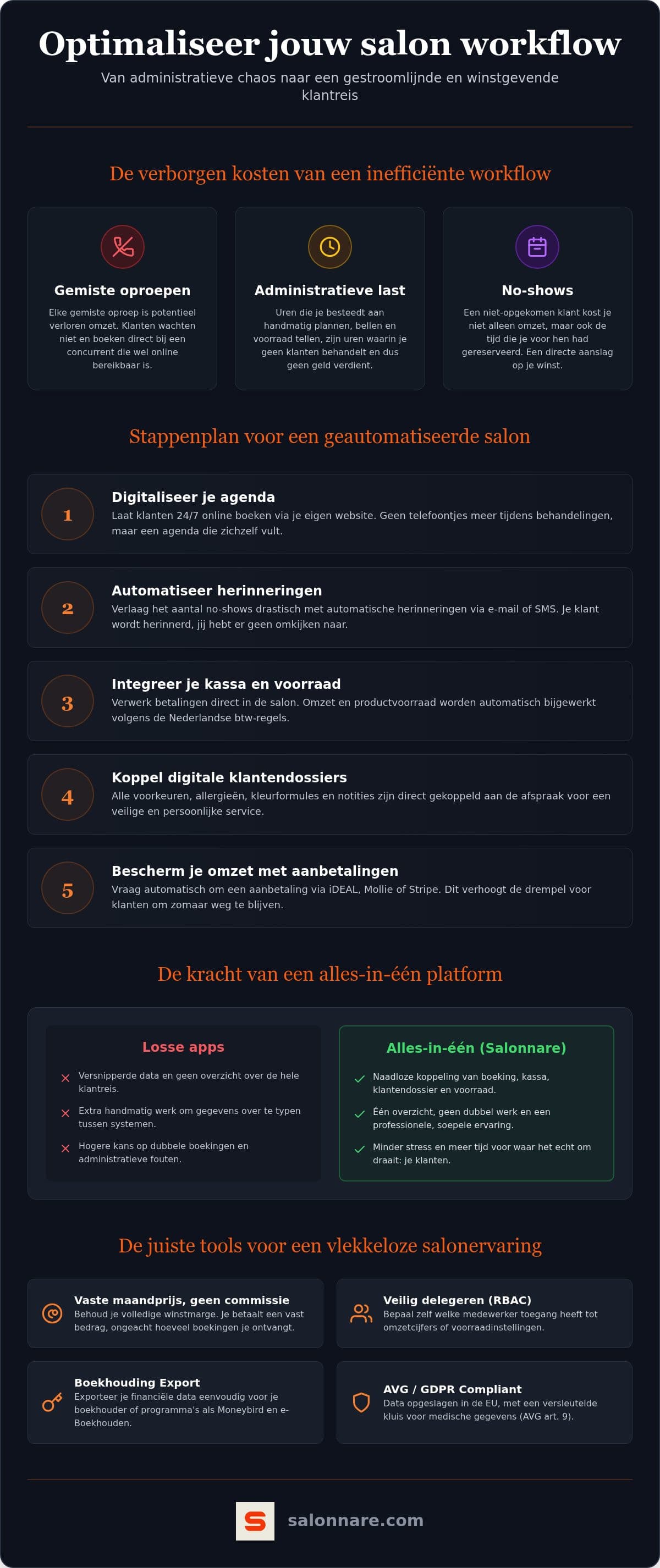
Checkout closes the chain. A point of sale that handles your VAT rates correctly books every receipt at the right rate and takes sold products off your stock. At the end of the month you export your revenue and VAT overview and send it to your accountant, or load it into Moneybird or e-Boekhouden. Note the distinction: this is an export, not a live connection that writes into your bookkeeping itself. For most salons that is exactly enough, and it saves the integration fees such a live link usually carries.
If you want to know what to look for in that till, the guide to choosing a POS system walks through the criteria.
Step 5: the follow-up that fills your diary without you typing
The last link gets skipped most often, and it pays the most. A client walking out happy is at that exact moment the easiest one to rebook.
Set up a message that goes out automatically a few weeks after the visit, timed to the treatment: sooner after a colour than after a cut. Alongside that you can send a review request and a birthday message. These are messages you write once and that keep running afterwards.
That way your diary is filled by the clients you already have rather than by ad spend. And because the confirmations, reminders and follow-ups all come out of the same system, the tone stays consistent and no link is ever missing.
What it costs and how to start small
You do not have to build this in a single weekend. The order in this article is also the order to roll it out: online booking first, then reminders, then the client record, then the till, then the follow-up. Each step saves time on its own.
When comparing software, look hard at the business model. A percentage per booking feels cheap at first and gets more expensive the better you do. Salonnare charges a flat monthly price: Free costs €0 a month for one staff member and 50 bookings a month, Starter costs €29 and Pro €59. No percentage of your revenue on any of the three.
As your team grows, you decide per staff member what is visible. Someone can manage the diary without seeing revenue figures or health notes. Those health notes sit in a separately encrypted vault under Article 9 of the GDPR, on servers inside the EU. The app works in five languages and runs on your phone, so you can look something up between two clients.
Want to see what your own week looks like when the diary fills itself? Start free with Salonnare and put your booking page online tonight. No credit card needed, and the free plan stays free.
Ready for a diary that fills itself?
Put your booking page online, let reminders go out on their own and keep your evenings clear. You can start today, no credit card required.
Start freeFrequently asked questions
How can I optimise my salon workflow without technical knowledge?
You do not need to code or install anything. You set your opening hours, treatments and durations once, put the booking page on your website or in your Instagram bio, and switch on the automatic confirmation and reminder. That is one quiet morning of work. After that you manage everything from your laptop or phone.
Where do I start if I still use a paper diary?
Start with online booking, because it immediately removes the calls that interrupt treatments. Move your existing clients and services across with a CSV import rather than retyping them, and keep the paper diary alongside as a reference for the first few weeks. Only once that is running should you add the client record and the till.
How do I reduce no-shows in my salon?
An automatic reminder by email or WhatsApp the day before catches most forgotten appointments. If people still fail to show for long or expensive treatments, a deposit helps: someone who has paid part up front either turns up or cancels in time. You arrange that through your own Mollie or Stripe account.
Is my client data safe under the GDPR?
Yes. All data sits on servers inside the EU. Health data such as allergies, medication and skin conditions counts as special category data under Article 9 of the GDPR, so it is kept in a separately encrypted vault, apart from your ordinary client notes. You decide per staff member who may view it.