



Hairdresser booking software without marketplace commission: how to keep almost 100% of your revenue
Being booked online is normal for most hair salons by now. The question is no longer whether you need a digital calendar, but what that calendar costs you per booking. Marketplaces that take a percentage of every appointment or every new client let your software bill grow along with your success. Hairdresser booking software without marketplace commission works the other way around: you pay a fixed amount per month and keep almost every euro you earn at the chair, aside from Salonnare's own platform fee of 0.5% (min. €0.30) per payment. This guide works through what that difference means and shows which features you need to run a fully automated salon at a low fixed fee.
What a commission model really costs your salon

Plenty of hairdressers start out on a large marketplace because it delivers new clients quickly. That works, but the price tag is tied to your revenue rather than to the product. Under a commission model you pay a percentage per booking or per new client. The better your salon performs, the higher your software bill. Appointment scheduling software is essentially a fixed tool rather than a variable cost, yet a commission model has you settling up on your own growth month after month.
Run the numbers for your own salon. Say you handle 50 bookings a month at an average spend of €45, which comes to €2,250 in revenue. A fixed monthly price stays exactly the same in that calculation, whether you schedule 20 appointments or 200. A percentage per booking scales along with you, so you pay the most in your busiest months. For your planning, that is the difference between a known cost and an open end.
There is a strategic effect as well. Without that percentage per booking it pays to have clients book through your own channels: your own website, your Google profile or your Instagram bio. That builds your own brand and your own client list, instead of the visibility of a platform where the salon two streets away is listed too.
A fixed monthly price: what you pay with Salonnare
Salonnare works with three fixed plans and charges no commission per booking, only its own platform fee of 0.5% (min. €0.30) per payment. The Free plan costs €0 per month and is meant for one staff member with up to 50 bookings per month, which is enough to move fully online as a solo stylist without investing first. As your calendar grows you move up to Starter at €29 per month or Pro at €59 per month.
What is not added on top of your subscription: a rising percentage of your revenue, a surcharge per new client or a fee per confirmation sent. Your monthly price stays your monthly price. That keeps the 2026 calculation simple: you know at the start of the year what your software costs, and every extra appointment you add only raises your revenue.
A fixed price also means trying it out costs nothing. You can set up your entire booking flow on the free plan and scale up only when you genuinely outgrow it. Try Salonnare for free and see what your calendar looks like without marketplace commission.
What to look for in a booking system with low commission
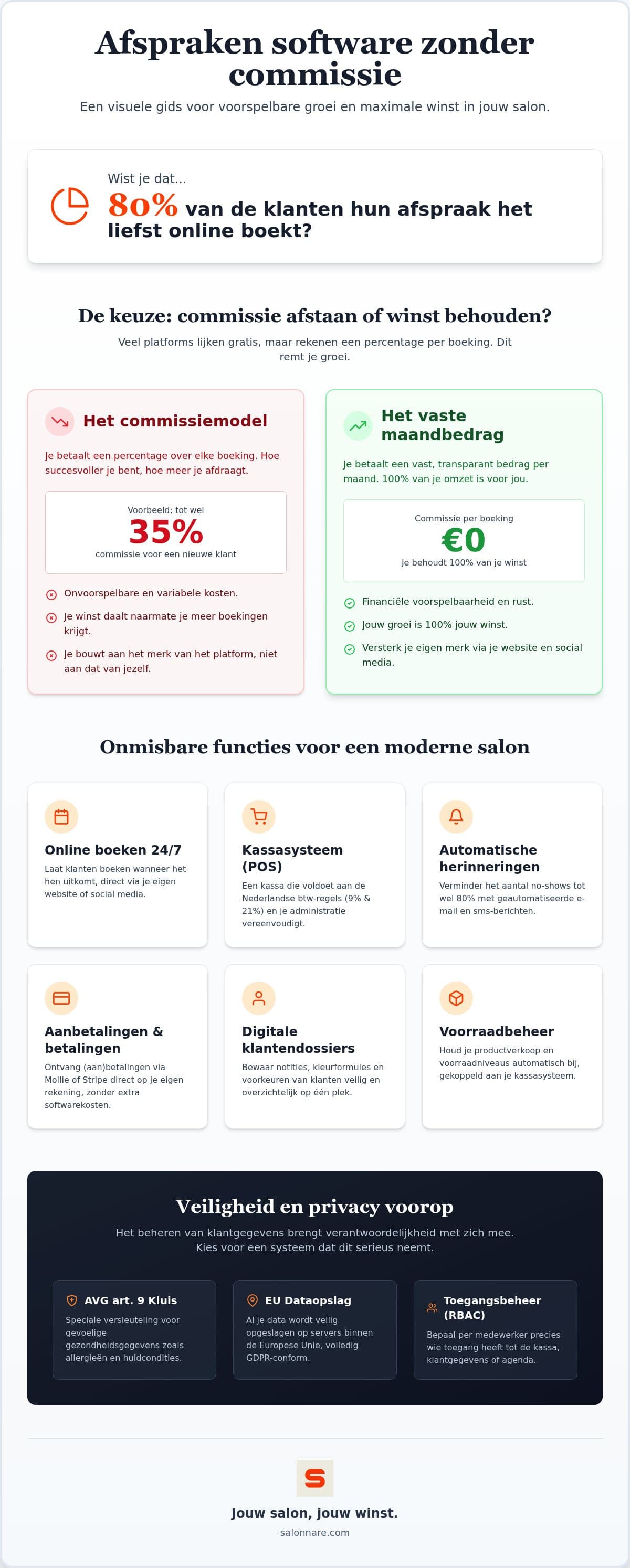
A low, fixed commission is a good start, but you also need tools that genuinely lighten your working day. Check four things when you compare.
A calendar attached to your till. An appointment you close should turn into a receipt straight away. Salonnare's point-of-sale accounts for Dutch VAT rates while it does so: 9% on the treatment and 21% on the products you sell alongside it. That saves you unpicking things at your quarterly return.
Automatic reminders. Forgotten appointments are the quietest cost in a salon. A confirmation at booking time and a reminder shortly before the appointment take a share out of that, without you having to message anyone yourself.
Booking where your client already is. Alongside your own website you can take appointments through your Google profile, so someone looking up your salon can book right away.
Permissions per staff member. Roles and permissions let you decide who may close the till, who sees the revenue figures and who only manages their own calendar.
Payments that land straight in your own account
With Salonnare you connect your own Mollie or Stripe account. When a client pays by iDEAL or card, that money goes directly into your account. Salonnare charges its own platform fee of 0.5% (min. €0.30) per payment on top of your payment provider's ordinary transaction fees, which you would pay even without salon software.
That makes the step towards online payments and deposits considerably smaller. If you ask for a deposit on long colour treatments or from new clients, there is something at stake when somebody cancels at the last minute. For your client it stays familiar in the meantime, because iDEAL is the payment method most people in the Netherlands use every day.
Storing client records and health data safely
The moment you note down colour formulas, allergies or scalp conditions, you are processing special category personal data. Article 9 of the GDPR sets extra requirements for that kind of information. Salonnare therefore keeps those notes in an encrypted vault that sits apart from ordinary client notes, with a separate access permission per staff member and a log of who has looked inside. Your data is stored within the EU.
If you want to know how to build a complete record and which details you should and should not capture, read our complete guide to client records software.
Switching over without losing your client list
The biggest hurdle when switching is usually not the software but your existing data. Salonnare has an import function with ready-made CSV templates for clients and appointments among others. You fill in a template in Excel or Numbers, upload it, and see a preview of what will be created before anything lands in your calendar. For a number of existing salon packages there is also a separate migration route that recognises that package's export.
It works just as easily the other way round: you export your sales figures towards your bookkeeping, for instance to Moneybird or e-Boekhouden. The platform is available in five languages and runs as an installable web app on your phone and tablet, so your calendar is in your pocket at the chair as well. To see which modules are included, have a look at the full feature overview or the page on hair salon software. Ready to begin? Start for free with Salonnare today.
Run the numbers for your own salon
The Free plan is permanently free for one staff member and 50 bookings per month, with no commission per booking - just a 0.5% platform fee (min. €0.30) per payment. Starter costs €29 per month and Pro €59 per month. Start for free at https://salonnare.com/en/free and move up only when your salon calls for it.
View the pricingFrequently asked questions about low-commission software
How much does Salonnare cost per month?
Salonnare has three fixed plans. The Free plan is €0 per month and is meant for one staff member with up to 50 bookings per month. Starter costs €29 per month and Pro €59 per month. The prices are fixed, so there are no surprises on your invoice.
Is there really no commission per booking?
On your subscription, yes: Salonnare charges no percentage per booking and no surcharge per new client, however many appointments you handle. For the software itself you only pay your fixed monthly price. For online and card payments, Salonnare's own platform fee of 0.5% (min. €0.30) per payment applies on top, alongside the ordinary transaction fees charged by your payment provider Mollie or Stripe.
Can I import my client data from my current software?
Yes. You download a CSV template, fill it in with Excel or Numbers and upload it. Before anything is created you see a preview of the import, so you can correct mistakes first. For a number of existing salon packages there is also a migration route that recognises that package's export automatically.
Is Salonnare GDPR compliant?
Yes. Your data is stored within the EU, and sensitive information such as allergies or colour formulas goes into an encrypted vault kept separate from ordinary client notes, in line with Article 9 of the GDPR. You decide per staff member who may view that data, and every access is logged.
How does paying by iDEAL work?
You connect your own Mollie or Stripe account to Salonnare. When a client pays online or leaves a deposit, the amount arrives directly in your own account, minus Salonnare's own platform fee of 0.5% (min. €0.30) per payment and the standard transaction fees charged by your payment provider.
Do I need special hardware for the point-of-sale?
No. Salonnare runs on any device with an internet connection, so on your laptop, tablet or phone, and you can add it to your home screen as an installable web app. Receipts can be sent digitally by email, so you are not obliged to buy a receipt printer.