



Exporting your salon till to accounting: what to hand over and how to check it
A revenue report alone does not explain every till transaction. When you export your till to your accounting, include end-of-day closes, cash figures and receipts too. This article shows what the export does and does not contain, and works through one month step by step.

What a till export does and does not contain

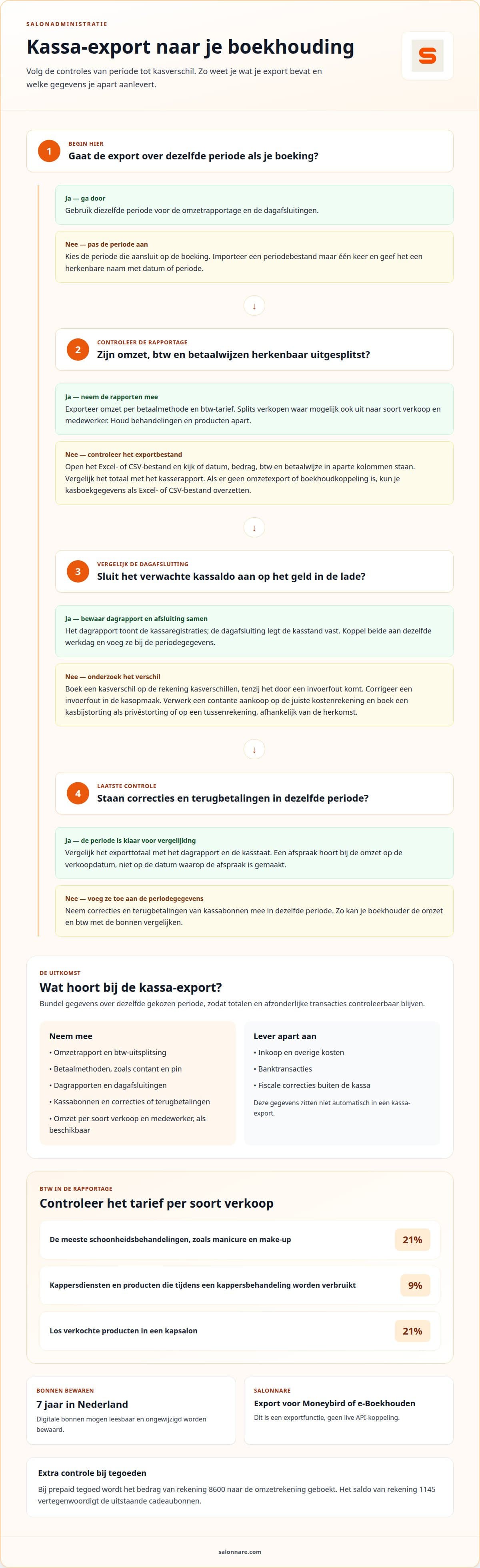
Start with a clear structure. Book treatments, products, gift cards and tips as separate types of till lines, so your accountant can see which amount belongs to a treatment.
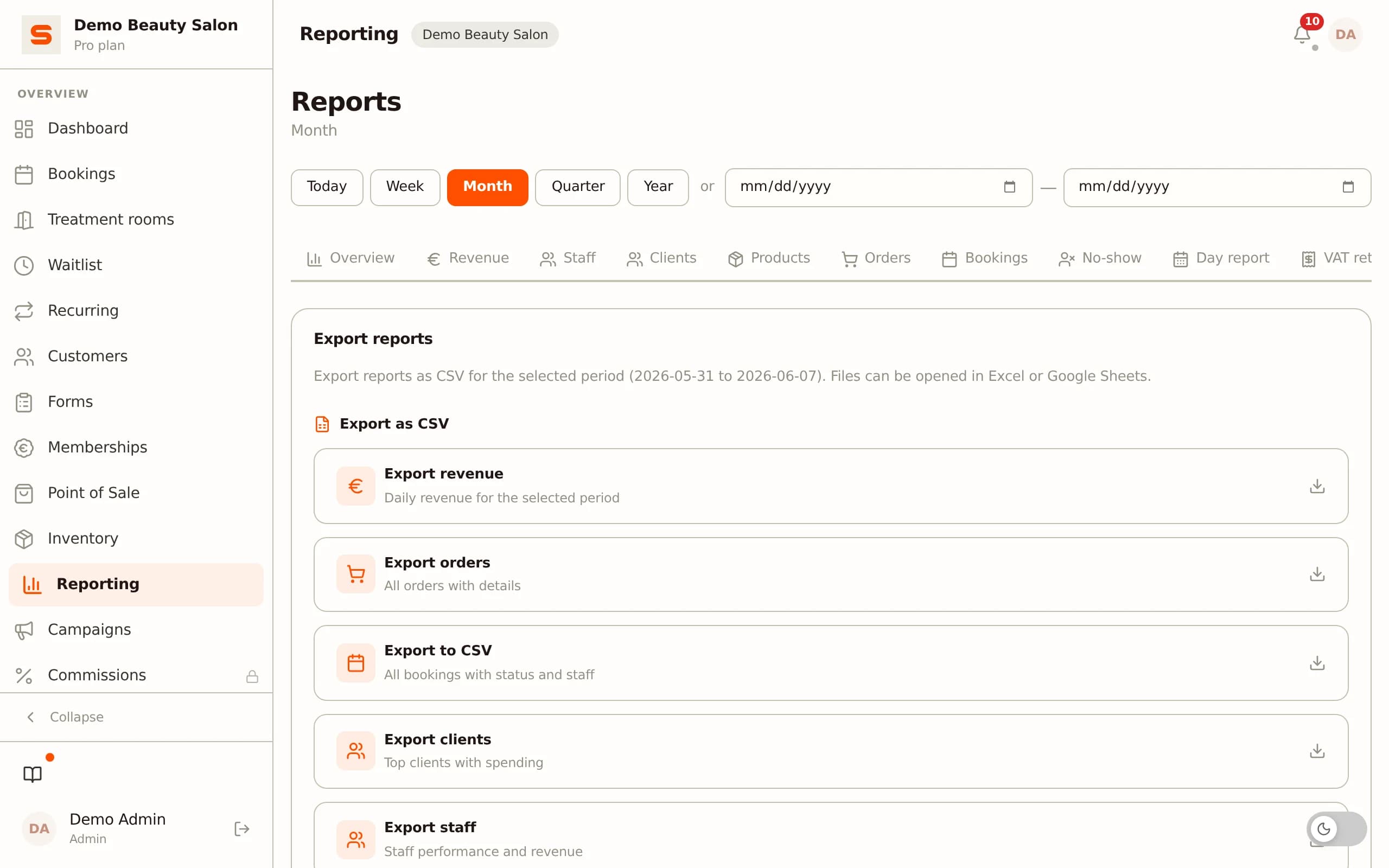
Export a monthly overview per period as a CSV or Excel file. Include revenue per payment method and per VAT rate, so cash, card and online payments stay recognisable. If your till offers it, also split by type of sale and by staff member.
The Dutch rate depends on what you sell. According to the Dutch Tax Authority, most beauty treatments such as manicure and make-up are 21%. Hairdressing services are 9%; products sold separately in a hair salon are 21%. Products used up during a hairdressing treatment fall under 9%.
A till export does not include purchases, bank transactions, other costs or tax corrections outside the till. Hand those over separately. Plan for the VAT return too: in the Netherlands it is usually quarterly, due by the last day of the month after the period. Chair rent you receive is also revenue for a salon owner.
End-of-day close and cash differences
A daily report shows that day's till entries; the end-of-day close records the cash position. Compare the expected cash with the money in the drawer. Book cash expenses, such as a cash purchase, to the right cost account, and book a cash difference to its own account unless it is a keying error.
In the Netherlands you keep receipts and revenue data for 7 years; digital receipts may be kept if they stay readable and unchanged. An appointment calendar shows treatments but does not replace till registration: record sales and payments in the till.
Avoid double bookings by importing a period file only once and put the period in the file name. A paid appointment counts as revenue on the sale date, and refunds belong in the same period as the receipt. For the daily routine see the salon cash-up checklist, and for year end the overview for your accountant.
Worked example: checking one month of exports
Say a hair salon takes €3,875 in a month including VAT. Check the export step by step:
- Cuts and treatments (9%): €3,270 incl. VAT. €3,270 / 1.09 = €3,000 excl., so €270 VAT. - Retail products (21%): €605 incl. VAT. €605 / 1.21 = €500 excl., so €105 VAT. - Total VAT: €270 + €105 = €375. Total incl. VAT: €3,270 + €605 = €3,875. - Payment methods: 40 online or card payments of €50 = €2,000, the remaining €1,875 cash or other. €2,000 + €1,875 = €3,875, so it adds up. - Salonnare transaction fee: 0.5% of €50 is €0.25, but the minimum is €0.30. So €0.30 per payment; 40 x €0.30 = €12.00. On top come the subscription, for example Starter at €9.99 per month excl. VAT, and your payment provider's costs.
So the payout to your bank is lower than gross revenue. Pass those costs to your accountant and the bank statement will match the export total. If revenue per payment method does not match the VAT total, first look for a refund or correction in another period.
Salonnare: till with VAT and export
Salonnare has a till with VAT support to register treatments and product sales. You can export accounting data for use in Moneybird or e-Boekhouden. This is an export file, not a live API link.
See the salon point of sale and the accounting page. To try it, start free or get in touch.
Make it a routine: export after every month, test one finished period first, and agree with your accountant which insights you need.

About the author
Nick van Iersel · founder of Salonnare (VanIersel Development, Waalwijk)
Nick builds Salonnare together with the salons that use it. He writes about scheduling, point of sale, privacy and everything a salon runs into as a business.
More about Nick and his articles →Start free with your salon till
Register sales with VAT and export them for your accountant. Begin with the free plan.
Start freeFrequently asked questions
How do you export till transactions to accounting software for a salon?
Export transactions for the same period as the booking in your accounts. Before importing, check that the file has recognisable amounts, VAT categories and payment methods. Use a separate period for a correction or refund so your accountant can trace exceptions.
Which salon tills connect to Dutch accounting packages?
Salonnare supports export of accounting data for Moneybird and e-Boekhouden. That is not a live API link: you transfer the export file to your accounting package. Check the output files and import options of your accounting software.
What does a till link to accounting software cost for a salon?
It depends on the till and accounting software you choose. An export function is different from an automatic link. With Salonnare the exchange with Moneybird and e-Boekhouden is by export; assess the package costs of your accounting software separately.
How do you set up a till export to accounting step by step?
Export a small, finished period first and import it into your accounting package. Check that totals land in the right categories and compare a few transactions with the receipts. Adjust the layout before you process the next period.