



Automatic appointment reminders via WhatsApp: how to cut salon no-shows
An empty chair because somebody simply forgot is the most frustrating way to lose revenue. The time was reserved, you turned away the client you could have taken, and you got nothing back for it. Sending messages by hand solves that on paper, but in practice you never get round to it. You would rather be doing your craft than working your phone. That is exactly where an automatic reminder earns its place: it goes out whether you are mid-colour or off for the day. This article is specifically about WhatsApp as a channel. You will read why it behaves differently from email for reminders, when to send, what good wording looks like, and how to pair the reminder with a deposit so a cancellation stops costing you anything.
Why WhatsApp works differently from email for reminders

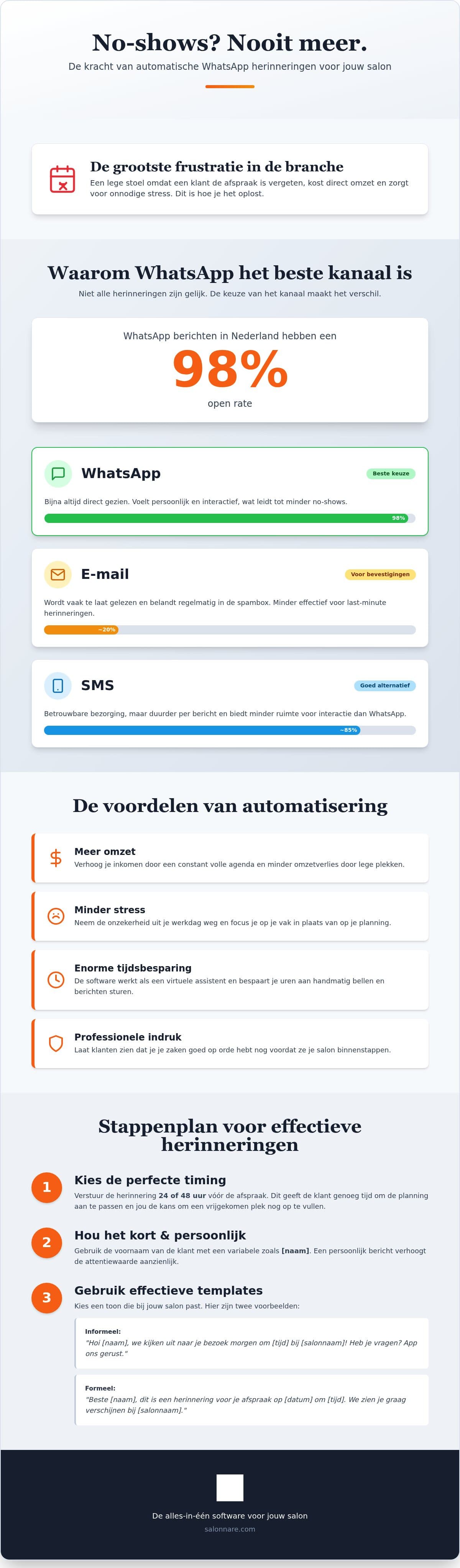
Email and WhatsApp do not do the same job. Email is excellent for the confirmation right after booking and for an invoice: it holds a lot, and the client can find it again. But for the final check, 24 hours before the treatment, email often falls short. People open their messaging app far more often than their inbox, and a confirmation email can end up among the promotions.
A WhatsApp message lands where someone is already looking all day. That is the whole point: you do not want an extra channel, you want the channel where the message actually gets read. Modern appointment scheduling software also lets you combine both - confirmation by email, reminder by WhatsApp.
There is a second difference. Almost nobody replies to an email. People do reply to a WhatsApp message. If a client cannot make it, you hear about it the day before instead of not at all. That gives you 24 hours to fill the gap, which is usually enough. Curious how the same principle works over SMS? We wrote a separate guide to appointment confirmation by SMS.
The right moment: 24 to 48 hours ahead
Timing decides how much your reminder is worth. Send too early and the client has forgotten again by the time the appointment comes round. Send too late, say the same morning, and you hear about a cancellation when you can no longer do anything with it.
The practical middle sits between 24 and 48 hours ahead. Long enough for the client to check their own diary and reschedule if needed, short enough that the message sticks. And if somebody does cancel, you have a full day to call someone from your waiting list.
Good preparation prevents exactly the costs that missed appointments stack up over a year. Two no-shows a week sounds like little, but multiply it by your own average ticket and you see why this is worth setting up.
You manage your automatic reminders in one place, so you set the interval once and it runs by itself from there.
What belongs in the message (and what does not)
A reminder does not need to be long. The client should see at a glance when they are expected and with whom. Use variables for the first name, the date and the time, and the message becomes personal without any effort on your side.
For an informal salon this works well: "Hi [name], looking forward to seeing you tomorrow at [time] at [salon name]. Can't make it? Just let us know here." If your practice is more clinical or corporate, pick a tighter tone: "Dear [name], this is a reminder for your appointment on [date] at [time] at [salon name]."
Three things to avoid: do not send in the middle of the night, even though the automation keeps running. Use the number only for appointment-related messages until someone has given consent for marketing - that is a GDPR requirement, not etiquette. And always include one clear action, for example a link that lets the client reschedule themselves. That saves you another phone call.
A reminder alone is not enough: pair it with a deposit
A reminder helps against forgotten appointments. Against non-commitment it only goes so far: someone who was already hesitating now cancels politely instead of not turning up. That is progress, but the gap in your calendar is still there.
That is what the deposit is for. Once someone has paid a small amount upfront, the appointment stops being a loose intention. You connect your own Mollie or Stripe account, clients pay by card or local methods such as iDEAL, and the money lands directly in your account. Salonnare only charges a 0.5% platform fee (min. €0.30) per payment and nothing per message sent - besides that you pay a fixed monthly amount and that is it.
How to pick the size of a deposit and how to explain it to clients without sounding distant is covered in our guide to collecting deposits. And if someone still does not show up, the system can automatically follow up on the missed appointment afterwards.
What setting this up actually costs
Sending reminders is included in every Salonnare plan, the free one included. Free costs 0 euro per month and is meant for one staff member with up to 50 bookings per month. Beyond that, Starter is 29 euro and Pro 59 euro per month.
Only a 0.5% platform fee (min. €0.30) per payment applies on top, and there is no per-message fee. That is deliberate: your costs should not climb steeply with your calendar, because then a good month punishes you.
The interface is available in five languages and your data sits on servers inside the EU. Health details such as allergies go into a separate encrypted vault built for Article 9 of the GDPR. We are a young company and keep building on what salons tell us; what is there works, and what is not there we do not promise. You can start without obligation and set up your first reminder today.
Switch on your first automatic reminder today
Set the interval once and let the reminders go out on their own from then on. The Free plan costs 0 euro per month for 1 staff member and 50 bookings, with only a 0.5% platform fee (min. €0.30) per payment and no cost per message.
Start free with automatic remindersFrequently asked questions about appointment reminders
Are appointment reminders included in the free plan?
Yes. Sending reminders is included in every plan, including the Free plan at 0 euro per month for 1 staff member and up to 50 bookings per month. Only the 0.5% platform fee (min. €0.30) per payment applies, with no charge per message sent, so your monthly cost does not change when you send more reminders.
When is the best time to send an appointment reminder?
Between 24 and 48 hours before the treatment. That is long enough for the client to check their own diary and reschedule if needed, and short enough that the message stays front of mind until the appointment. If someone does cancel, you still have a full day to fill the gap from your waiting list.
Can I write the reminder text myself?
Yes, you write the messages in your own tone. Variables for the first name, date and time let the system fill in the details automatically, so every message reads as personal without you typing anything per client. You can use different wording per treatment or per situation.
Do clients find automated messages impersonal?
In practice not really, as long as the tone fits and the message is short. A reminder mostly reads as a service: someone is thinking along with you. And because it arrives in a messaging app, replying is far easier than picking up the phone. People who cannot make it therefore tell you sooner.