



Treatment room and resource scheduling without double bookings
The moment a salon has more than one treatment room, chair or device, a scheduling problem appears that a plain calendar cannot solve. A staff member may be free, but if the only pedicure chair or the laser room is already taken, the appointment still cannot happen. Scheduling on staff alone leads to double bookings sooner or later: two clients in the same room at once, or a treatment that needs a specific device that is in use elsewhere. This article explains how to set up treatment rooms and other resources as a separate scheduling layer, so your calendar reflects the physical reality of your salon - and how to do it in Salonnare.
Why scheduling on staff alone is not enough
In a salon with a single workstation the planning overlaps: the staff member, the chair and the room are one and the same. As soon as you grow to multiple rooms or specialised workstations, that splits apart. You then have two scarce resources that can be occupied independently: the person performing the treatment, and the physical place where it happens.
An example: a beauty salon has three staff but only one room equipped for device-based skin treatments. Having three staff free does not mean you can book three of those treatments at once - the room is the bottleneck. If you only schedule on staff, the system accepts three simultaneous bookings that are impossible in practice.
The solution is to treat the treatment room as its own schedulable resource. An appointment then occupies two things at once: a staff member and a room. Only when both are free is the slot truly bookable.
Setting up treatment rooms in Salonnare
In Salonnare you record your physical workstations as treatment rooms. That can be an actual room, but just as easily a chair, a wash basin or a device - anything you have a limited number of and that cannot be used by two clients at once.
You give each room a recognisable name (for example "Pedicure 1", "Laser room" or "Massage room") so you can see at a glance in the calendar where an appointment takes place. The number of rooms you create matches your real capacity: if you have two identical treatment chairs, you create two.
From then on, each room becomes a separate layer in your planning. The calendar stays clear - you still see per staff member who is doing what - but underneath, the system guards that no single room is ever double-occupied at the same time.
Linking treatments to the right space
Not every treatment needs a specific room. A haircut works in any chair, but a facial requires the treatment room with the right equipment. By recording per treatment which space is required, the system knows exactly which resource an appointment claims.
When scheduling - whether by the salon itself or by a client through the online booking page - the room is automatically included in the availability check. If the staff member is free but the required room is taken, the time slot is not offered. This prevents an online booking from locking in an appointment you cannot physically fulfil.
This matters especially for salons that enable online booking: the client only sees slots that are actually possible, including room availability. That saves calling back afterwards to reschedule.
Double bookings are blocked at the source
The core of resource scheduling is that conflicts are prevented at the moment of booking, not discovered afterwards. When an appointment claims a room, that room is reserved for that time window. A second appointment that needs the same room at an overlapping time simply cannot be recorded.
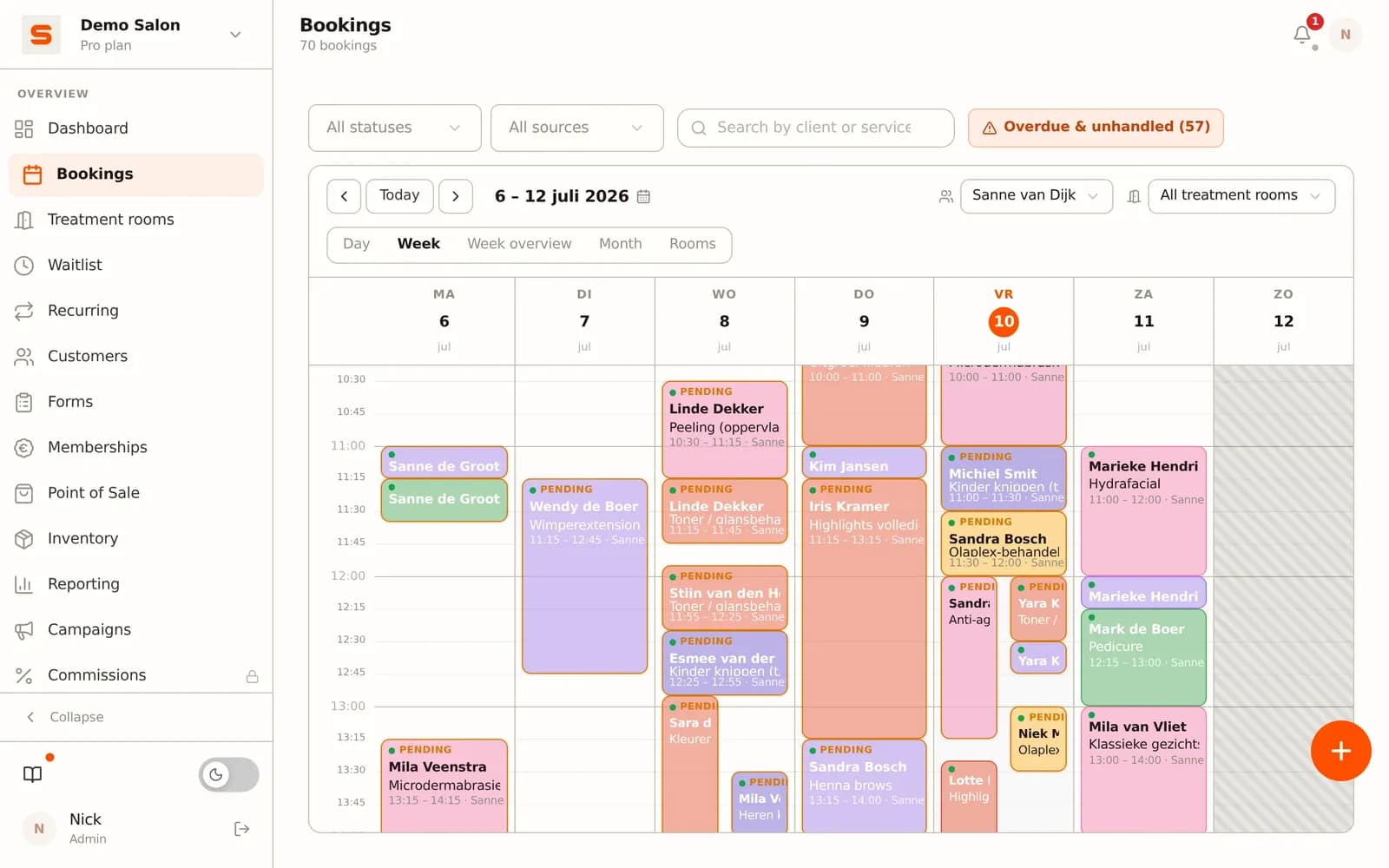
This applies across all booking channels at once: the front desk, a staff member scheduling on their phone, and the public online booking page all draw from the same availability. There is no separate "room book" that drifts out of sync with the calendar - it is one shared view.
For salons this means less noise: no two clients standing at the same chair at once, no treatment that cannot go ahead because the device is occupied, and no manual checking whether the room is free.
Setting up resource scheduling in three steps
Good room scheduling takes a one-off bit of thinking, but after that it runs along with your normal calendar.
Step 1: Map your scarce resources. Walk through your salon and note everything you have a limited number of: rooms, specialised chairs, devices. Those are your resources. Create them as treatment rooms in Salonnare, with names your team recognises immediately.
Step 2: Link treatments to the required space. Go through your treatment list and decide which ones need a specific room or device. Treatments that can happen anywhere you leave free; treatments with a requirement you link to the right resource.
Step 3: Let the calendar guard it. From now on every booking - internal or online - automatically checks both the staff member and the room. You no longer have to keep track in your head of whether the space is free; the system only offers feasible slots.
Want to see how treatment rooms come together with your calendar and online booking? Try Salonnare for free and set up your workstations in an afternoon.
Frequently asked questions
What is the difference between scheduling on staff and on treatment room?
Scheduling on staff only guards whether the person is free. Resource scheduling also guards whether the physical place - the room, chair or device - is free. In a salon with multiple workstations those are two separate scarce resources: an appointment needs both. By scheduling the room as its own layer, you prevent the system from allowing appointments that are physically impossible.
Can I schedule a chair or device as a resource too, not just a room?
Yes. A "treatment room" in Salonnare stands for any scarce workstation: an actual room, a treatment chair, a wash basin or a device. Anything you have a limited number of and that cannot be used by two clients at once can be recorded as a resource and linked to the right treatments.
Does this also prevent double bookings through the online booking page?
Yes. The online booking page draws from the same availability as your internal calendar. If the required room is taken, the time slot is not offered to the client - even if the staff member is free. That way a client never locks in an appointment you cannot physically fulfil.
Do I have to link every treatment to a room?
No, only the treatments that genuinely need a specific space or device. Treatments that can happen at any workstation you leave free - they do not load any specific resource. That keeps flexibility where you can and guards capacity where you must.