



Online scheduling for your salon: from paper diary to a digital calendar
An online calendar for your salon is a digital planning board that replaces the paper diary behind the counter: every appointment, staff member and treatment room on one screen, kept in sync automatically everywhere. Instead of a book that sits in one place and that only one person can edit at a time, you and your colleagues all look at the same live schedule - at the counter, on your phone and at home on the sofa. For a hairdresser or salon that is the difference between constantly flipping pages and seeing at a glance what the day looks like. A good salon calendar does not just place appointments; it also guards your breaks, your treatment rooms and each staff member's availability - without you having to do the maths.  This article shows how to move from a paper or loose diary to an online scheduling system, what sets a good salon appointment calendar apart, and how Salonnare digitises your salon's planning without you having to learn a complicated package.
From paper diary to digital: why switch now
A paper diary works fine as long as you work alone and the phone stays quiet. The moment a second chair appears, or your regulars increasingly want to book outside opening hours, the book starts to pinch. It sits in one place, only one person can write in it at a time, and when you are off, your planning stands still.
The problems build up slowly: a double booking because two people wrote in the diary at once, an appointment scribbled out until it is unreadable, a client number you can no longer find. And every time the phone rings during a cut, you have to take off your gloves, walk to the counter and hunt for a slot by hand.
An online calendar solves this by making the schedule central and always current. Every appointment lives in one digital place that all your staff look at in real time. If someone changes something, the others see it instantly - no more two versions of the truth.
And because the calendar lives in the cloud, you can open it anywhere: the counter tablet, your phone on the go, or at home when you want to prepare the week.
The answer to "do I really need to go digital?" is almost always yes as soon as you work with more than one person or want clients to book themselves. The switch costs a little time once, but it pays back in calm every single working day.
An online calendar per staff member and treatment room
The heart of a salon calendar is the overview: who does which treatment when, and in which room. A good online calendar shows your staff side by side in their own columns, so you can see in one glance how full the day is and where the gaps are.
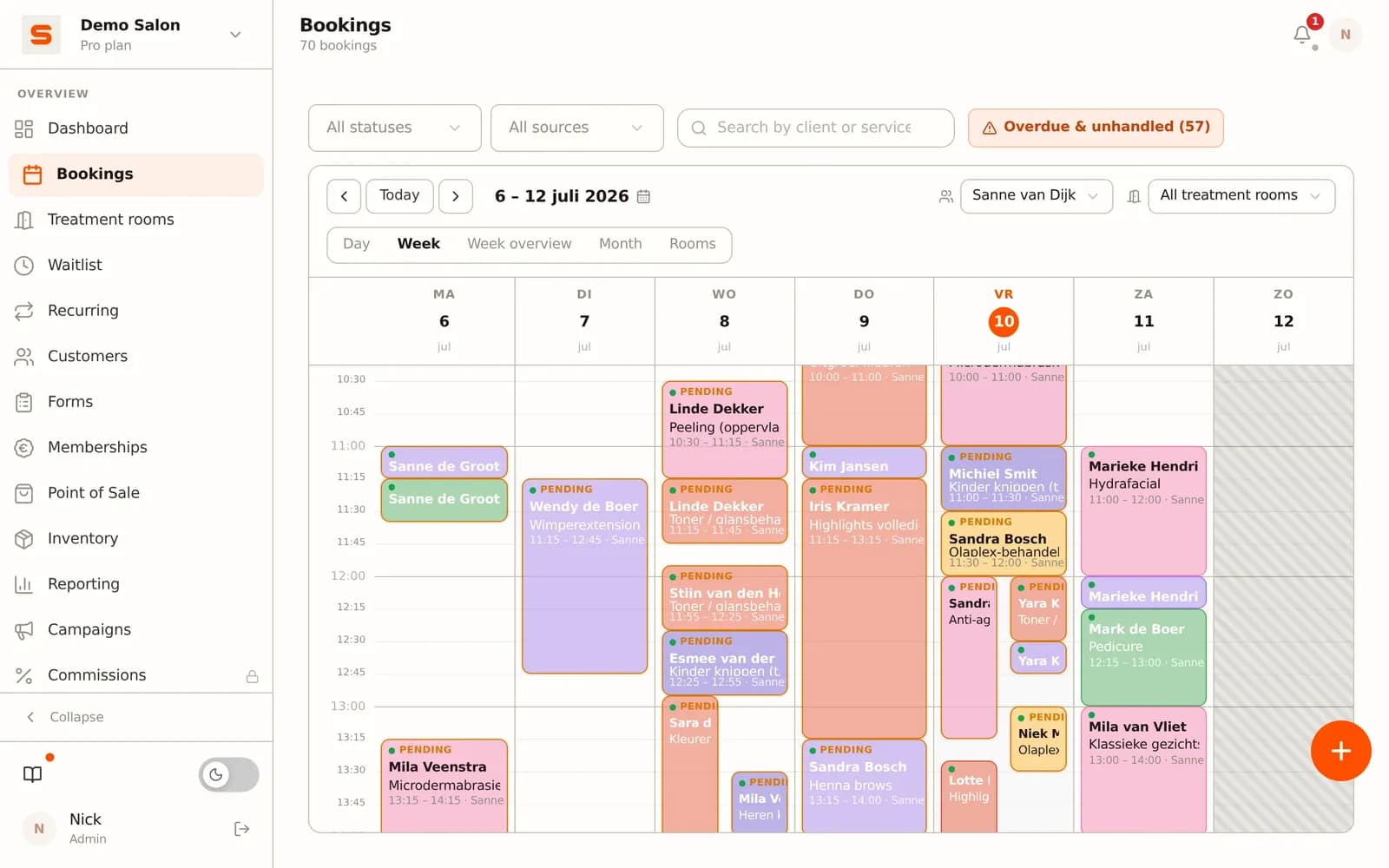
Columns per staff member. Every stylist or specialist has their own column. You place an appointment in the right column and the calendar automatically respects that person's working hours and breaks. Someone who only starts at noon will not be offered a 9am booking.
Day and week views. A day view lets you zoom in on today; a week view gives you the overview to plan ahead. You drag appointments to another time slot or another staff member when something shifts - the duration and colour move along automatically.
Treatment rooms and resources. If you work with separate spaces (a colour room, a pedicure chair, a dedicated wash station), you plan each one as its own resource. That stops two treatments from claiming the same room at the same time.
Automatic conflict detection. Try to book something that clashes with an existing appointment, break or closed day, and the system warns you immediately. Double bookings, the classic mistake of a paper diary, disappear.
Variable treatment duration. A colour treatment takes longer than a dry cut. You set the default duration per service, so the calendar reserves exactly as much space as needed - and your online availability matches reality.
Clients book themselves 24/7 on your own site and via Google
An online calendar only becomes truly powerful when clients can book into it themselves. Where a paper diary is filled only by you, an online calendar fills itself: whatever a client reserves online appears automatically in the right column on the right day.
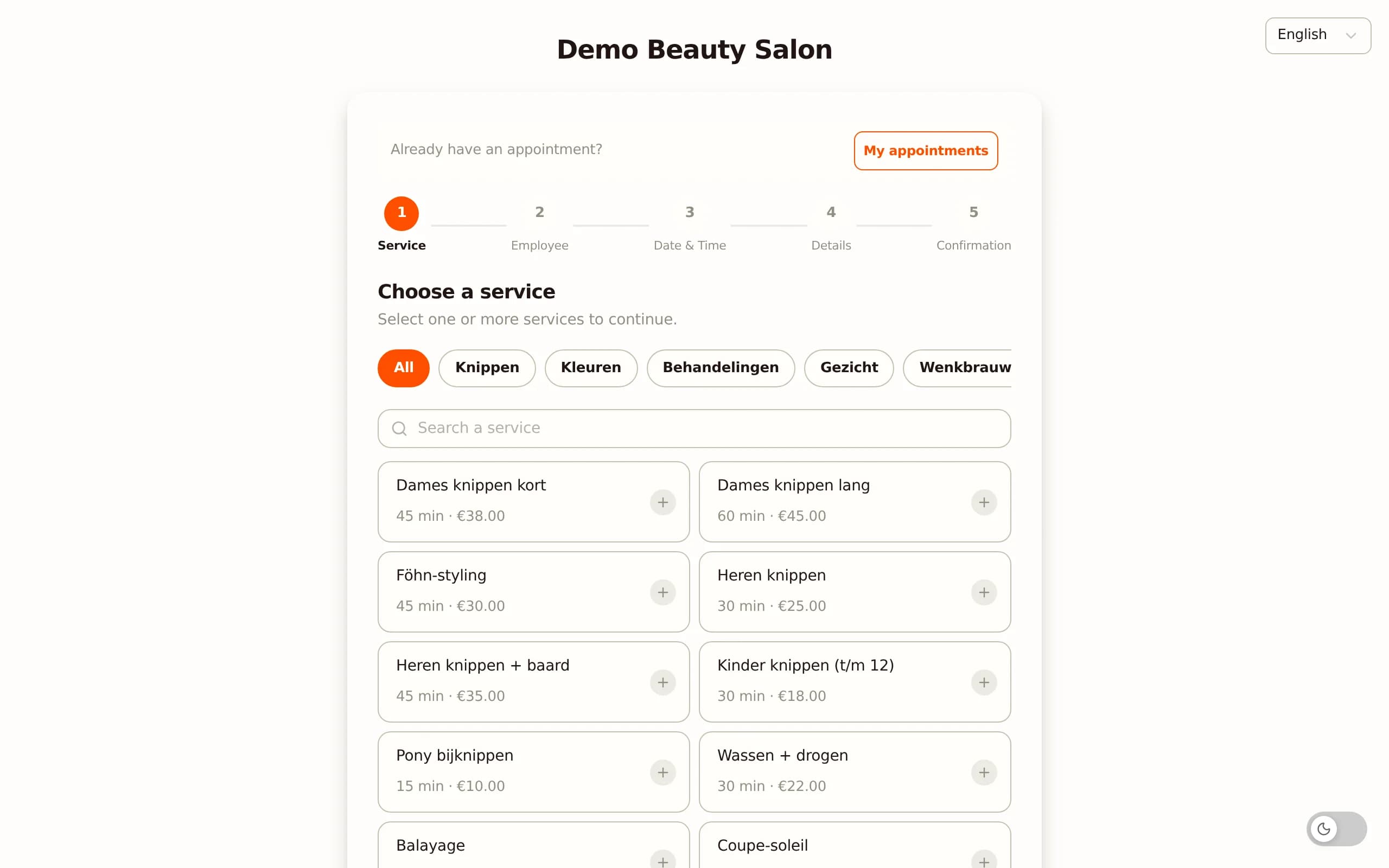
A booking page on your own site. You get a booking link to place on your website, in your Instagram bio or in your Google profile. The client sees only the free slots you have released, picks a treatment, a staff member and a time, and confirms right away. Your calendar updates itself without you having to answer the phone.
Visible in Google. Through the Google connection a booking button appears in Google Search and Maps. Someone searching for "hairdresser near me" can grab a slot in your calendar straight away.
You keep control. You set the booking rules yourself: how many days ahead clients may book, up to how many hours before, and whether new clients can reserve directly or need your approval first. That keeps your calendar tidy even when clients fill it themselves.
An important difference from a marketplace: bookings come in through your own channel, not through a platform that takes a percentage per appointment. You pay a fixed monthly price, with no commission per appointment; online payments carry only a platform fee of 0.5% (min. €0.30). Read more about the booking side on the bookings management page.
Automatic reminders and fewer no-shows
A digital calendar helps not only with planning, but also with holding on to appointments. A no-show hurts twice: the slot stays empty and you no longer fill it at the last minute. Two built-in features work together here.
Automatic reminders. As soon as a client grabs a slot in your calendar, a confirmation email goes out immediately. One or two days before the appointment an automatic reminder follows, sent in your salon's name so it looks professional. A timely reminder alone measurably lowers the number of forgotten appointments. You set the reminders once and after that they run along with every booking - see automatic reminders.
Deposits at busy times. On the Pro plan, for popular time slots or new clients, you can set a deposit per treatment - a fixed amount or a percentage - that the client pays when booking via iDEAL or credit card. People who have already paid something show up more reliably. On a no-show you keep the deposit; on a timely cancellation it is refunded automatically.
The beauty is that all of this hangs off the calendar. If a client cancels, the slot immediately frees up again in your calendar and someone else can take it. You do not have to cross anything out or retype it - the schedule stays current on its own.
Available everywhere: mobile, tablet, web and a native app
A paper diary sits on the counter and nowhere else. An online calendar travels with you. Salonnare runs in the browser on your computer or counter tablet, and there is a native app for your phone, so your calendar is at hand on the go too.
At the counter. A tablet at the desk is ideal for the day's planning: you see all the columns side by side, drag appointments and check out after the treatment in the same environment.
On your phone. If you step outside for a moment or you are at home, the app lets you quickly check whether something has been added, move an appointment or call a client back. You no longer have to go to the shop to know what tomorrow looks like.
Always the same data. Because everything lives in the cloud, you see exactly the same, current calendar on every device. A change on the tablet is visible a second later on your phone and on your colleague's screen. Since the app is the web environment wrapped around your phone, every feature works on mobile too: there is no second system to learn.
That "available everywhere" is exactly why many salons eventually take the step to digital: your planning is no longer tied to one place and one person.
Permissions per staff member: who sees which calendar
As soon as you work with several people, you do not want everyone to see and change everything. An online calendar handles this with permissions per staff member (role-based), something a paper diary simply cannot do.
Own calendar or the full overview. You decide per staff member whether someone sees only their own appointments or the whole salon's calendar. A part-time stylist may only need their own column, while the owner or reception oversees the whole picture.
Shield sensitive data. You can shield client notes, financial figures and settings per role. That way someone who only does treatments has no access to the revenue report or the contact details that do not belong to their job.
GDPR and secure storage. Because this involves personal data, Salonnare stores client data encrypted and GDPR-compliant on servers in the EU, with a separate secure vault for sensitive health notes. Who can see what is set with role-based permissions.
This fine-grained access protects both your clients and your business. It prevents mistakes (someone accidentally moving a colleague's calendar) and keeps sensitive information with the people who actually need it. For a hair salon with a team that is one of the biggest advantages of digital scheduling - see also the niche explainer on hair salon software.
Switching from paper or a loose diary to Salonnare
Moving to an online calendar often feels bigger than it is. In practice you set it up over a few evenings. These steps keep it manageable.
Step 1 - Set up your staff and working hours. Add each staff member with the days and times they work. That forms the basis of your columns and determines which time slots are available online.
Step 2 - Add your treatments. Give each service a name, a duration and a price. The duration decides how much space an appointment gets in the calendar, so take it seriously - it makes your online availability accurate.
Step 3 - Set up your treatment rooms (if needed). If you work with separate spaces, record them so the calendar does not double-book them.
Step 4 - Import your clients. If you have a file of client details, bring it in via a CSV import so you do not start with an empty database and regulars recognise themselves right away.
Step 5 - Turn on your booking page and reminders. Share your booking link and set the reminders. From that moment your calendar partly fills itself.
Step 6 - Run a week in parallel. Keep your old diary alongside for the first week if you like, so you get comfortable without risk. Most salons let the paper book go after just a few days.
You do not have to get everything perfect at once. Start with the planning and the booking page; the till, reporting and stock can follow later.
Conclusion: one live schedule for your whole salon
An online calendar changes your working day: no more scribbled-out appointments and double bookings, but one live schedule you share with your team. You see every staff member and treatment room side by side, clients book themselves 24/7, reminders bring no-shows down, and you have your calendar at hand everywhere - at the counter, on your phone and in the app.
The nice part is that you can start small. Salonnare has a permanently free plan (Free, €0 per month, for 1 staff member and 50 bookings per month) that lets you try out the online calendar, the booking page and the client list.
As your salon grows, you move up to Starter (€29) or Pro (€59) per month - a fixed price, with no marketplace commission per booking (just a platform fee of 0.5%, min. €0.30, per online payment). Payments via iDEAL and card land in your own account, your data sits GDPR-compliant in the EU, the interface comes in nine languages, and there is both a web app and a native app.
Want to know exactly what is inside? See the overview of all features. And take your salon digital this week: create a free account and walk through the setup before you go live.
Frequently asked questions
What is an online calendar for a salon?
It is a digital planning board that replaces the paper diary. Every appointment, staff member and treatment room lives in one place in the cloud, which your whole team looks at in real time. If someone changes something, the others see it instantly. You open the calendar on the counter tablet, on your phone or at home, and clients can book into it themselves online. That prevents double bookings and keeps your planning always current.
Can every staff member have their own calendar?
Yes. Each staff member has their own column with their own working hours and breaks, and you see them side by side in day or week view. With role-based permissions you also decide who may see which calendar: someone can see only their own appointments or the full salon overview. Sensitive data such as client notes and revenue figures can be shielded per staff member.
What is the difference from a plain online booking system?
A booking system is about the client reserving; an online calendar is about your planning behind it. In Salonnare they are linked: a client books through your booking page and that appointment appears automatically in the right column of your calendar. But the calendar does more than receive bookings - it plans per staff member and treatment room, guards breaks, detects conflicts and lets you move appointments with drag-and-drop.
Can I bring my paper diary along when I switch?
You enter existing appointments manually for the coming weeks, but you bring your client list across in one go via a CSV import, so you do not start with an empty database. In practice you set up your staff, working hours and treatments over a few evenings and, if you like, run the first week in parallel with your old diary. After that most salons let the paper book go quickly.
Does the online calendar work on my phone too?
Yes. Salonnare runs in the browser on your computer and counter tablet, and there is a native app for your phone. On every device you see the same, current calendar: a change on the tablet is visible a second later on your phone and on your colleague. So you can check and move appointments on the go, without having to go to the shop.