



Purchasing for a beauty salon: from order list to margin
Stock that doesn't match your sales costs money and clarity: you over-order, or you run out mid-treatment. This article covers the buying side: order lists per supplier, a minimum stock level per item and the margin you keep per product, with a worked example you can check yourself.
Keep sales, usage and stock apart

Good purchasing starts with one distinction: a product you sell leaves through the till, a product you use disappears in the treatment room. Both lower your stock, but they call for different buying decisions. You order a cleanser based on treatments, and a retail serum based on what clients buy.
Record sales and usage as separate stock movements and compare your records with the physical count regularly, so differences show up early. For stock in general, read salon inventory management.
Order lists per supplier
Make a separate list for each supplier. Per item, note the product name, pack size, current stock, minimum stock and the date of the last order. Keep cleansers from supplier A apart from gloves from supplier B, so each ordering round is one order.
- Log received items on the right supplier list straight away. - Process usage and sales as separate movements. - Note any issue, such as a damaged pack, on the item. - Then bundle the items you need per supplier and order at a fixed moment.
Software can hold suppliers and minimum stock levels so you don't rebuild every list. Always check before ordering that the quantities match your stock and planned treatments.
Worked example: one serum from purchase to margin
Say you buy a serum for €18.00 (excl. VAT) and sell it for €39.50 including 21% VAT. The margin works out like this:
1. Selling price without VAT: €39.50 / 1.21 = €32.64. 2. Margin in euros: €32.64 - €18.00 = €14.64. 3. Margin as a percentage of net revenue: 14.64 / 32.64 = 44.9%. 4. If the client pays by card or online, Salonnare takes a 0.5% transaction fee with a minimum of €0.30. 0.5% of €39.50 is €0.20, so the €0.30 minimum applies. You keep €14.64 - €0.30 = €14.34.
Now the order. Say you sell 4 bottles a month and use 2 in treatments: 6 a month, about 1.5 a week. With a 1-week delivery and 1 bottle of buffer, your minimum stock is 1.5 + 1 = 2.5, rounded up to 3 bottles. When stock drops to 3, the serum goes on the list. An order of 12 bottles is 12 x €18.00 = €216.00 purchase cost and, if all sell, 12 x €14.64 = €175.68 gross margin. For treatments, see calculating profit margin per treatment.
Include software and fixed costs
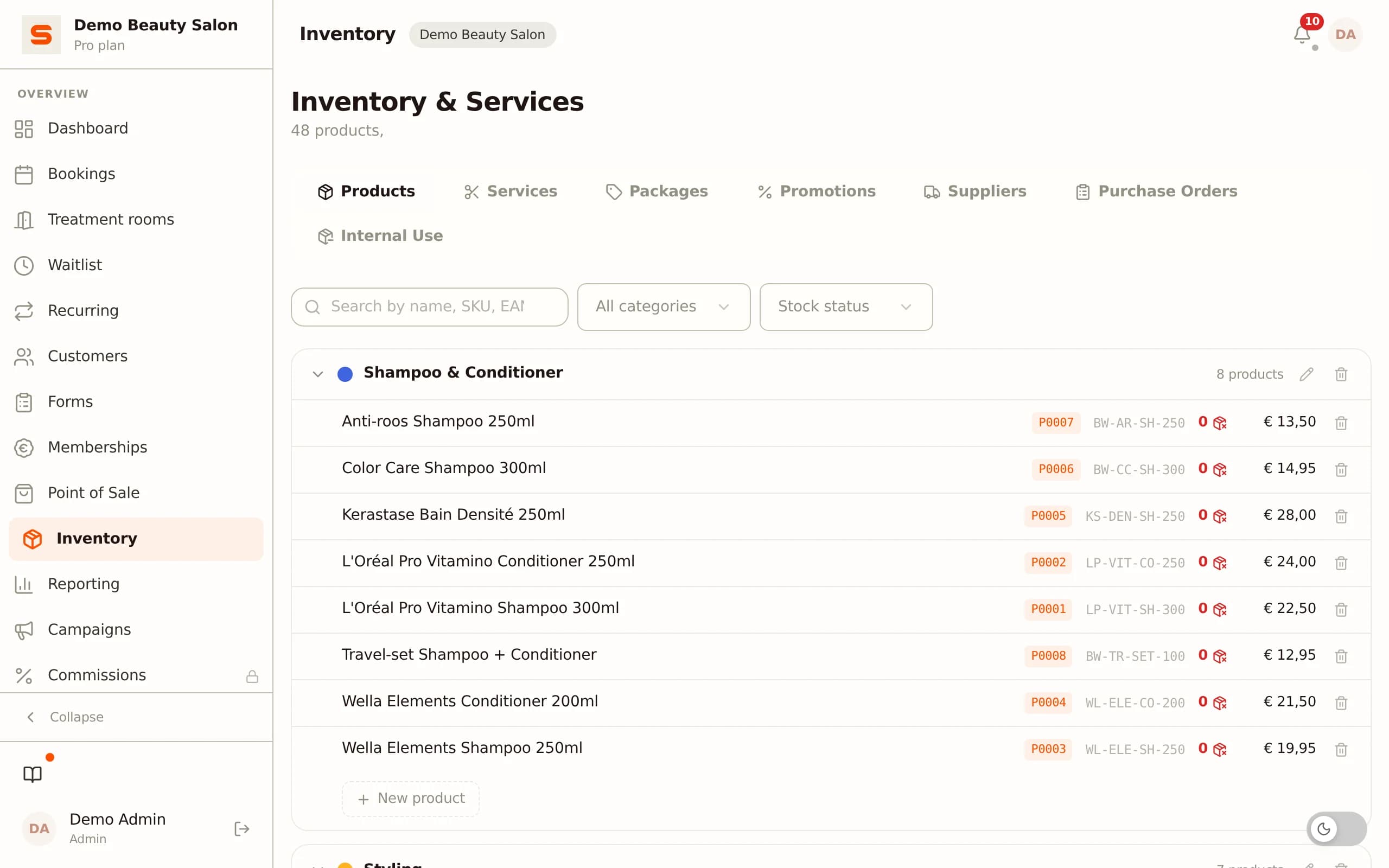
Stock software records items, movements and suppliers in one place. In Salonnare you link sales at the point of sale to inventory, so sold products don't silently stay in the count. Current prices are on the pricing page.
Keep software costs as recurring monthly costs, separate from one-off start-up costs, and only count features you really use. Keep invoices and receipts readable and unchanged; digital storage is fine. Products sold in a beauty salon fall under 21% VAT in the Netherlands, so record sales and purchases clearly to compare them in your bookkeeping.
Compare suppliers and set a budget

Compare suppliers on the total cost per product, minimum order, shipping and lead time, not just price per pack. Base your stock budget on usage and sales, not a general margin. On receipt, check packaging and origin and record batches so you can trace products and limit expired or counterfeit stock.
If your treatment menu changes, so do your products. Start small and adjust your lists based on what you see.
Start free with your salon admin
Try stock, till and client records on the free plan. You can cancel or change plan monthly.
Start free with SalonnareFrequently asked questions
How do you track product sales and stock?
Record every product sale through your till and log stock movements when you use or receive products. Separate items you sell from products you use in treatments, and compare your records with the physical count regularly.
Is my data stored safely?
Salonnare works in line with GDPR. Health data, such as allergies or skin conditions, is kept in the GDPR vault. Roles and permissions decide which staff see client information.
Can I import data from another till system?
You can import existing client lists from CSV or Excel files. Earlier till transactions, stock levels or invoices are not transferred automatically, so keep those in your own records.
What does purchasing for a beauty salon involve?
Planning, ordering and recording products and consumables. You track what comes in, what you use and what clients buy, so orders match your current stock.
Which products and materials does a beauty salon need to buy?
Think cleansing products and gloves, products used during treatments and items you sell to clients.