



Online booking system for salons: what it delivers and how to choose
Every afternoon the same situation: clients call while someone is in the chair, voicemail fills up, and by the end of the day there are three messages still waiting for a reply. Two of those clients have meanwhile booked elsewhere. The third wanted a different day after all. Manual appointment management costs time that could be better spent on the work itself - and it leads to mistakes your clients notice. An online booking system solves this by letting clients book themselves whenever it suits them, even outside opening hours. But not every system is the same. This article describes what sets an online booking system for a salon apart from a generic reservation tool, which features are essential, and what the most common mistakes are when choosing.
The real cost of manual appointment management
Manual appointment management seems cheap - after all, it costs nothing more than a diary and a phone. But the hidden costs are larger than they appear at first glance.
Lost income from missed availability. A client who calls while you are busy hangs up. Some try again later; others quickly look for an alternative and book there. You do not need to express that as a number to understand that every missed call is a potentially lost booking.
Double bookings and scheduling errors. A paper diary or loose spreadsheet offers no guarantee that two staff members are not scheduled for the same treatment room at once, or that a stylist who has the day off does not receive a booking. Digital systems prevent such conflicts automatically by tracking availability per staff member.
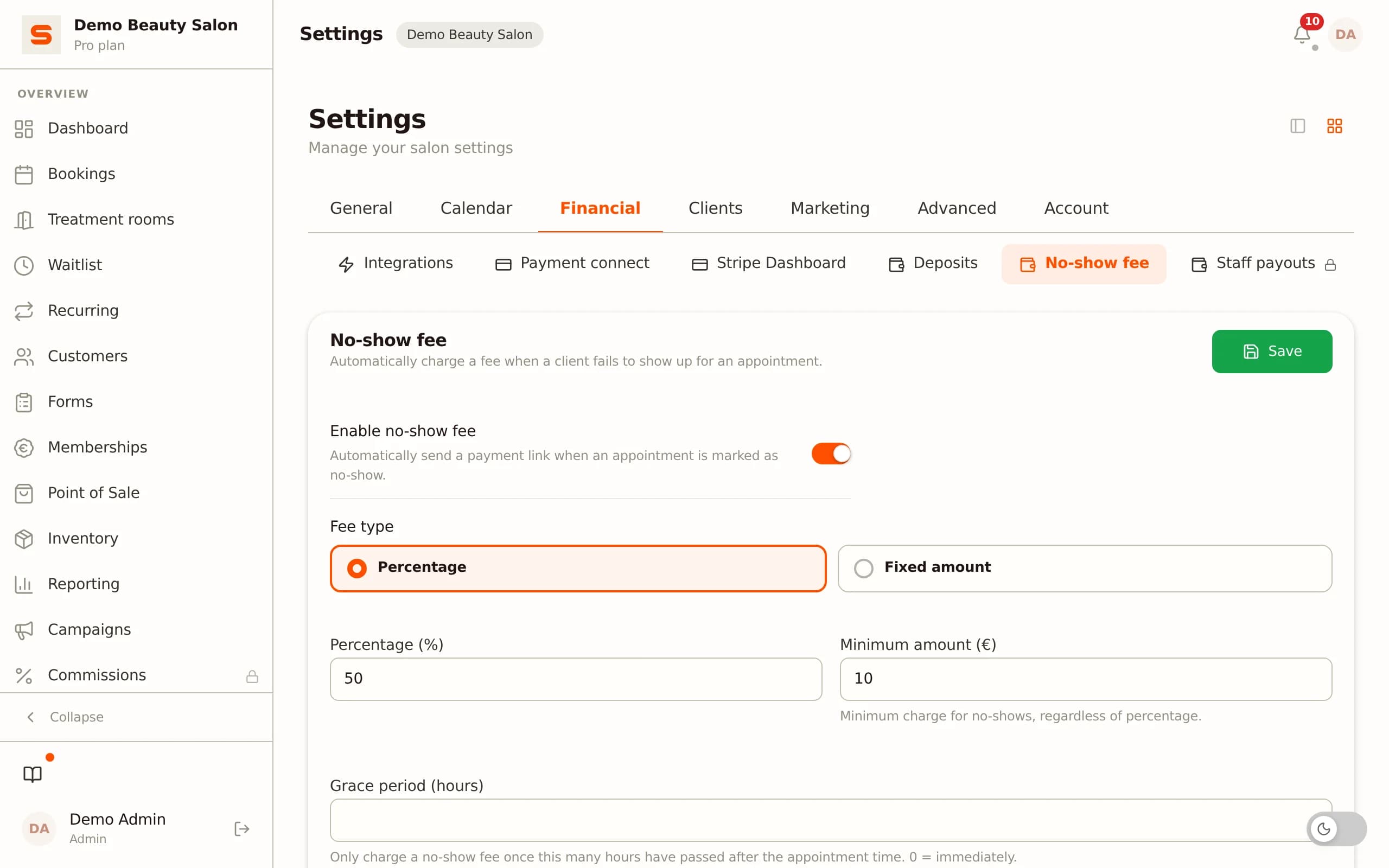
No-shows without protection. Clients who do not turn up while you have kept the time free for them cost direct revenue. Without a deposit or no-show fee at the time of booking, there is little to act as a deterrent. With an online system that requests a deposit at the moment of booking, you change the behavioural incentive: the client has already paid something and therefore has skin in the game.
Time on admin instead of on clients. Confirming appointments by phone, sending reminders, keeping waiting lists - those are tasks that can run automatically once you have a system for them. Every hour you spend on scheduling admin is an hour you do not spend on treatments.
Ten features an online booking system for salons must have
A generic reservation tool - the kind that restaurants and fitness studios also use - often lacks features that are essential for salons. Use this list as a checklist when choosing.
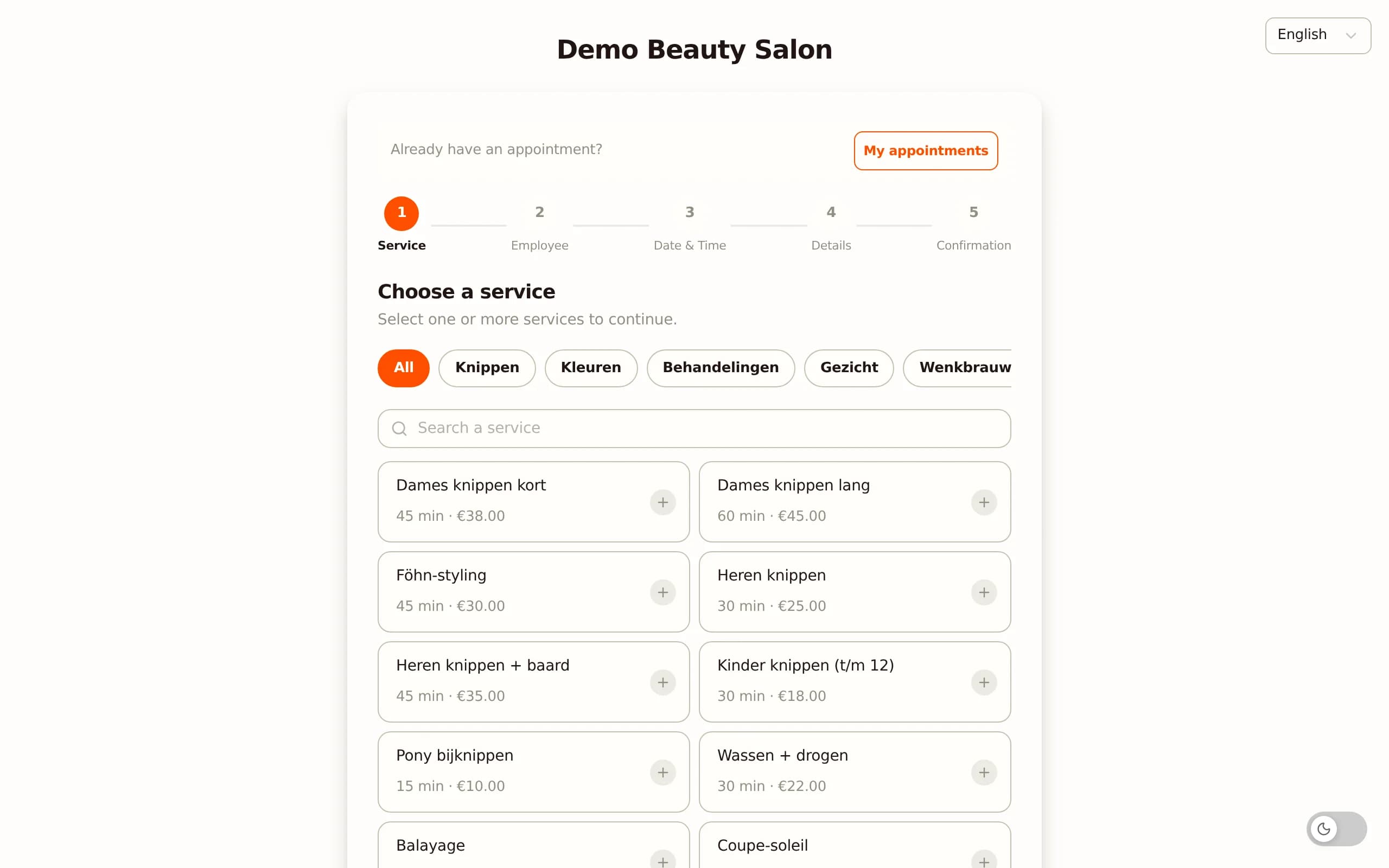
1 - 24/7 self-booking for clients. Clients should be able to schedule an appointment at any time, including outside your opening hours. A booking link you share via your website or social media is the foundation for that.
2 - Multi-service bookings in a single session. A client who colours and cuts in one visit should be able to combine both treatments in one booking. Systems that do not support this force clients to schedule two separate appointments - which leads to gaps in the diary or logistical confusion.
3 - Staff selection per service. If clients have a preference for a specific stylist, they should be able to choose them directly. And if a treatment is done by two staff members - the colour specialist and then the cutter - the system should be able to schedule that as one continuous booking.
4 - Automatic confirmation by email. As soon as a booking is confirmed, the client should immediately receive a confirmation email with the date, the time, the service and any preparation instructions. That replaces the telephone confirmation and gives the client a reference document.
5 - Automatic reminder before the appointment. A reminder by email one or two days before the appointment lowers the number of no-shows. This should run automatically without you having to do anything.
6 - No-show protection via deposit or no-show fee. The ability to request a deposit when booking online or to set a no-show fee if someone cancels outside the cancellation window. This way you transfer the risk of an empty chair partly to the client.
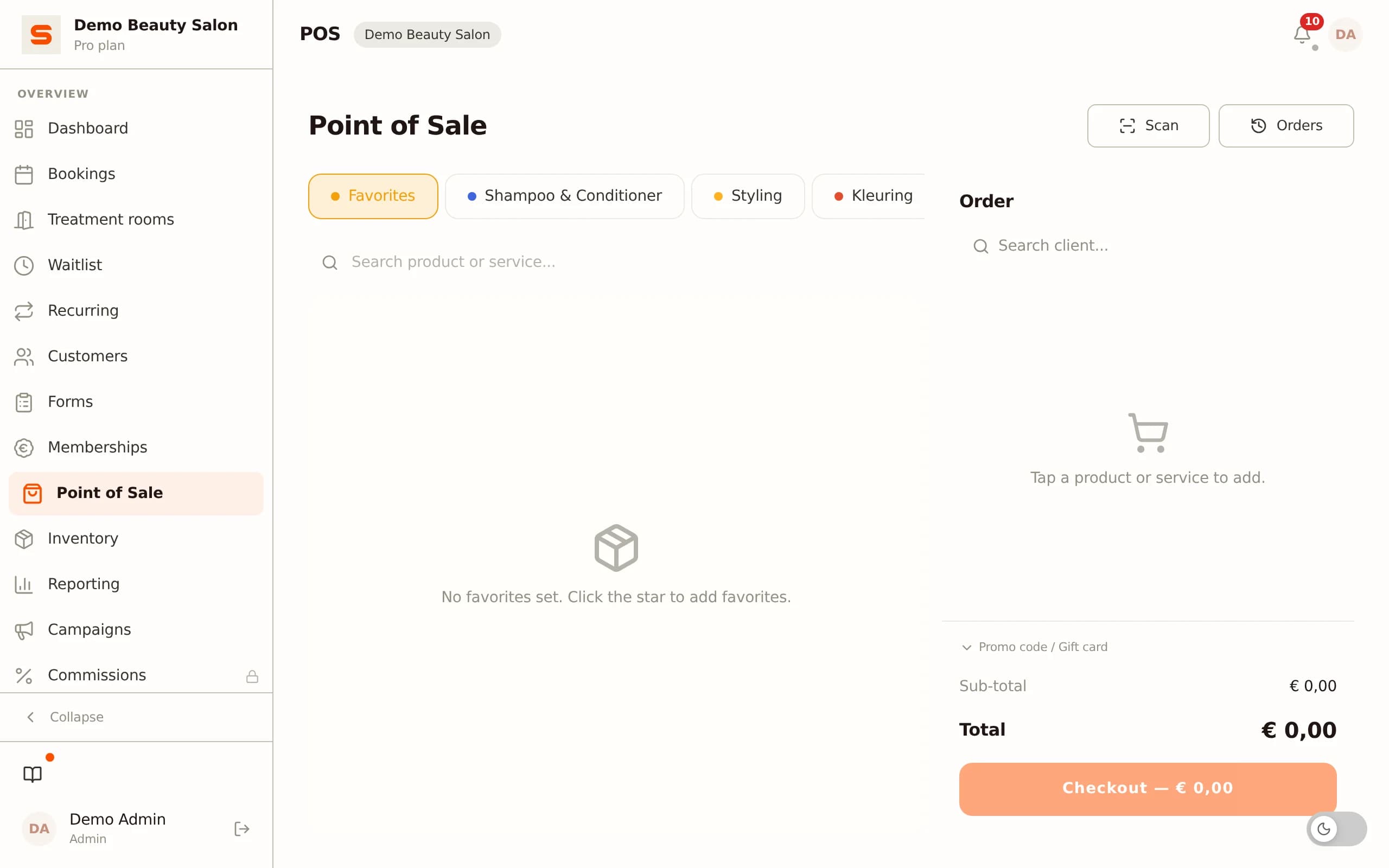
7 - Integration with the point-of-sale system. After the treatment, the booking should serve directly as the basis for checkout - with the services, the staff member and the amount already filled in. Manual re-entry is a source of errors and duplicate work.
8 - Building client profiles through bookings. Every booking a (new) client makes should end up in a client profile: name, contact, order history, preferences. That profile grows on its own as visits accumulate.
9 - Mobile view for clients. Most bookings are made via a smartphone. The booking page must work flawlessly on a mobile screen - with large buttons, a simple selection process and quick confirmation.
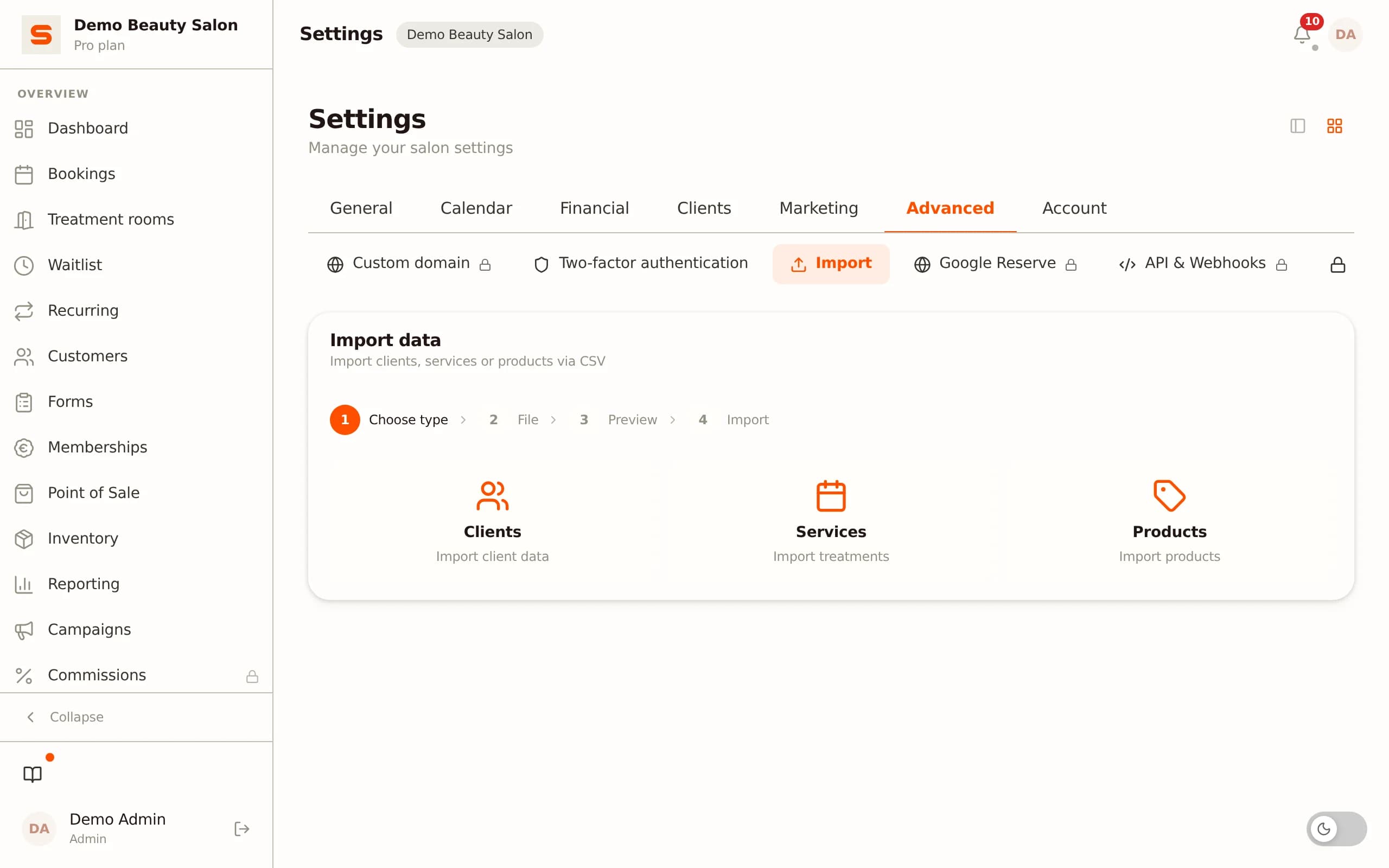
10 - CSV import for existing client data. If you switch from another system or from manual administration, you must be able to import existing client data. A system that does not support that import forces you to re-enter everything manually or to start with an empty database.
How Salonnare sets up your booking flow
The core of Salonnare is linking bookings, client profiles and checkout in one system - without needing a separate tool for each part.
Online booking via a shared link. Every salon in Salonnare has a public booking page that clients can open via a link on your website, your Google profile or wherever you share it. Clients choose a service, a staff member and a date, and confirm directly online. Booking outside opening hours is a given - the diary is always open.
Multi-service bookings in one flow. If a client wants to combine two treatments, that is possible in one booking. The system calculates availability based on the combined duration and the staff members involved. This way no scheduling conflicts arise between services that take place consecutively on the same day.
No-show protection with a no-show fee. Through the settings you can activate a no-show fee that is automatically charged if a client cancels the appointment outside the set window or does not show up at all. You set the cancellation threshold and the amount yourself.
Cancelling with clear communication. If a client cancels an appointment via the system, they immediately see which conditions apply and what the possible costs are for late cancellation. That avoids surprises and gives the client the choice to confirm deliberately.
Automatic emails without extra work. After booking, the client receives a confirmation email. Just before the appointment a reminder goes out automatically. That runs without you having to do anything - the emails go out in your salon's name (sending from your own domain is coming soon).
Integration with Google. Connect your Google Business Profile under Settings > Google Business Profile and Salonnare places an appointment link on your profile in Google Search and Google Maps. That link takes clients who find your salon straight to your own booking page, and Salonnare checks daily that it is still there. This works on every plan, including Free.
Your own channel, no per-booking commission. Bookings come in through your own booking page and your own Google listing, not through a marketplace that takes a percentage per booking. You pay a fixed monthly price - with a permanently free plan to start - plus a platform fee of 0.5% (min. €0.30) per online payment, and deposits (Pro plan) flow through local payment methods (iDEAL via Mollie or Stripe) straight to your own bank account.
Common mistakes when choosing an online booking system
A wrongly chosen booking system is hard to undo: client data is locked in, staff are used to the interface, and migrating costs time. These are the mistakes salons mention most often in hindsight.
Choosing separate tools that do not talk to each other. A booking tool from party A, a point-of-sale system from party B and client management in a spreadsheet: technically it works, but with every booking you enter data multiple times. That costs time and increases the chance of inconsistency in your administration.
Not building in no-show protection. A system that offers online booking but does not support a deposit or no-show fee leaves one of the most important advantages of digital booking unused. No-shows are the direct loss of treatment time - and that loss is avoidable.
Not testing the mobile experience. Before you choose a booking system, open the booking page on your own phone and go through the entire process. If that feels cumbersome or works poorly, it feels at least as annoying to your clients.
Thinking about data migration too late. Anyone who starts with a new system and only discovers afterwards that existing client data cannot be imported loses the client history they built up. Ask explicitly for every tool you consider whether CSV import is supported and how that process works.
Choosing a system without a trial period. A demo shows the prettiest scenarios. A real trial period, in which you create a booking yourself, handle a test no-show and run through the checkout, shows the reality. Do not choose definitively without having gone through the full flow yourself.
Frequently asked questions
Can a client book an appointment outside opening hours?
Yes, that is the point of an online booking system. The booking page is always available. Clients can schedule an appointment at any time of day or night based on the availability you have set. You do not have to do anything for it - the booking appears automatically in your diary and the client immediately receives a confirmation email.
How does a no-show fee work with online bookings?
You set a cancellation window in the system - for example 24 hours before the appointment - and a no-show amount. If a client cancels after that window or does not show up at all, the set amount is automatically charged. The client is informed of this when booking. This way you transfer the risk of an empty treatment chair partly to the client who did not honour the appointment.
What is the difference between an online booking system and an appointment system?
In practice the terms are used interchangeably, but there is a relevant distinction: an appointment system manages the internal diary, while an online booking system also has a public interface with which clients can book themselves. For salons the combination is most valuable: an internal diary linked to an external booking page, so that availability is always current and double bookings are impossible.
How do I get started with online booking in Salonnare?
After creating your account you set up your services, staff and availability. The system automatically generates a booking page for your salon. You share that link on your website, your Google profile or through your own channels. Clients can book with it directly. With the permanently free plan at salonnare.com/en/free you go through the full setup and test the booking flow before going live.