



Nail salon software: what do you really need in 2026?
A nail salon has its own rhythm: treatments take a long time, client retention is crucial for recurring revenue, and the material cost per treatment is noticeably higher than for a standard haircut. A simple calendar app is fine if you see the occasional client, but the moment your nail salon grows - more staff, busy Friday afternoons, a waiting list for popular technicians - your scheduling quickly ends up spread across WhatsApp messages and separate spreadsheets. Nail salon software is meant to get ahead of that moment: an integrated system for appointments, point of sale, client management and staff scheduling that fits the way a nail salon actually works.
What sets a nail salon apart from other salons
In the software market, nail salons and hair salons are often lumped together, but their operational needs differ on a few essential points. A nail salon that picks software built for hair salons quickly runs into limitations that only become visible after the purchase.
Longer treatment times and tight schedules
A haircut takes 30 to 45 minutes. A gel manicure, an acrylic set or a gel-nail repair often takes 60 to 90 minutes, sometimes longer. Those longer treatment times make accurate scheduling more critical: a buffer set too tightly, or a system that cannot set treatment durations per type, unintentionally creates an overcrowded schedule. Clients who walk in five minutes early while the previous treatment is still running are a familiar problem in nail salons that work without good software.
Material cost per treatment
Gel, acrylic, top coat, primers and nail foils are expensive. If the system does not track which materials are used for which treatment, you have no insight into your real material margins at the end of the month. In a nail salon, product costs are a significant part of the treatment price - a share that climbs quickly if you do not systematically track what is consumed.
Client loyalty and the return pattern
Nail treatments are repeat purchases by definition: clients come back every three to six weeks for an infill or removal and reapplication. That repeat-purchase pattern makes client retention strategically more important than in a salon where clients visit once or irregularly. Software that sends appointment reminders and shows who has not returned for too long helps actively maintain that client relationship.
Commission structure with multiple technicians
Many nail salons work with technicians on commission or as self-employed professionals renting a workspace. If the system does not track per staff member which revenue they generate, commission calculation has to be done manually - with all the work and all the discussion that comes with it.
Five features that make the difference for a nail salon
Most nail salons that switch to new software do so because their current solution falls short on one or more of the following points.
1. Online booking with treatment duration per type
A public booking page where clients choose a treatment, select a technician and reserve a time slot - even when the studio is closed. Essential here: the software calculates availability based on the actual treatment duration, not a standard duration of 30 or 60 minutes for everything. An acrylic set needs a different block of time than a single repair. Clients who book outside business hours stop messaging you during the day to ask if there is still room.
2. No-show protection on expensive treatments
A no-show on a gel manicure costs you the treatment time plus the material you already prepared. A card authorisation at the time of online booking - where the client registers the card but is only charged after the treatment - gives you the option to charge a no-show fee if someone fails to appear or cancels too late. This noticeably lowers your no-show rate without making clients pay at the time of booking.
3. Point of sale with iDEAL and Dutch payment methods
A checkout in a nail salon sometimes contains a combination of treatments and products: a gel-nail set plus a bottle of cuticle oil plus a gift card. The point of sale must handle those combinations, support iDEAL and card, and produce a correct receipt. Systems that only accept credit card, or offer iDEAL via a workaround, are operationally awkward in the Netherlands.
4. Inventory management with threshold values
Which gels, primers and nail files need restocking? If the system tracks how much product is consumed per treatment and sends an alert once a threshold is reached, you no longer have to walk through the supply cabinet manually every week. You order at the right moment, neither too late nor too early.
5. Staff scheduling per technician
Schedules per staff member, leave registration and a system that automatically translates roster changes into availability in the booking calendar. Without this, managing a studio with multiple technicians quickly runs through chat groups - which sooner or later leads to double bookings or an unavailable technician at a moment when a client has already received a confirmation.
How Salonnare supports nail salons
Salonnare is built for the Dutch and Belgian beauty market. The features below are live and in daily use.
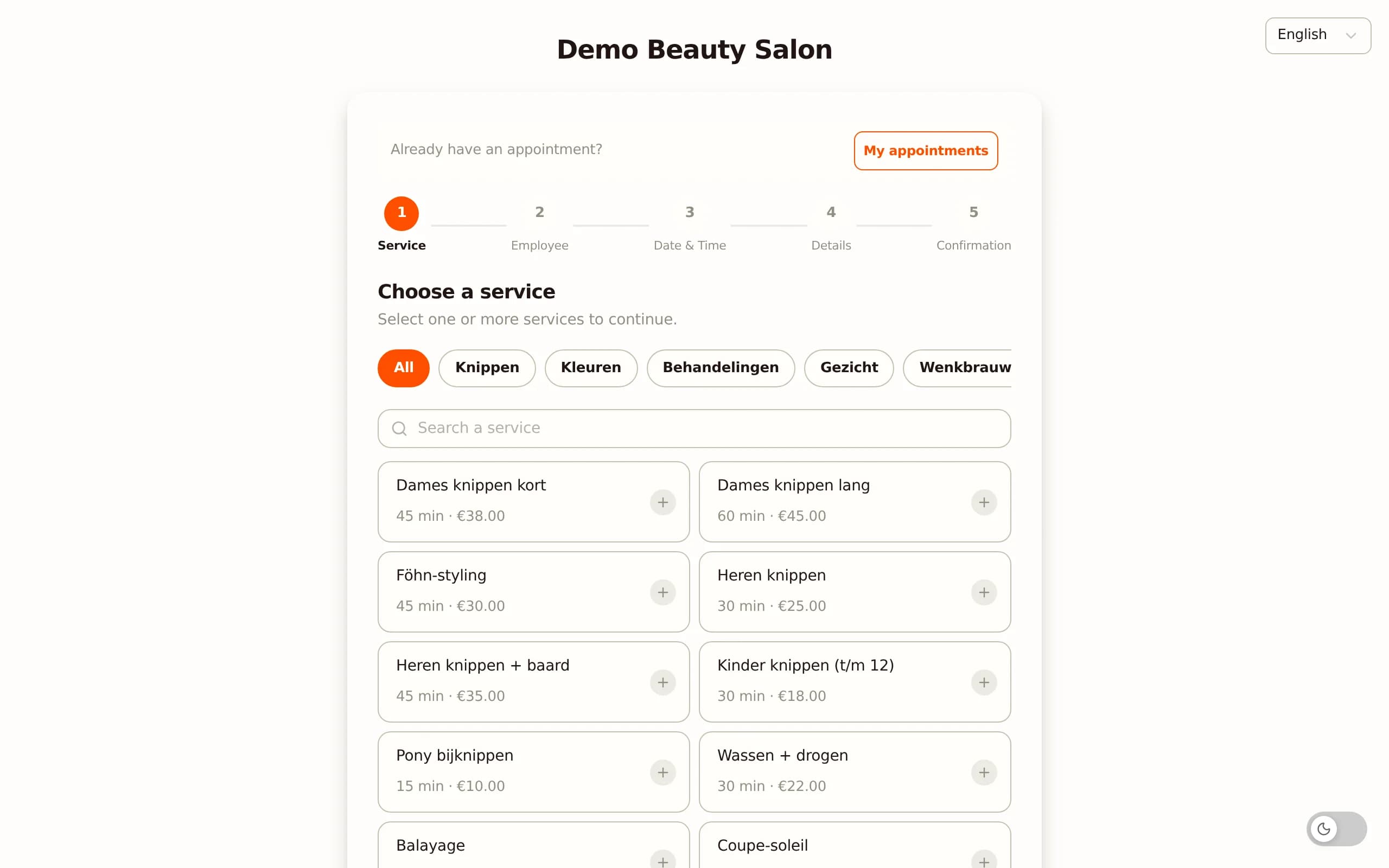
Online booking and multi-service appointments
The public booking page can be linked to your website and Google Business Profile. Clients choose a treatment, a technician and a time. Availability is calculated based on the working schedules you set per staff member, including treatment duration and any buffer afterwards. Multiple treatments can be combined in one booking - handy when a client wants to schedule a pedicure and manicure at the same time.
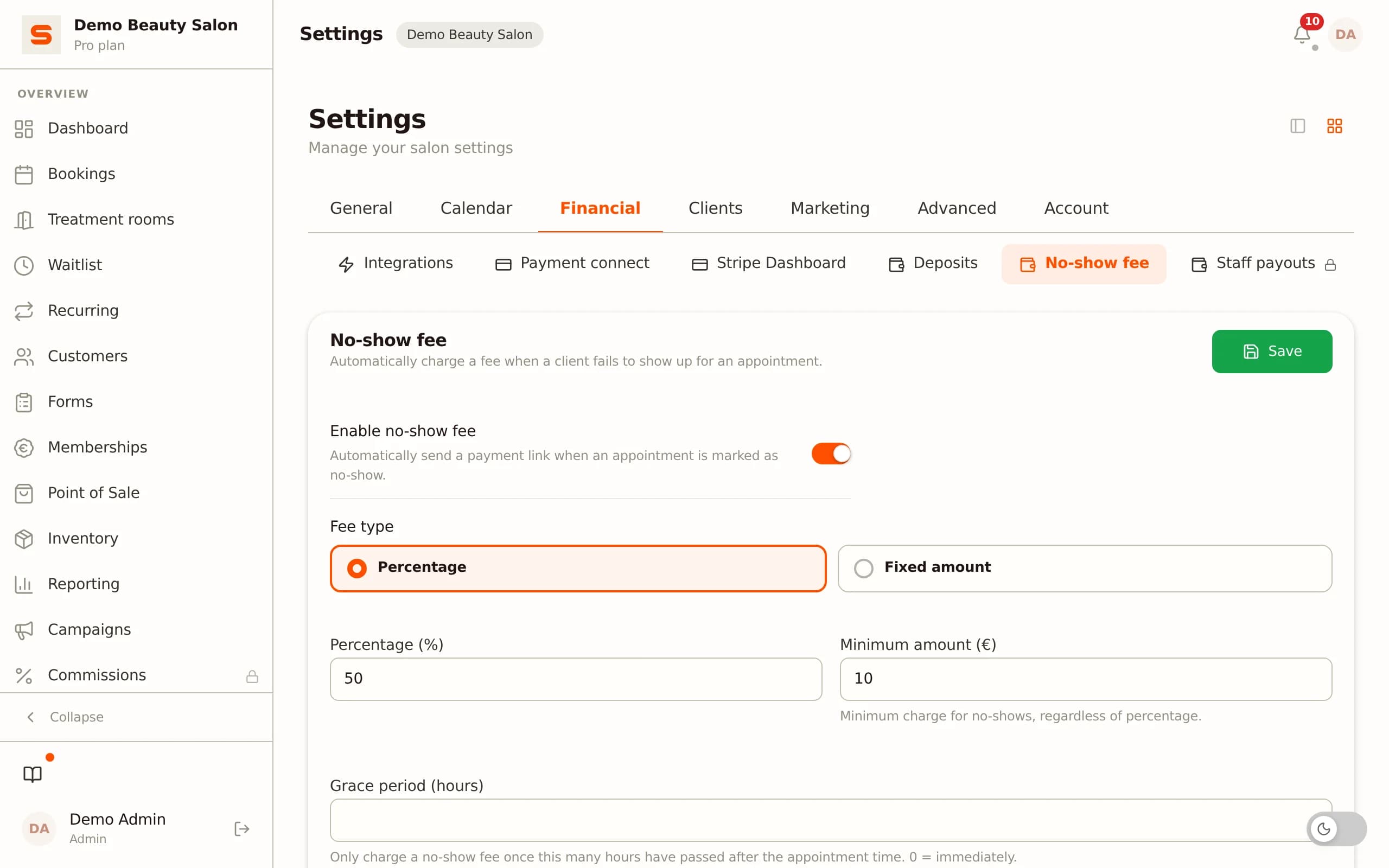
No-show fee per treatment type
Under Settings - Bookings you set a no-show fee. Clients authorise their card when booking online. On a no-show or a late cancellation, the fee is collected automatically. You decide the amount and the cancellation window yourself, so it matches your current policy.
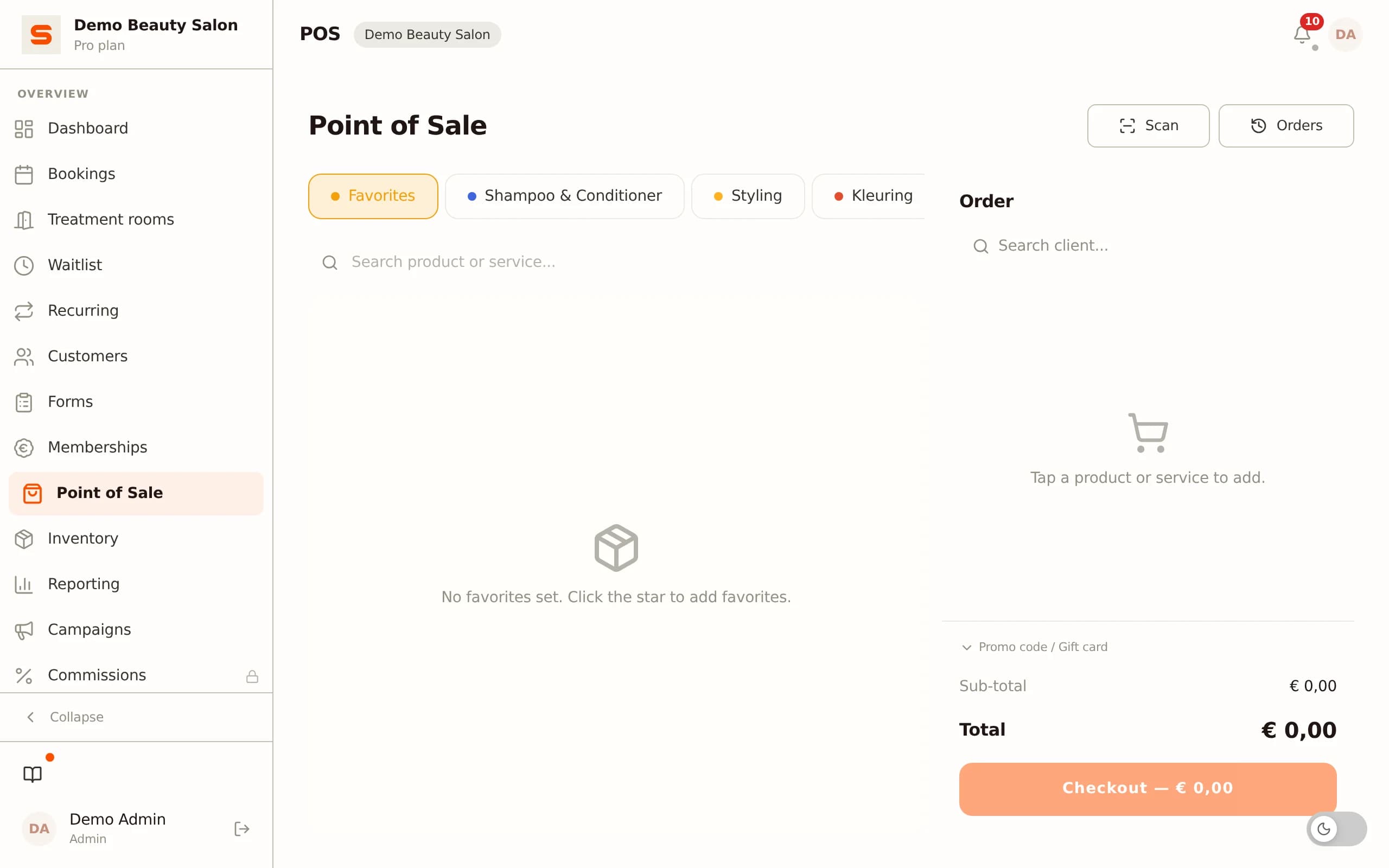
Point of sale with iDEAL and gift cards
The POS module handles treatments and products in one checkout. Payment by iDEAL, card or cash. Gift cards can be sold and redeemed with automatic balance tracking. No separate checkout app or external terminal needed for the daily till.
Inventory management per sale
Product stock is tracked per sale from the point of sale. You set a threshold value per product for alerts. That way you know when gels or top coats need restocking before you run out in the middle of a treatment.
Commission settlement per technician via Stripe Connect
Via Stripe Connect, Salonnare tracks which share of the till revenue each technician has generated. You set commission percentages per staff member. The settlement is automatically available in the revenue overview at the end of each period - no more manual calculation at the end of the month.
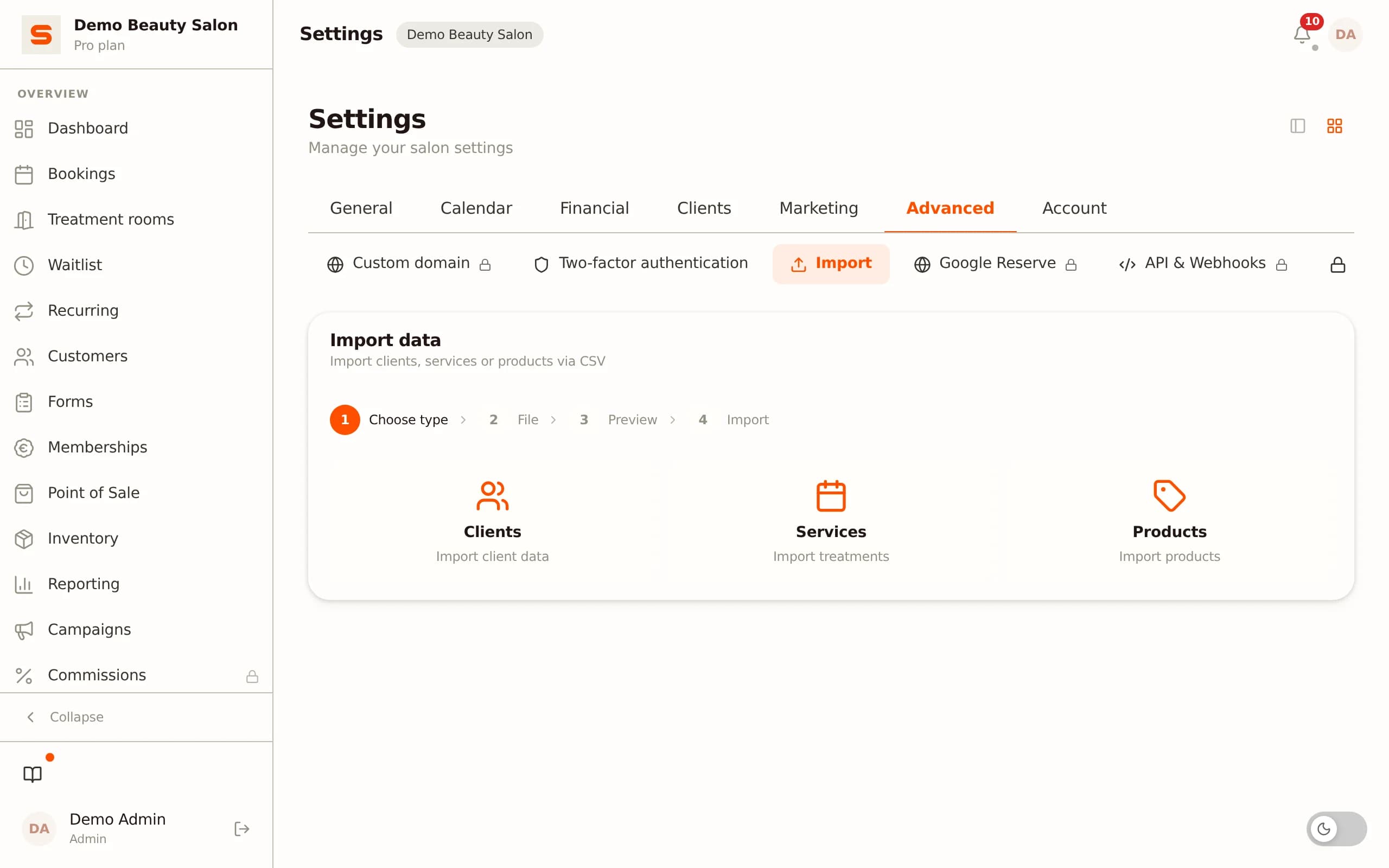
Importing existing client data
You import your current client list under Settings - Clients - Import. The system shows a visual column mapping so you can check that name, email and phone number are transferred correctly before you confirm the import.
Loyalty and client retention
The loyalty programme lets clients build points with every treatment and redeem them for discount vouchers. That fits the return pattern of nail clients well: someone who comes back every six weeks builds points quickly and feels the reward concretely.
Google and Microsoft login for staff
Technicians and receptionists log in with their existing Google or Microsoft account. No separate password to remember, no extra authentication app on top of what they already use.
Try the full functionality for free at salonnare.com/en/free - no credit card required.
What does nail salon software cost, and when does it pay for itself?
The monthly subscription price is not the full story. Nail salons that switch to new software are regularly surprised by costs that are not visible in the first demonstration.
Transaction fees on bookings
Some platforms - particularly those that position themselves as a marketplace - keep a percentage of every payment processed through them. For a nail salon with ten treatments a day, transaction fees of 1 to 3 percent quickly add up to a substantial amount per month, on top of the subscription. At a demo, always ask whether there are transaction fees and at what moment they are charged.
Module pricing
Inventory management as a paid add-on, email reminders only available in the most expensive plan, extra cost per staff member above a certain number. Ask for the total price for your specific situation - including the number of active technicians and the features you actually use.
Data export when you leave
If you ever want to switch, data export is essential. Platforms that make client data, treatment history and inventory fully exportable give you the freedom to move. Platforms that do not create a lock-in that only hurts once you want out. This is also a GDPR obligation: clients have the right to request their data, and you must be able to provide it.
Salonnare uses a fixed monthly rate without transaction fees on payments and without paywalls for the core features. The free trial gives you the time to assess whether the system fits your way of working before you make a decision.
Frequently asked questions
Can I import my existing client list into Salonnare?
Yes. Salonnare has a CSV import function for client data. You export your current list from your old system or spreadsheet and import it under Settings - Clients - Import. The system shows a visual mapping of the columns so you can check that name, email and phone number are transferred correctly. You only confirm after checking, so nothing is lost if the column order differs.
Does the online booking page work even if I work solo in my nail salon?
Yes. The public booking page works even if you are the only technician. Clients see your availability based on the schedule you set, can choose a treatment and reserve a time without you having to be available for it. You simply do not use the staff scheduling and commission settlement features if you work solo.
How can I reduce no-shows on expensive gel and acrylic treatments?
Under Settings - Bookings you set a no-show fee per treatment type. Clients authorise their card when booking online - the payment is registered but only charged after the treatment. On a no-show or a late cancellation, the set fee is collected automatically. You decide the amount and the cancellation window yourself, so it matches your current policy.
Does Salonnare comply with GDPR if I keep skin-related notes?
Yes. Salonnare has an encrypted vault for special categories of personal data - such as skin conditions, allergies to certain products or contact allergies. Those notes are stored separately with AES-256-GCM encryption and separate access control per staff member. Ordinary client notes and health-related notes are technically separated. Client data is held on servers within the EU, which aligns with the requirements of GDPR Article 9 for special categories of personal data.